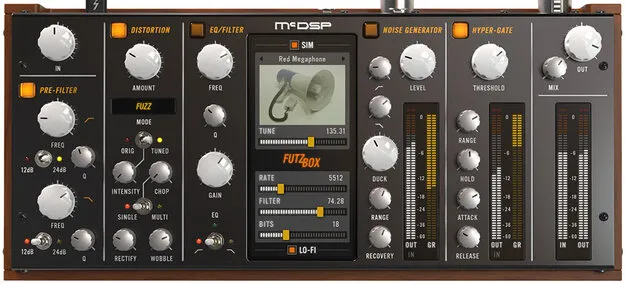
FutzBox Native v7 Upgrade from v6 distortion and noise plugin interface by McDSP

FutzBox Native v7 Upgrade from v6: Distortion and Noise Plugin by McDSP

FutzBox Native v7 Upgrade from v6 is a distortion and noise generator plugin by McDSP for creating low-fidelity versions of audio signals. It is an upgrade path for existing owners of FutzBox Native v7.

VST3VST2AUAAXWindowsmacOS64-bit
AVAILABLE ATPlugin Boutique
Opens the store in a new tab
01Overview

FutzBox Native v7 Upgrade from v6 is aimed at producers and post-production engineers who need distorted, lo-fi sounds from dialog or other tracks. McDSP describes the plugin as a way to recreate the character of radios, cell phones and televisions in a single product. It combines a library of Synthetic Impulse Models (SIMs) with filtering, EQ, distortion, a noise generator and a gate. The Native version runs in VST3, AU and AAX formats on Windows and macOS.

Best for

  • Dialog futzing
  • Radio and phone effects
  • Television sound simulation
  • Signal dropout effects
  • Lo-fi sound design
  • Film post-production
Developer
McDSP
Category
Distortion
Store
Plugin Boutique
02Key features

What you get

  • Library of Synthetic Impulse Models (SIMs) for device simulations
  • Configurable futz effects with filtering, EQ and distortion
  • Flexible noise generator with ducking capability
  • Hyper-sensitive gate for signal dropout effects
  • New Tuned Intensity Control, Chop and Wobble controls
  • Zero latency algorithms with double precision processing
  • Mono and stereo versions included
  • Optimized for Apple Silicon and latest Intel processors
03In depth

Lo-Fi Sound Simulation with Synthetic Impulse Models

The core of FutzBox is its library of Synthetic Impulse Models, or SIMs. Each SIM is a model of a specific playback or transmission device, such as a radio, a cell phone or a television. McDSP says the models are built in an optimized format that uses less DSP power than conventional convolution-based products.

The SIMs can be scaled in real time and changed on the fly, which suits automation during scene changes. Original and distorted audio can also be blended in real time, so you can move between clean and futzed sound as the material requires.
Controls for Distortion, Noise and Gating

Beyond the SIM library, FutzBox includes configurable futz effects covering filtering, EQ and distortion. A flexible noise generator offers ducking, so noise can drop out under the signal. A hyper-sensitive gate creates signal dropout effects.

New controls in this version include Tuned Intensity Control, Chop and Wobble. The plugin is available in mono and stereo versions, and its algorithms are described as zero latency with double precision processing.

04Specs

Will it run?

Formats, systems and requirements as listed by Plugin Boutique. Missing details are left out, not guessed.

DeveloperMcDSP
TypePlugin
CategoryDistortion
FormatsVST3, VST2, AU, AAX
Operating systemsWindows, macOS
Architecture64-bit
05FAQ

Questions, answered

What is FutzBox Native v7 Upgrade from v6 used for?

It is used to create distorted, low-fidelity versions of audio signals. McDSP highlights simulations of radios, cell phones and televisions, which are common in post-production dialog work.

Which formats and operating systems does it support?

The plugin is available in VST3, VST2, AU and AAX formats on Windows and macOS. McDSP notes that VST support ended as of v7.0, so VST versions of v6 plugins will no longer be updated.

Is this an upgrade for existing owners?

Yes. This product is an upgrade path for existing owners of FutzBox Native v7, and the Native version is intended for users outside the AAX DSP setup that the HD version serves.

What do I need to use FutzBox Native v7 Upgrade from v6?

McDSP plugins require an iLok2 or iLok3 USB Smart Key, or a free iLok License Manager account with iLok Cloud for authorisation. Each v7 plugin includes two activations per authorisation.

07Developer

More from McDSP

All McDSP products →