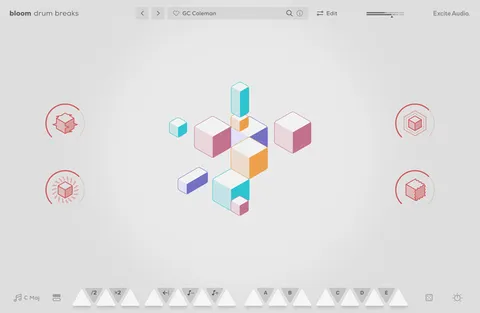
Evolve Alloy by Excite Audio metal-inspired sample synth plugin interface

Evolve Alloy: Metal-Inspired Sample Synth by Excite Audio Free Download

Rated 4.7/5 on Plugin Boutique (245 ratings)

Evolve Alloy is a sample-based synthesizer from Excite Audio built around metallic sound sources. It combines 250 samples, synth oscillators and four metal-inspired macro effects in a quad-layer engine.

VST3VST2AUAAXStandaloneWindowsmacOS64-bit
AVAILABLE ATPlugin Boutique
Free trial available from the developer
01Overview

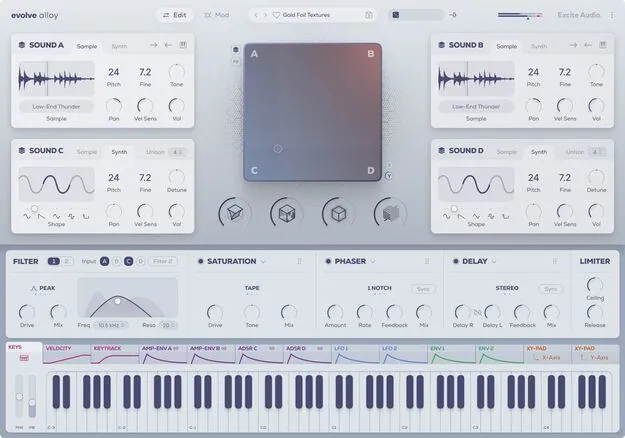
Evolve Alloy is designed around metal. Its four layers can hold either a sample from a library of 250 sources or a synth oscillator, from bells and glockenspiels to industrial foley and metallic-sounding synths. An XY pad blends the layers in real time, and dual filters, a modulation matrix and a rearrangeable three-slot effects chain shape the result. You can also import your own samples and build custom patches.

Best for

  • Metallic synth sounds
  • Bells and plucks
  • Industrial techno textures
  • Ambient and minimal pads
  • Hyperpop plucks
  • Sound design with foley
Developer
Excite Audio
Store
Plugin Boutique
02Key features

What you get

  • Quad-layer engine with four sound sources (A, B, C, D)
  • Sample and synth oscillator engines per layer
  • XY pad with Sounds and FX modes
  • 250 sound sources across acoustic, atonal, chords and foley
  • User sample import for custom patches
  • Randomise sounds, parameters and effects in one click
  • Four metal-inspired macros: Sharpen, Rust, Vibrate, Spring
  • Dual filters with HPF, LPF, BP and Peak modes
  • Rearrangeable three-slot effects chain with 16 modules
03In depth

Sound Sources and Layering for Metallic Synth Sounds

The core of Evolve Alloy is its quad-layer engine. Each of the four layers (A, B, C, D) can host a sample-based instrument or a synth oscillator. Sample sources include acoustic, atonal, chord, multisample, synth, texture and tuned foley material. Synth sources offer an oscillator shape slider and unison detuning.

Sample sources give you playback direction, tone and keytracking controls. Every layer has pitch, fine tuning, velocity sensitivity, panning and volume. Clicking a layer's dice picks a metallic sample at random, and the header dice randomises sound sources, parameters and effects together.

The XY pad works in two modes. Sounds mode blends between the four sources, while FX mode modulates any available parameter in the instrument.

Modulation, Filters and Effects for Sound Design

Evolve Alloy provides 12 modulation sources, including six ADSR envelopes with delay and hold, two LFOs with retrigger and offset options, velocity and keytracking with adjustable curves, and the X and Y position of the XY pad. A modulation matrix lists all assigned routings, and curve and polarity settings allow finer control.

The four macros are Sharpen, Rust, Vibrate and Spring. Sharpen reduces sustain and boosts the transient, Rust adds distortion and grit, Vibrate adds short delays and feedback for a metallic tone, and Spring applies a spring reverb. Macros can run before or after the FX modules.

Dual filters can be routed from each source and run in parallel or in series. The three effects slots offer 16 modules, including saturation, delay, reverb, compressor, phaser, speaker simulation, noise and pitch drift.

04Specs

Will it run?

Formats, systems and requirements as listed by Plugin Boutique. Missing details are left out, not guessed.

DeveloperExcite Audio
TypePlugin
CategoryVirtual Instruments
FormatsVST3, VST2, AU, AAX, Standalone
Operating systemsWindows, macOS
Architecture64-bit
Free trialYes
05Upgrades

Upgrade and crossgrade options

06FAQ

Questions, answered

What is Evolve Alloy?

Evolve Alloy is a sample-based synthesizer from Excite Audio that focuses on metallic sounds. It layers samples and synth oscillators across four sources and shapes them with filters, modulation and macro effects.

Which formats and operating systems does Evolve Alloy support?

Evolve Alloy is available in VST3, VST2, AU, AAX and Standalone formats. It runs on macOS 10.15 or higher, including Intel and native Apple Silicon, and on Windows 7 or higher. It is 64-bit only.

What do I need to use Evolve Alloy?

Evolve Alloy requires a compatible DAW such as Ableton Live, Pro Tools, Logic Pro, FL Studio, Cubase, Nuendo, Reaper or Reason, or it can run in Standalone mode. An internet connection is required to authorise the software. A trial is available.

Can I import my own samples into Evolve Alloy?

Yes. You can import your own samples to start a new sound or replace any source in an existing patch.

08Developer

More from Excite Audio

All Excite Audio products →