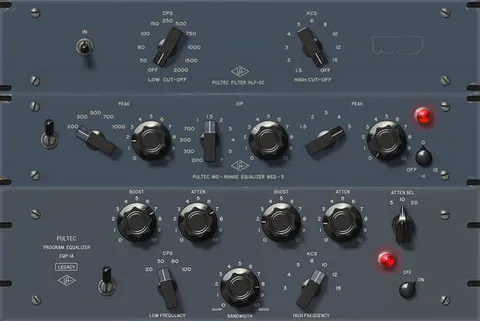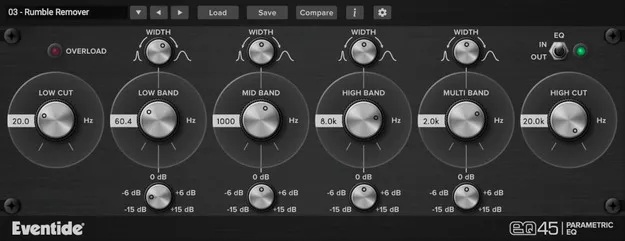
EQ45 Urei 545-style parametric EQ plugin interface by Eventide

EQ45: Urei 545-Style Parametric EQ Plugin by Eventide

Rated 4.7/5 on Plugin Boutique (58 ratings)

EQ45 is a four-band parametric equalizer plugin from Eventide, based on the circuit model of the analog Urei 545 parametric EQ. It adds high and low cut filters and is available in VST3, VST2, AU and AAX formats.

VST3VST2AUAAXWindowsmacOS64-bit
AVAILABLE ATPlugin Boutique
Opens the store in a new tab
01Overview

EQ45 is built around an emulation of the Urei 545, an analog EQ that Eventide describes as a go-to choice for a generation of engineers, valued for its tone and color. The plugin lets you boost or attenuate frequency content across four parametric bands, with Gain and Width controls on each. Its 24 dB/octave High Cut and Low Cut filters add further shaping, and the EQ In/Out toggle lets you use the filters alone. The interface is designed to stay simple while still allowing subtle or large adjustments.

Best for

  • Mix corrective EQ
  • Tonal shaping on instruments
  • Filtering low and high frequencies
  • Vintage-style EQ coloration
  • Carving space in mixes
Developer
Eventide
Category
EQ
Store
Plugin Boutique
02Key features

What you get

  • Emulation of the analog Urei 545 EQ
  • Four-band parametric EQ with Gain and Width controls
  • 24 dB/octave High Cut and Low Cut Butterworth filters
  • EQ In/Out toggle to use the filters alone
  • Overload protection responds to transients above -0.1 dB
  • Instrument-specific presets for carving individual tones
03In depth

Sound and Character of the Urei 545 Emulation

The core of EQ45 is a model of the analog Urei 545 parametric EQ. Eventide says the original was favored for its tone and color, and the plugin aims to carry that character into a digital workflow. The four bands each offer gain and width control, so you can make broad tonal changes or narrow, surgical cuts.

The High Cut and Low Cut sections use 24 dB/octave Butterworth filters. Because the EQ section can be bypassed with the EQ In/Out toggle, you can use the filters on their own for simple rolloffs without the parametric bands coloring the signal.
Filters, Overload Protection and Instrument Presets

Each parametric band gives you direct control over boost or cut and bandwidth, which suits corrective work as well as tonal shaping. An overload protection mechanism responds when a signal's transient rises above -0.1 dB, which helps keep peaks under control during processing.

EQ45 also includes instrument-specific presets. They are a starting point for carving the tone of a single source before you refine the settings to fit your mix.

04Specs

Will it run?

Formats, systems and requirements as listed by Plugin Boutique. Missing details are left out, not guessed.

DeveloperEventide
TypePlugin
CategoryEQ
FormatsVST3, VST2, AU, AAX
Operating systemsWindows, macOS
Architecture64-bit
05FAQ

Questions, answered

Which formats does EQ45 support?

EQ45 is available in VST3, VST2, AU and AAX formats.

What operating systems does EQ45 run on?

EQ45 runs on Windows 10 and later, including Windows 11, and on macOS 10.14 and later, with Intel and Apple Silicon Macs supported. Both systems require 64-bit hosts.

Do I need an iLok dongle to use EQ45?

No. EQ45 does not require an iLok dongle. A free iLok account is needed for authorization.

Which hosts has Eventide tested EQ45 in?

Eventide tests its desktop plugins in Ableton Live, Cubase, FL Studio, Logic Pro, Pro Tools and Studio One. The developer notes that its plugins should work with any compatible host.

07Developer

More from Eventide

All Eventide products →