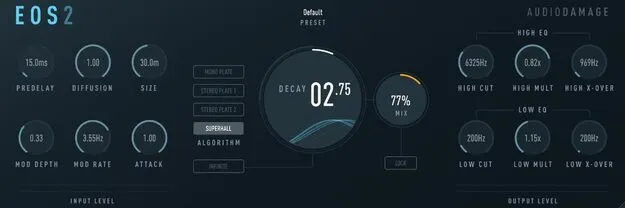
Eos 2 reverb plugin by Audio Damage interface

Eos 2: Algorithmic Reverb Plugin by Audio Damage Free Download

Rated 4.7/5 on Plugin Boutique (342 ratings)

Eos 2 is a reverb plugin by Audio Damage that offers four algorithms: three plate simulators and the Superhall algorithm for dense, modulated hall reverbs. It is available in VST3, VST2, AU and AAX formats.

VST3VST2AUAAXWindowsmacOSLinux64-bit
AVAILABLE ATPlugin Boutique
Free trial available from the developer
01Overview

Eos 2 is an effects plugin in the reverb subcategory, built around four reverb algorithms. Three are plate simulators, and the fourth, Superhall, is aimed at expansive, dense reverbs with gentle modulation. Controls for pre-delay, diffusion and density, size, attack and decay shape the space, while built-in filters and an infinite decay setting extend the range from natural rooms to sound design effects. The plugin runs on Windows, macOS and Linux in 64-bit only.

Best for

  • Dense hall reverbs
  • Plate reverb on drums
  • Ambient pad textures
  • Frozen sound design
  • Stereo reverb from mono sources
Developer
Audio Damage
Category
Reverbs
Store
Plugin Boutique
02Key features

What you get

  • Four reverb algorithms: three plate simulators plus Superhall
  • Pre-delay, diffusion/density, size, attack and decay controls
  • Rate and depth modulation of the reverberator delay lines
  • Low cut and high cut filters at the reverberator inputs
  • Infinite decay setting for freezing and sound design
  • Mix control with LOCK to keep Mix fixed across presets
  • Mono-in/stereo-out and stereo-in/stereo-out operation
  • Resizable vector-based GUI for Hi-DPI and Retina displays
03In depth

Reverb Algorithms and Sound Character

Eos 2 includes three plate simulators and the Superhall algorithm. The developer describes Superhall as suited to expansive, dense and rich reverbs with gentle modulation. Modulation rate and depth controls change the delay lines inside the reverberators. Used gently, this sounds more natural, and at extreme settings it becomes more otherworldly.

The plugin can take a mono input and still output a stereo reverb, or work in a stereo-in, stereo-out setup.
Shaping the Tail: Filters, Mix and Infinite Decay

Two EQ filters, a low cut and a high cut, sit at the input of the reverberators. Together with the decay controls, they change how high and low frequencies fade over time, which alters the tonal quality of the reverb tail.

Setting the decay time to infinity freezes the input signal, similar to a looped sample, which is useful for unusual textures and sound design. The Mix control sets the balance between dry and wet signal, and engaging the LOCK button keeps the Mix value unchanged when you load presets.

The GUI is vector-based and resizable per instance, so it displays consistently across screen resolutions, including Hi-DPI and Retina displays.

04Specs

Will it run?

Formats, systems and requirements as listed by Plugin Boutique. Missing details are left out, not guessed.

DeveloperAudio Damage
TypePlugin
CategoryReverb
FormatsVST3, VST2, AU, AAX
Operating systemsWindows, macOS, Linux
Architecture64-bit
Free trialYes
05FAQ

Questions, answered

What formats does Eos 2 support?

Eos 2 is available in VST3, VST2, AU and AAX formats. It runs on Windows, macOS and Linux.

What are the system requirements for Eos 2?

On macOS, it requires macOS 10.12 Sierra or newer, and M1 Apple Silicon is supported. On Windows, it requires Windows 8.1 or newer. On Linux, it requires Ubuntu 18 or newer. All versions are 64-bit only and will not run on 32-bit systems.

Does Eos 2 have a trial?

Yes, a trial version is available.

Can Eos 2 create a stereo reverb from a mono input?

Yes. Eos 2 can be used in a mono-in, stereo-out configuration, creating a stereo reverb output even when the input signal is mono.

07Developer

More from Audio Damage

All Audio Damage products →