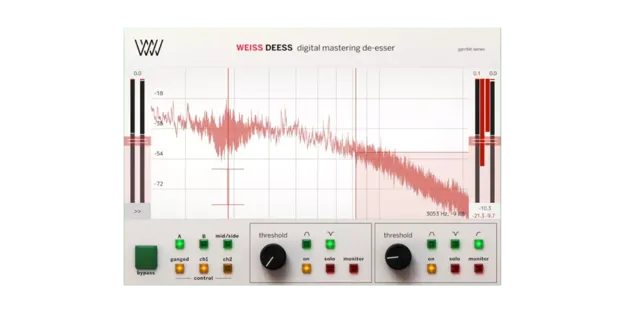
Weiss Deess by Softube de-esser plugin interface

Weiss Deess: Two-Band De-Esser Plug-in by Softube

Rated 4.7/5 on Plugin Boutique (451 ratings)

Weiss Deess is a de-esser plug-in by Softube, based on algorithms code-ported from the Weiss DS1-MK3 hardware unit. It offers two independent de-essing bands.

VST3VST2AUAAXRTASWindowsmacOS64-bit
AVAILABLE ATPlugin Boutique
Opens the store in a new tab
01Overview

Weiss Deess is a de-esser effect from Softube, built around algorithms code-ported from the Weiss DS1-MK3 digital de-essing unit. The developer positions it as a focused tool for taming sibilance in vocals, hi-hats and mixes, including mastering work. The plug-in is also available as part of the Weiss DS1-MK3 collection. Its interface pairs a visual faceplate with a side menu for detailed control of ratios, attack and release times, knee settings and make-up gain.

Best for

  • Lead vocal sibilance
  • Hi-hat harshness control
  • Mastering de-essing
  • Tracking vocals
  • Mix sibilance control
Developer
Softube
Category
De Essers
Store
Plugin Boutique
02Key features

What you get

  • Two independent de-essing bands
  • Multiple filter shapes with bandwidth control
  • Large FFT display showing filter shapes
  • Side menu for ratio, attack, release and knee
  • Low-latency mode for de-essing while tracking
  • Code-ported algorithms from the Weiss DS1-MK3
  • Clean faceplate with detailed controls in side menu
  • 64-bit operation on Windows and macOS
03In depth

Two-band de-essing with flexible filter control

Weiss Deess has two independent de-essing bands. Softube notes that sibilance rarely centers on a single frequency, which makes a second band useful for complex material and mastering applications.

Each band offers a range of filter shapes and bandwidth control, so you can target the exact frequency range that needs attention. The developer says this lets you address the problem without affecting the rest of the signal.
Visualization and workflow for tracking and mixing

A large display shows FFT readouts alongside the filter shapes, so you can see the effect the plug-in has on the signal. The faceplate is kept uncluttered for quick tweaking, while the side menu gives access to the full set of parameters.

A low-latency mode lets you de-ess while tracking, so vocals can be treated during recording rather than only in the mix.

Compatibility and host requirements

Weiss Deess runs as a 64-bit plug-in in VST3, VST2, AU, AAX and RTAS formats on Windows and macOS. Softube recommends VST3, as some of its plug-ins have features that are not present in the older VST format. TDM, VENUE and RTAS are no longer supported according to the developer.

04Specs

Will it run?

Formats, systems and requirements as listed by Plugin Boutique. Missing details are left out, not guessed.

DeveloperSoftube
TypePlugin
CategoryDe Esser
FormatsVST3, VST2, AU, AAX, RTAS
Operating systemsWindows, macOS
Architecture64-bit
05FAQ

Questions, answered

What formats does Weiss Deess support?

Weiss Deess is available in VST3, VST2, AU, AAX and RTAS formats. It runs as a 64-bit plug-in on Windows and macOS.

What do I need to use Weiss Deess?

You need a compatible host such as Pro Tools, Logic Pro, Cubase, Ableton Live, Studio One or Reaper, a Softube account and an iLok account. Internet access is needed to download the installers and manage licenses.

Can I use Weiss Deess while recording?

Yes. A low-latency mode is included so you can de-ess a vocal during tracking, according to the developer.

Which operating systems are supported?

Weiss Deess supports Windows 10 and Windows 11 (64-bit), as well as macOS Big Sur, Monterey and Ventura. Apple silicon is supported natively.

07Developer

More from Softube

All Softube products →