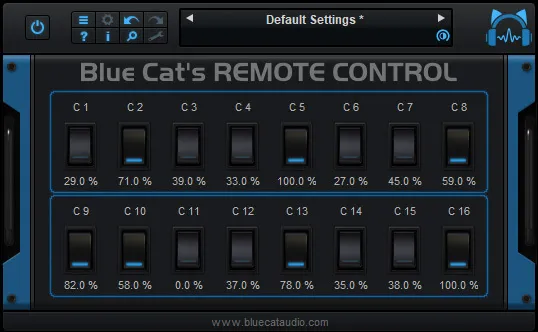
Blue Cat's Remote Control by Blue Cat Audio virtual MIDI control surface plugin interface

Blue Cat's Remote Control: Virtual MIDI Control Surface Plugin Free Download

Rated 4.1/5 on Plugin Boutique (42 ratings)

Blue Cat's Remote Control is a plugin that lets you control and monitor several MIDI-controllable plugins or devices in real time from one customizable user interface. It is developed by Blue Cat Audio.

VST2AUAAXWindowsmacOS64-bit
AVAILABLE ATPlugin Boutique
Free trial available from the developer
01Overview

Blue Cat's Remote Control is a MIDI control surface built as a plugin for your DAW. It gives you a single place to map knobs, faders, switches and joysticks to MIDI CC messages, so you can operate plugins or external hardware from one panel. Blue Cat Audio positions it as a tool for producers who find a plugin's default interface awkward, or who want to manage many plugins in one project from a unified layout.

Best for

  • MIDI CC mapping
  • Hardware controller setup
  • Automation to MIDI
  • Custom plugin interfaces
  • Instant preset recall
Category
Utilities
Store
Plugin Boutique
02Key features

What you get

  • Virtual MIDI control surface and monitoring tool
  • Real-time control or monitoring of MIDI-controllable plugins and devices
  • 30 built-in skins with knobs, faders, switches and joysticks
  • Adjustable response curves with advanced settings
  • Custom controllers built with the KUIML language
  • Transform automation lanes into MIDI CC messages
  • Instant preset recall using MIDI CC messages
  • MIDI Learn for quick control assignment
  • Undo and redo support
03In depth

Building a Custom MIDI Control Surface

Each control in Remote Control can be set as a switch, fader, joystick, knob or meter. You assign a MIDI channel and CC number to every control and shape its response curve with advanced settings. MIDI Learn speeds up assignment, so you can link a physical controller or plugin parameter without typing values by hand.

The plugin includes 30 built-in skins. You can pick a different skin for each instance, which helps when you want a dedicated panel for a specific plugin or piece of hardware. For more control over the layout, the KUIML language lets you build your own digital workstation controller.
Automation, CC Mapping and Preset Recall

Remote Control can turn automation lanes into MIDI CC messages, which lets you drive external gear or other plugins from your DAW timeline. It can also remap incoming MIDI from one CC number to another, with a different response curve or MIDI channel.

Instant preset recall works through MIDI CC messages, so a single controller message can restore a stored state. Undo and redo are included for changes you make inside the plugin.

04Specs

Will it run?

Formats, systems and requirements as listed by Plugin Boutique. Missing details are left out, not guessed.

DeveloperBlue Cat Audio
TypePlugin
CategoryUtility
FormatsVST2, AU, AAX
Operating systemsWindows, macOS
Architecture64-bit
Free trialYes
05FAQ

Questions, answered

What formats does Blue Cat's Remote Control support?

It is available in VST2, AU and AAX formats. It runs on Windows and macOS.

What do I need to run Blue Cat's Remote Control?

You need a host application that supports VST2, AU or AAX plugins. On macOS, an Intel or Apple Silicon processor and macOS 10.9 or newer are required. On Windows, an SSE2-enabled processor and Windows Vista or newer are required.

What does Remote Control do with MIDI?

It can control or monitor any MIDI-controllable plugin or external MIDI device in real time. It can also remap MIDI CC messages and convert automation lanes into MIDI CC.

Is there a trial version?

Yes, a trial version is available.

07Developer

More from Blue Cat Audio

All Blue Cat Audio products →