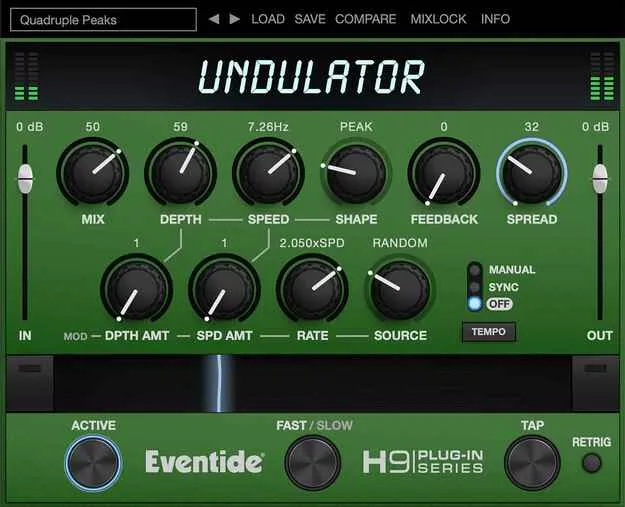
Undulator by Eventide tremolo effect plugin interface

Undulator: Modulated Tremolo Effect Plugin by Eventide

Undulator is an Eventide tremolo effect plugin, based on the classic modulated tremolo of the H3000 effects processor. It combines feedback, detuned delays and AM/FM-style modulation to add rhythm and movement to sounds.

VST3VST2AUAAXStandaloneWindowsmacOSiOS64-bit
AVAILABLE ATPlugin Boutique
Opens the store in a new tab
01Overview

Undulator is Eventide's modulated tremolo effect, derived from the H3000 effects processor. It pairs a tremolo with multi-tap delay and feedback, so the effect can turn short sounds into longer layered textures or add rhythmic movement to sustained ones. The developer describes it as a creative tool for strings, pads, guitars, keys and samples. It is available as a plugin for desktop DAWs and as an iOS app.

Best for

  • Evolving synth pads
  • Tempo-synced sample chops
  • Rhythmic guitar and keys
  • Live tremolo performance
  • Ethereal layered delays
  • Vocal and string movement
Developer
Eventide
Category
Tremolos
Store
Plugin Boutique
02Key features

What you get

  • MIX control adjusts the dry/effect ratio
  • Multiple modulation waveform shapes and sources
  • SPREAD subtly detunes the delays
  • FEEDBACK for accentuated delays or infinite loops
  • Secondary LFO modulates depth and speed targets
  • SYNC locks the tremolo to tempo
  • RETRIG resets modulation at the top of the waveform
  • RIBBON for real-time morphing between settings
  • SLOW/FAST mode with momentary BRAKE
  • TAP to update tremolo speed in real time
  • MIDI control of Ribbon, Bypass, Slow/Fast and Tap
  • iOS app works as standalone, AUv3 or Inter-App Audio effect
03In depth

Tremolo, Delay and Feedback Working Together

Undulator combines a tremolo with delays and feedback. The MIX control sets the ratio of dry to effected signal. FEEDBACK pushes the delays further, up to infinite loops, while SPREAD subtly detunes the delays for a wider, more animated sound.

Modulation is handled by multiple waveform shapes and sources, which change the rhythmic feel of the effect. A Secondary LFO sets how quickly the depth and speed modulation move their targets, adding a wobble that keeps the effect from sounding static. SYNC locks the tremolo to tempo, and RETRIG resets the modulation at the top of the waveform for a more predictable result.
Performance Controls and MIDI Mapping

The RIBBON control lets you play the effect in real time, morphing between settings you choose. The SLOW/FAST button switches to a slow LFO mode, and holding it down engages BRAKE, which slows the LFOs at a constant rate until released. TAP updates the tremolo speed in real time.

On desktop, MIDI can control the Ribbon (CC#1), Active/Bypass (CC#2), Slow/Fast (CC#3) and Tap (CC#4), which makes the effect usable as a live performance tool with a keyboard or controller.

Who Undulator Is For

Undulator suits producers who want rhythmic, evolving treatments for sustained parts such as pads and keys, and for sample chopping and tempo-synced production elements. Because of its Ribbon and MIDI control, it also fits musicians who want to perform tremolo changes live rather than only set them in the DAW.

04Specs

Will it run?

Formats, systems and requirements as listed by Plugin Boutique. Missing details are left out, not guessed.

DeveloperEventide
TypePlugin
CategoryTremolo
FormatsVST3, VST2, AU, AAX, Standalone
Operating systemsWindows, macOS, iOS
Architecture64-bit
05FAQ

Questions, answered

What formats does Undulator support?

Undulator is available as VST3, VST2, AU, AAX and Standalone. The iOS version works as a standalone app, an AUv3 plugin or an Inter-App Audio effect.

Which operating systems are supported?

Undulator runs on Windows 10 and later, macOS 10.14 and later on Intel and Apple Silicon, and iOS 11.0 and later.

Does Undulator require an iLok account?

Yes, an iLok account is required. No physical dongle is needed.

Can I control Undulator with a MIDI keyboard?

Yes. On desktop, MIDI can control the Ribbon (CC#1), Active/Bypass (CC#2), Slow/Fast (CC#3) and Tap (CC#4).

07Developer

More from Eventide

All Eventide products →