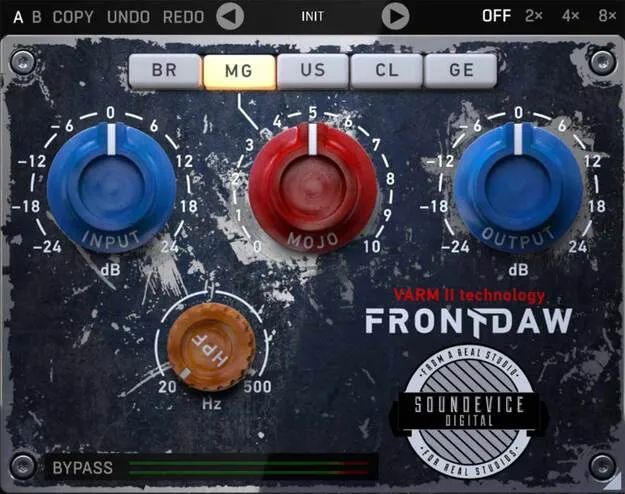
Front DAW by United Plugins analogue preamp plugin interface

Front DAW: Analogue Console Preamp Plugin by United Plugins Free Download

Rated 4.6/5 on Plugin Boutique (524 ratings)

Front DAW is a preamp effect plugin by United Plugins that adds analogue console-style input saturation to tracks in a DAW mix. It offers three circuit types and a Mojo control for the amount of saturation.

VST3VST2AUAAXWindowsmacOS64-bit
AVAILABLE ATPlugin Boutique
Free trial available from the developer
01Overview

Front DAW is designed to give digital mixes some of the character of an analogue desk. It sits on the input of each track and applies saturation modeled on analogue console circuitry. The developer describes it as a front door for every recording, created with English producer and remixer Greg Brimson's idea in mind. It is available in VST3, VST2, AU and AAX formats for Windows and macOS.

Best for

  • Mixing channel saturation
  • Analogue console emulation
  • Full mix track processing
  • Vintage tube coloration
  • Gentle vocal and drum saturation
Category
Preamps
Store
Plugin Boutique
02Key features

What you get

  • Three analogue circuit types: BR, US and GE
  • Mojo knob controls the amount of saturation
  • VARM modeling varies each plugin instance slightly
  • Internal 64-bit processing at any sampling rate
  • Designed to be CPU-friendly on many tracks
  • Smart bypass avoids clicks during automation
  • Resizable photorealistic graphic interface
  • License-file activation with no iLok or dongle
03In depth

Analogue Console Sound and Circuit Types

Front DAW uses United Plugins' Variable Analogue Random Modeling technology, known as VARM. The developer says VARM models the small random differences in electrical component values found in real console channels, so each plugin instance responds slightly differently.

The BR, US and GE buttons select three analogue circuit types. BR is modeled on classic British consoles, US on a punchy American-style input, and GE on a colourful vintage German tube console. The Mojo knob sets the amount of saturation. The effect is intentionally gentle, since the plugin is meant to run on many tracks at once.
Workflow, Processing and Interface

Front DAW is built to be light on the CPU, so it can be placed on every track of a mix if needed. Internal 64-bit processing is used at any sampling rate, including 192 kHz and above. Its smart bypass is designed to avoid clicks or harmful noise when parameters are automated.

The photorealistic interface can be resized by dragging the arrow in the bottom right corner, making it smaller to save screen space or larger for easier control.

04Specs

Will it run?

Formats, systems and requirements as listed by Plugin Boutique. Missing details are left out, not guessed.

DeveloperUnited Plugins
TypePlugin
CategoryPreamp
FormatsVST3, VST2, AU, AAX
Operating systemsWindows, macOS
Architecture64-bit
Free trialYes
05FAQ

Questions, answered

What formats does Front DAW support?

Front DAW is available in VST3, VST2, AU and AAX formats.

Which operating systems are supported?

Front DAW runs on Windows and macOS. On macOS it requires 10.10 or later, with M1 Silicon Macs and macOS 11 Big Sur supported, and it is 64-bit only. On Windows it supports Windows 8 to 10 in 32-bit or 64-bit.

What do I need to use Front DAW?

You need a VST2, VST3, AAX or AU compatible host on macOS, and a VST2, VST3 or AAX compatible host on Windows. An Intel or AMD processor with SSE2 support is required on both platforms.

Does Front DAW require an iLok or internet access to activate?

No. Front DAW uses licence files for activation, so no iLok, dongle or internet access is required.

Is there a trial version?

Yes. United Plugins offers a 15-day trial version with no saving limits.

07Developer

More from United Plugins

All United Plugins products →