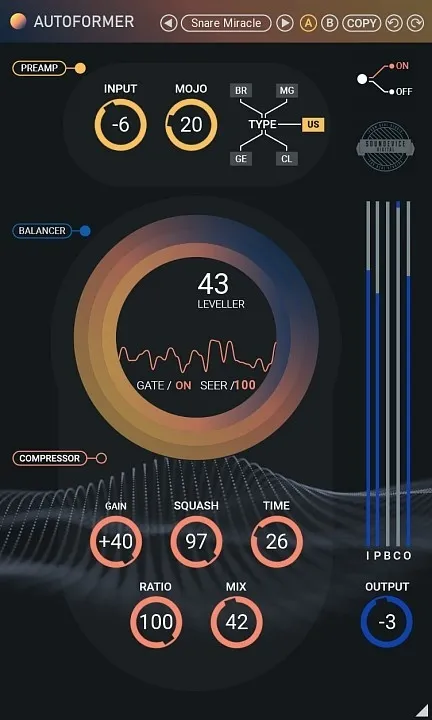
Autoformer preamp, volume rider and compressor plugin interface by United Plugins

Autoformer: Preamp, Volume Rider and Compressor by United Plugins Free Download

Rated 4.4/5 on Plugin Boutique (4,017 ratings)

Autoformer is a dynamics processing plugin from United Plugins that combines an analog-style preamp, an automatic volume rider and a compressor in one effect. It is aimed at vocals, voice-overs, bass and drum recordings.

VST3VST2AUAAXWindowsmacOS64-bit
AVAILABLE ATPlugin Boutique
Free trial available from the developer
01Overview

Autoformer is built for tracks that are almost right but need smoothing. The plugin chains three stages: a preamp with three analog-style circuit modes, an automatic volume section that repairs performance mistakes and volume dropouts, and a fast modern compressor for overall dynamics. Each section has its own bypass switch, so you can run the whole chain or use just one part. It is available in VST3, VST2, AU and AAX formats for Windows and macOS.

Best for

  • Vocal leveling
  • Voice-over processing
  • Bass guitar dynamics
  • Double bass mixing
  • Drum recording balance
  • Analog-style preamp coloration
Store
Plugin Boutique
02Key features

What you get

  • Analog-style preamp with British, American and German circuit modes
  • Automatic volume rider with SEER detection and LEVELLER adjustment
  • Fast modern compressor that leaves spectral character unchanged
  • Individual bypass switches for every section
  • Five LED meters for monitoring the signal chain
  • License-file activation with no iLok, dongle or internet needed
  • Resizable photorealistic interface
  • Internal 64-bit processing at any sampling rate, up to 192 kHz and above
03In depth

Preamp Modes and Tonal Character

The preamp section offers three buttons modeled on different analog circuit types. BR is meant to evoke a classic British console with a fat sound, US is labeled as a punchy American-style input, and GE gives a colorful vintage German tube console character.

The developer describes the preamp as inspired by the Front DAW plugin. Use it when you want color on a vocal or bass line before the dynamics stages, or switch it off and use only the volume and compression sections.
Volume Rider and Compressor Workflow

The Balancer section is the automatic volume function. It evens out performance mistakes and volume dropouts. The SEER parameter analyzes the incoming signal to decide whether the material needs adjustment, and LEVELLER sets the adjustment itself.

The fast compressor is meant to soothe dynamics without changing the spectral character of the signal. Five LED meters show activity across the chain, so you can monitor each stage while you work. The interface is photorealistic and resizable by dragging the bottom-right corner.

Licensing and System Requirements

Autoformer uses license files instead of an iLok or dongle, and it does not require internet access for activation. A 15-day unlimited trial is available. On Windows it supports Windows 8 to 10 in 32-bit or 64-bit, and on Mac it supports macOS 10.10 and later, including M1 Silicon Macs and macOS 11 Big Sur. Both platforms need an Intel or AMD processor with SSE2 support and a compatible host. The plugin processes internally at 64-bit and handles sampling rates of 192 kHz and higher.

04Specs

Will it run?

Formats, systems and requirements as listed by Plugin Boutique. Missing details are left out, not guessed.

DeveloperUnited Plugins
TypePlugin
CategoryDynamics Processor
FormatsVST3, VST2, AU, AAX
Operating systemsWindows, macOS
Architecture64-bit
Free trialYes
05FAQ

Questions, answered

What is Autoformer used for?

Autoformer is used to clean up and shape recordings, especially vocals, voice-overs, bass guitar, double bass and drums. Its volume rider repairs uneven performances and its compressor tames dynamics.

Which formats and operating systems does Autoformer support?

Autoformer is available in VST3, VST2, AU and AAX formats. It runs on Windows and macOS, with Windows 8 to 10 and macOS 10.10 or later supported.

What do I need to use Autoformer?

You need a VST2, VST3, AAX or AU compatible host, an Intel or AMD processor with SSE2 support, and a 64-bit system on Mac. Windows supports both 32-bit and 64-bit.

Does Autoformer require an iLok or internet activation?

No. Autoformer activates with license files, so no iLok, dongle or internet access is required.

Is there a trial version?

Yes. Autoformer includes a 15-day unlimited trial version that you can use in your projects.

07Developer

More from United Plugins

All United Plugins products →