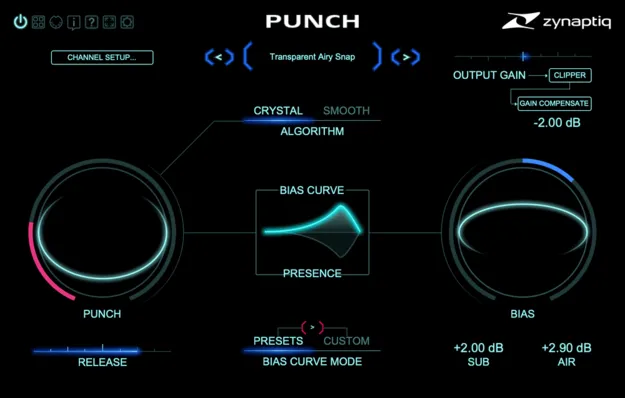
PUNCH transient shaper plugin interface by Zynaptiq

PUNCH: Intelligent Dynamics Contouring Plugin by Zynaptiq

Rated 4.8/5 on Plugin Boutique (24 ratings)

PUNCH is a transient shaper plugin from Zynaptiq that adds punch and contour to individual sounds, stems and full mixes. It offers adjustable release times, from very short snaps to smooth dynamics expansion.

VST3AUAAXWindowsmacOS64-bit
AVAILABLE ATPlugin Boutique
Opens the store in a new tab
01Overview

PUNCH is built around dynamics contouring rather than simple transient enhancement. Zynaptiq describes it as working equally well on single sounds and complex mixed material, applying its processing to separate sound components. Users can dial in anything from airy snap to longer attack overshoot, or reduce over-compression on a mix. Two processing algorithms, CRYSTAL and SMOOTH, offer different approaches, and the plugin supports channel counts up to 16.

Best for

  • Drum transient shaping
  • Adding punch to mixes
  • Stem processing
  • Reducing over-compression
  • Immersive mixing
  • Bass and percussion contouring
Developer
Zynaptiq
Store
Plugin Boutique
02Key features

What you get

  • Adjustable release time from very short snap transients to smooth expansion
  • Frequency-dependent processing with BIAS and visual hover menus
  • CRYSTAL algorithm with 10-band minimum phase reconstruction
  • SMOOTH algorithm with 100+ minimum phase bands
  • Transparent oversampled or multi-band output clipper
  • Zero latency processing
  • Up to 16 channels for immersive workflows
  • Optional 64-bit processing and zoomable vector GUI
03In depth

Sound Shaping and Algorithm Choice

PUNCH adjusts how the attack and release of a signal are shaped, with release time adjustable from very short snaps through medium impact attacks to smooth dynamics expansion. Zynaptiq says the frequency-dependent processing can add airy presence, mid-range twang and low-end weight, or add contour to sounds that feel flat.

The CRYSTAL algorithm uses reconstruction based on 10 minimum phase bands, while SMOOTH uses more than 100. The BIAS function and visual hover menus make frequency-dependent adjustments easier to set without a steep learning curve.
Workflow, Output Clipping and Channel Support

The plugin has zero latency processing and an optional 64-bit processing mode. Its output clipper can be set to oversampled or multi-band operation, and Zynaptiq describes the clipper as transparent.

PUNCH supports up to 16 channels for immersive workflows. The GUI is fully vectorized and zooms up to 200 percent, which helps when working on fine adjustments.

04Specs

Will it run?

Formats, systems and requirements as listed by Plugin Boutique. Missing details are left out, not guessed.

DeveloperZynaptiq
TypePlugin
CategoryTransient Shaper
FormatsVST3, AU, AAX
Operating systemsWindows, macOS
Architecture64-bit
05FAQ

Questions, answered

What formats does PUNCH support?

PUNCH is available in VST3, AU and AAX formats. It runs on Windows and macOS.

Which operating systems are supported?

PUNCH supports macOS 10.15 or newer on Intel and Apple Silicon processors, and Windows 10 or newer.

What do I need to activate PUNCH?

PUNCH uses PACE copy protection and requires a free iLok.com account. Activation can be placed on the computer's hard drive or on an iLok 2 or newer USB dongle, which is not included.

Does PUNCH work with multichannel audio?

Yes. Zynaptiq states that PUNCH supports channel counts from mono up to 16 for immersive workflows.

07Developer

More from Zynaptiq

All Zynaptiq products →