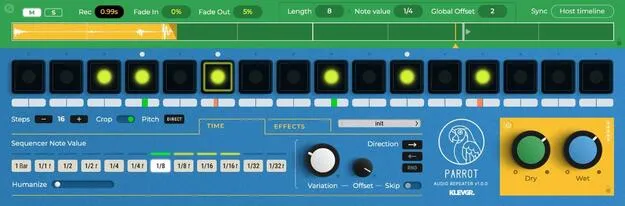
Parrot by Klevgrand loop-based sampling delay plugin interface

Parrot: Loop-Based Sampling Delay Effect by Klevgrand

Rated 4.6/5 on Plugin Boutique (32 ratings)

Parrot is a delay effect plugin by Klevgrand that samples short slices of incoming audio and repeats them in a sequenced loop of up to 16 steps. It is available as VST2, AU and AAX for Windows and macOS.

VST2AUAAXWindowsmacOS64-bit
AVAILABLE ATPlugin Boutique
Opens the store in a new tab
01Overview

Parrot works on any audio you route into it. It samples small slices of the signal and plays them back as a step-sequenced loop, so a simple input can turn into beat variations, harmonic accents or glitchy textures. Loop length, per-step pitch, note values, filtering and dynamics all change the pattern as you adjust them, and small tweaks can introduce new pulses or stutters.

Best for

  • Glitchy rhythmic textures
  • Beat variation
  • Harmonic accents
  • Evolving ambient textures
  • Dance-floor production
Developer
Klevgrand
Category
Delays
Store
Plugin Boutique
02Key features

What you get

  • Loop-based live sampling with sequenced playback
  • Step sequencer with up to 16 steps
  • Per-step pitch control and accent
  • Variable note values for evolving rhythms
  • Pan alternation that follows the sequencer
  • Evolving filter section with multiple modes
  • DAW sync or free-running mode
  • Humanizer for subtle timing variation
  • Parameter locking for preset switching
  • Included preset collection
03In depth

Sound and Character of the Parrot Delay

Parrot creates rhythmic patterns by sampling slices of incoming audio and repeating them in a sequenced loop. Control over loop length, pitch, variation, dynamics and filtering lets the result move from a steady rhythm to broken, glitchy textures that change over time.

The sequencer responds strongly to small parameter changes, so minor adjustments can produce new pulses, stutters or harmonic shifts. Developer Klevgrand positions the plugin as suited to both structured grooves and more exploratory, generative sounds.
Workflow: Sync Options, Filters and Controls

Parrot can sync to your DAW or run in free-running mode, which gives a more exploratory result. Each step offers its own pitch control and accent, and note values can vary to create evolving rhythms.

The filter section has multiple modes and evolves over time, and a separate dry-signal filter lets you shape the original sound independently. A humanizer adds subtle timing variation, and mute and solo controls work during sampling. Parameters can be locked so they stay fixed when you switch presets.

04Specs

Will it run?

Formats, systems and requirements as listed by Plugin Boutique. Missing details are left out, not guessed.

DeveloperKlevgrand
TypePlugin
CategoryDelay
FormatsVST2, AU, AAX
Operating systemsWindows, macOS
Architecture64-bit
05FAQ

Questions, answered

What formats does Parrot support?

Parrot is available in VST2, AU and AAX formats. It is a 64-bit plugin that runs in any AU, VST or AAX compatible 64-bit host.

Which operating systems does Parrot run on?

Parrot runs on Windows and macOS. The developer lists macOS 10.13 or later (ARM and Intel) and Windows 7 SP1 or later.

What do I need to use Parrot?

You need a compatible 64-bit host that supports AU, VST or AAX plugins. Parrot processes audio you feed into it, so it is used as an insert effect on a track or bus.

Can Parrot sync to my DAW tempo?

Yes. Parrot can sync to your DAW, or you can switch to free-running mode for a more exploratory, generative result.

07Developer

More from Klevgrand

All Klevgrand products →