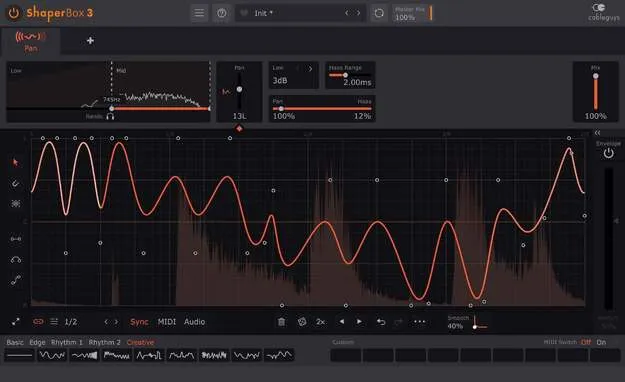
PanShaper 4 by Cableguys stereo autopanner plugin interface

PanShaper 4: Multiband Stereo Autopanner by Cableguys Free Download

Rated 4.8/5 on Plugin Boutique (67 ratings)

PanShaper 4 is a multiband autopanner and stereo rhythm designer from Cableguys. It uses drawable panning LFOs and an envelope follower on each band to shape stereo movement in VST3, VST2, AU and AAX formats.

VST3VST2AUAAXWindowsmacOS64-bit
AVAILABLE ATPlugin Boutique
Free trial available from the developer
01Overview

PanShaper 4 is built around a drawable panning LFO and an envelope follower on every band, so you can sketch pan patterns and shape stereo placement directly. It blends standard left/right panning with psychoacoustic Haas panning, and its LFO can be synced to beats and bars with sample accuracy or triggered from MIDI or audio. Cableguys positions it as a tool for making mixes fill the speakers, from subtle widening to extreme pitch-bending Doppler effects. It runs as a plugin on its own or alongside other Shapers in ShaperBox 3.

Best for

  • Stereoizing mono drums
  • Adding movement to basslines
  • Autopanning real instruments
  • Rhythmic stereo tremolo
  • Animating electric pianos
  • Extreme Doppler sound design
Developer
Cableguys
Category
Stereo Width
Store
Plugin Boutique
02Key features

What you get

  • Drawable panning LFO with expandable editing view
  • Envelope follower on each band: low, mid and high
  • Blend of standard panning and Haas panning, 0–40 ms
  • Multiple panning modes: Balance 0/3/4.5/6 dB and Stereo Combined
  • Loop length from 1/128 to 32 bars with sample-accurate sync
  • Audio-rate modulation up to 5.24 kHz
  • Master Mix and Smoothed Bypass for click-free blends
  • Nine slots for custom waves, saved with the patch
03In depth

Sound and Panning Character

PanShaper 4 offers two panning approaches that you can combine. Standard panning uses balance modes at 0, 3, 4.5 and 6 dB, plus a Stereo Combined mode. The Haas range is adjustable from 0 to 40 ms, so the effect can be subtle or extreme.

The developer describes the Haas option as psychoacoustic, and it is the main tool for stereo widening without changing the level balance between the speakers. Each band has its own dry/wet mix, so you can keep the bass centered and solid while moving the highs.

Audio-rate modulation runs up to 5.24 kHz, which opens the door to sound design beyond ordinary autopanning.
Workflow and Waveform Editing

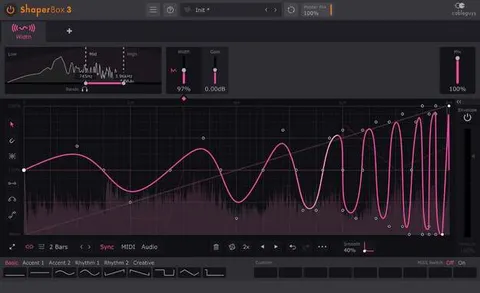
The LFO can be expanded for detailed editing and drawn freely. A draggable Pan parameter shifts the whole wave up or down. Loop length can be set in beats and bars, or in Hertz and milliseconds, from 1/128 to 32 bars.

Wave tools include flip, resize, move and randomize for a wave or selection, a 2x/3x button to double or triple a pattern, and selection skewing to raise intensity over time. You can copy and paste waves between any Shapers and undo or redo LFO edits without limit. Nine slots store custom waves with the patch, and user waves can be switched via MIDI.

The interface can be resized from 75% to 200% and supports Retina/HiDPI displays. A built-in help feature shows a description when you hover over any control. Trigger Smoothing and Smoothed Bypass reduce clicks when switching waves or going to the dry signal.

04Specs

Will it run?

Formats, systems and requirements as listed by Plugin Boutique. Missing details are left out, not guessed.

DeveloperCableguys
TypePlugin
CategoryStereo Width
FormatsVST3, VST2, AU, AAX
Operating systemsWindows, macOS
Architecture64-bit
Free trialYes
05FAQ

Questions, answered

What formats does PanShaper 4 support?

PanShaper 4 is available in VST3, VST2, AU and AAX formats. It is a 64-bit plugin.

What do I need to run PanShaper 4?

On macOS, it requires Mac OS X 10.13 or later (64-bit only) on an Intel or Apple Silicon processor, with a VST 2, VST 3, AU or AAX host DAW. On Windows, it requires Windows 7, 8, 10 or 11 (64-bit only) with a VST 2, VST 3 or AAX host DAW.

Can PanShaper 4 sync to my project tempo?

Yes. You can set the LFO loop length in beats and bars, and it stays sample-accurate in sync with your track. You can also use Hertz or milliseconds.

Does PanShaper 4 work with MIDI or audio triggers?

You can trigger panning patterns with MIDI, and the developer describes an audio triggering option that follows the rhythm of drums, loops and instruments.

07Developer

More from Cableguys

All Cableguys products →