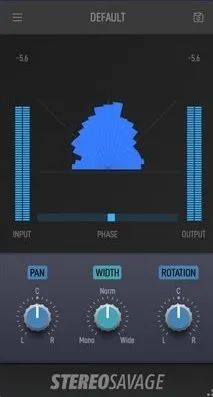
StereoSavage 2 Elements stereo width plugin interface by Plugin Boutique

StereoSavage 2 Elements: Stereo Width and Imaging Plugin Free Download

Rated 4.4/5 on Plugin Boutique (3,596 ratings)

StereoSavage 2 Elements is a stereo effects plugin from Plugin Boutique for controlling stereo width, panning and imaging, with metering to check phase and mono compatibility. It is available in VST2, AU and AAX formats for Windows and macOS.

VST2AUAAXWindowsmacOS64-bit
AVAILABLE ATPlugin Boutique
Free trial available from the developer
01Overview

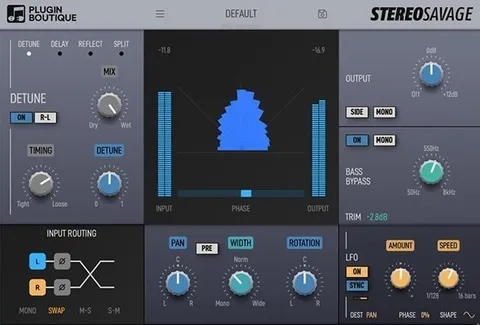
StereoSavage 2 Elements focuses on the stereo field of a mix. Its centre panel combines width, pan and rotation controls with a goniometer, a phase correlation meter and input and output level meters. The rotation control moves the centre signal while leaving the sides in place, which is useful for shifting a stereo source without the hard movement of a standard pan. The plugin is built for producers who want to shape how a mix spreads across the speakers and confirm that it still holds up in mono.

Best for

  • Drum loop imaging
  • Mono compatibility checks
  • Mix stereo widening
  • Reverb movement panning
  • Stereo bus metering
Category
Stereo Width
Store
Plugin Boutique
02Key features

What you get

  • Stereo width control for adjusting the spread of a mix
  • Pan control alongside width and rotation in the centre panel
  • Rotation control that moves the centre signal and keeps the sides in place
  • Goniometer display with out-of-phase signals shown below the 45-degree line
  • Phase correlation meter for checking mono compatibility
  • Mono button in the output section for quick mono checks
  • Input and output level meters for balanced A/B comparison
  • Available in VST2, AU and AAX formats, 64-bit only
03In depth

Stereo Width, Panning and Rotation Controls

The centre panel of StereoSavage 2 Elements carries three controls: Pan, Width and Rotation. Pan and Width will be familiar from most DAWs. Rotation works differently. It pans the centre signal and leaves the sides where they are.

Plugin Boutique gives a drum loop with reverb as an example. With Rotate applied, the drum kit moves left and right while the reverb stays put. The developer describes the result as more natural than a simple pan.
Metering for Phase and Mono Compatibility

The metering is built into the centre panel. A goniometer shows the stereo image, with out-of-phase signals sitting below the 45-degree line. A horizontal phase correlation meter sits at the bottom. When the reading stays toward the right, the signal is mono compatible. If it moves far to the left, some of the mix may disappear in mono.

The MONO button in the output section lets you check the mix in mono. Input and output level meters are also included, so you can match levels when comparing processed and unprocessed audio.

04Specs

Will it run?

Formats, systems and requirements as listed by Plugin Boutique. Missing details are left out, not guessed.

DeveloperPlugin Boutique
TypePlugin
CategoryStereo Width
FormatsVST2, AU, AAX
Operating systemsWindows, macOS
Architecture64-bit
Free trialYes
05FAQ

Questions, answered

What formats does StereoSavage 2 Elements support?

StereoSavage 2 Elements is available in VST2, AU and AAX formats. It runs on Windows and macOS and is 64-bit only.

What do I need to run StereoSavage 2 Elements?

On Mac, it requires macOS 10.11 or later and supports Intel and Apple Silicon. On Windows, it requires Windows 8 or later. The AAX version requires Pro Tools 10.3.6 or later.

Can StereoSavage 2 Elements check whether a mix works in mono?

Yes. The phase correlation meter shows mono compatibility, and the MONO button in the output section lets you listen to the mix in mono.

Does StereoSavage 2 Elements have a trial?

Yes, a trial version is available.

07Developer

More from Plugin Boutique

All Plugin Boutique products →