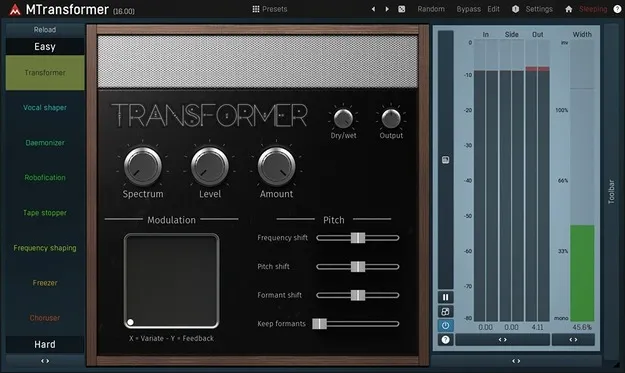
MTransformer by MeldaProduction frequency shifter plugin interface

MTransformer: Frequency and Pitch Shifter Plugin by MeldaProduction Free Download

Rated 4.7/5 on Plugin Boutique (196 ratings)

MTransformer is a spectral effects plugin by MeldaProduction that transforms any frequency to any other and reshapes the level of each frequency. It is available as VST3, VST2, AU and AAX for Windows and macOS.

VST3VST2AUAAXWindowsmacOS64-bit
AVAILABLE ATPlugin Boutique
Free trial available from the developer
01Overview

MTransformer is a frequency shifter from MeldaProduction that processes audio spectrally. Frequency shifting and pitch shifting both move each frequency to a different one, and MTransformer lets you set those target frequencies freely. The developer describes it as a tool for daemonic and robotic voices, and for changing which frequencies are loud and which are quiet. It runs on Windows and macOS in several plugin formats, and a trial is available.

Best for

  • Robotic vocal effects
  • Daemonic voice processing
  • Experimental sound design
  • Electronic textures
  • Surround audio processing
  • Creative spectral effects
Store
Plugin Boutique
02Key features

What you get

  • Frequency shifting and pitch-style transformation of any frequency
  • Per-frequency level transformation, including removing quiet content
  • Four modulators: LFO, envelope, randomizer, pitch detector
  • Four multiparameters for controlling several settings at once
  • Oscillators with shape mixing, custom waveforms and step sequencer
  • Harmonic mode for direct control of harmonic content
  • Mono, stereo, mid/side and up to 8 channels of surround
  • Easy and Edit interfaces, resizable and GPU-accelerated
03In depth

Spectral Frequency Shifting and Level Control

MTransformer moves each frequency in the audio to a new one, so you can use it for frequency shifting or for pitch-style transformations. It also reshapes the level of each frequency, so loud and quiet parts of the spectrum can swap places or quiet content can be removed.

Oscillators can be built from predefined shapes, custom waveforms drawn with the MeldaProduction Envelope System, a step sequencer, or a harmonic mode that controls harmonic content directly. Harmonic mode is aimed at high-frequency oscillators.
Modulation, Surround Support and Workflow

Four modulators can each act as an LFO, level follower, MIDI or audio triggered ADSR envelope, randomizer or pitch detector, and they can listen to the plugin's sidechain. Four multiparameters let you control several settings with one control and morph between stored settings.

MTransformer handles mono, stereo, mid/side, single channels and up to 8 channels of surround audio. The interface can be resized and styled, with knobs, sliders or buttons, and it includes an Easy screen with predefined modes alongside a full Edit screen. Smart randomization and automatic gain compensation help with browsing and experimenting.

Who MTransformer Suits

MTransformer suits producers who want unusual processing rather than standard pitch correction. Typical uses include robotic or daemonic vocals, altered textures, and sound design for electronic and experimental music. Because it supports surround formats, the developer also positions it for music, film and game audio work.

Beginners can start with the Easy screen and a few controls, while experienced users can use the Edit screen and its full set of modulation and oscillator options.

04Specs

Will it run?

Formats, systems and requirements as listed by Plugin Boutique. Missing details are left out, not guessed.

DeveloperMeldaProduction
TypePlugin
CategoryFrequency Shifter
FormatsVST3, VST2, AU, AAX
Operating systemsWindows, macOS
Architecture64-bit
Free trialYes
05FAQ

Questions, answered

What is MTransformer used for?

MTransformer is used for spectral transformations such as frequency shifting and pitch-style changes, which can produce robotic or daemonic voices and unusual textures. It also lets you change the levels of individual frequencies.

What formats and operating systems does MTransformer support?

MTransformer is available in VST3, VST2, AU and AAX formats. It runs on Windows and macOS, and the plugin is 64-bit.

What do I need to run MTransformer?

You need a VST, VST3, AU or AAX compatible 64-bit host. On Windows, Windows 8, 10 or 11 (64-bit) is required, and on macOS, macOS 10.14 or newer. Both platforms need an Intel or AMD processor with SSE2 support, and macOS also supports native Apple Silicon.

Is there a trial version of MTransformer?

Yes, a trial is available for MTransformer.

07Developer

More from MeldaProduction

All MeldaProduction products →