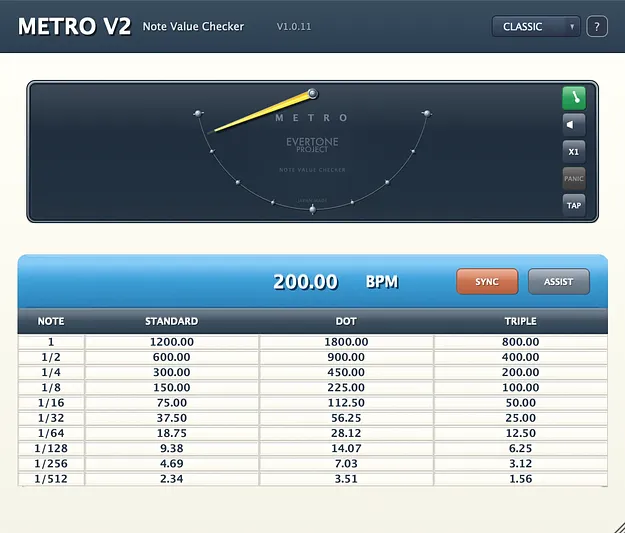
Metro v2 Upgrade from v1 plugin interface with pendulum note meter by Evertone Project

Metro v2 Upgrade from v1: Note-Value Calculator Plugin by Evertone Project

Metro v2 Upgrade from v1 is a utility plugin by Evertone Project that calculates BPM-derived note values to help set expander and compressor parameters during mixing and mastering.

VST3AUAAXWindowsmacOS
AVAILABLE ATPlugin Boutique
Opens the store in a new tab
01Overview

Metro v2 is an upgrade for existing owners of Metro v1. It turns the song tempo into note-length values that can be fed back into dynamics parameters, so processing can be set on a note basis rather than by feel alone. The version adds tap tempo, an in-place help mode, a refined CLASSIC theme and a new PULSE FLOW SCOPE view. Projects saved with Metro v1 open unchanged.

Best for

  • Kick and snare shaping
  • Parallel compression
  • Bus and master glue
  • Note-based dynamics
  • Mix and master tempo sync
Category
Utilities
Store
Plugin Boutique
02Key features

What you get

  • Visual pendulum meter showing quarter, 8th, 16th and 32nd note positions
  • New PULSE FLOW SCOPE view with note periods from 1/1 to 1/512
  • ASSIST recommended values for upward expander, compressor and glue compressor
  • Normal and Advanced modes, the latter for parallel DRY/WET processing
  • Tap tempo for setting BPM by clicking the pendulum area
  • Help mode with tooltips that appear when hovering a control
  • Click-to-copy values for pasting into parameter fields
  • BPM input range of 30 to 990 with DAW tempo sync
03In depth

Visual note meter and pulse flow scope

The core of the plugin is a pendulum-style meter. Full left-to-right travel represents a quarter note, and dot markers show the 8th, 16th and 32nd positions. This makes it easy to confirm which note value you are targeting while shaping attack, hold and release on a kick or snare.

Version 2 adds PULSE FLOW SCOPE, an alternative view that traces one sine cycle across the window over one period of the selected note value, from 1/1 down to 1/512. A toggle in the header switches between the pendulum and the scope.
ASSIST values and workflow controls

ASSIST shows BPM-derived recommended values for three processor types: upward expander, compressor and glue compressor. Normal mode gives general-purpose values for processors without a DRY/WET control, while Advanced mode gives values tuned for parallel DRY/WET processing.

Clicking a value in the table copies it to the clipboard, ready to paste into the parameter field. BPM can be typed in, read from the session with SYNC, or set by tapping the pendulum area. The speed button switches the meter between half, normal and double speed.

04Specs

Will it run?

Formats, systems and requirements as listed by Plugin Boutique. Missing details are left out, not guessed.

DeveloperEvertone Project
TypePlugin
CategoryUtility
FormatsVST3, AU, AAX
Operating systemsWindows, macOS
05FAQ

Questions, answered

Who is Metro v2 Upgrade from v1 for?

It is an upgrade for owners of Metro v1. Producers who calculate tempo-based values for expanders and compressors during mixing and mastering will find it most useful.

Which plugin formats and operating systems does it support?

Metro v2 is available in VST3, AU and AAX formats. It runs on Windows and macOS. The macOS build is a Universal Binary for Intel and Apple Silicon, requiring macOS 10.15 or later, and Windows 10 or 11 (x64) is supported.

Can I open projects saved with Metro v1?

Yes. Projects saved with Metro v1 open unchanged in Metro v2.

Which DAWs and sample rates are supported?

The listed hosts include Logic Pro, Cubase, Studio One, Pro Tools, Reaper and Ableton Live, among others. Sample rates from 44.1 kHz up to 192 kHz are listed.

07Developer

More from Evertone Project

All Evertone Project products →