Note-Value Calculation and the Visual Note Meter
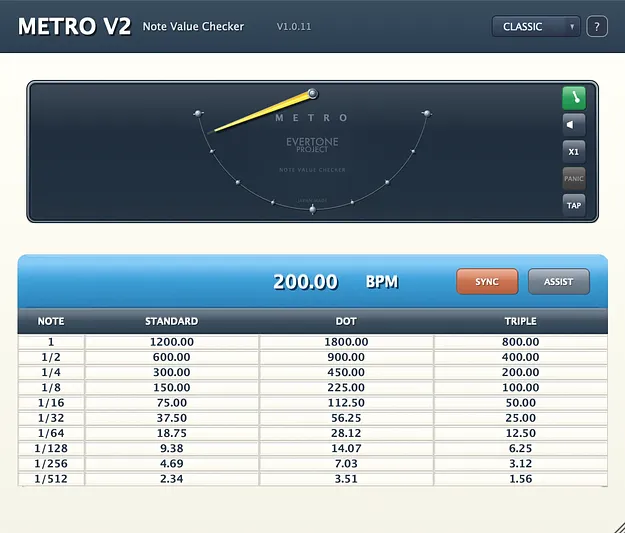
The core of Metro v2 is its BPM-derived calculation table. You can enter tempo directly, or turn on SYNC to read the host session's BPM automatically. Tap Tempo lets you set the BPM by clicking the pendulum area.
The visual note meter is a pendulum that swings left and right. Full travel represents a quarter note, and dot markers show the 8th, 16th and 32nd positions. While shaping the attack, hold and release of a kick or snare with an expander or compressor, you can check the note value by sight as well as by ear.
PULSE FLOW SCOPE is a second visual mode. It traces one sine cycle across the window for the selected note value, from 1/1 down to 1/512, so the rhythm reads as a steady beam rather than a swinging needle.