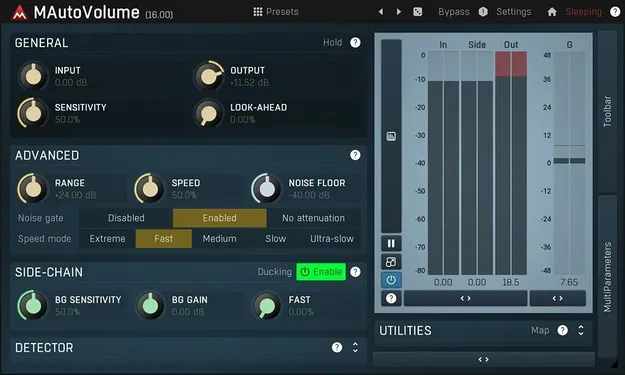
MAutoVolume by MeldaProduction auto gain plugin interface

MAutoVolume: Sidechain-Driven Auto Gain Plugin by MeldaProduction Free Download

Rated 4.6/5 on Plugin Boutique (524 ratings)

MAutoVolume is an automatic gain plugin from MeldaProduction that adjusts a track's level using a sidechain input, so a vocal, bass or lead can stay on top of the mix. It is available as a plugin for Windows and macOS.

VST3VST2AUAAXWindowsmacOS64-bit
AVAILABLE ATPlugin Boutique
Free trial available from the developer
01Overview

MAutoVolume is built for tracks that need to stay at a consistent level against a changing mix, such as vocals, bass, solo guitars and saxophones. Instead of relying only on manual fader moves or compression, you feed the rest of the mix into the plugin's sidechain, and it adjusts the gain of the track it sits on. The developer describes the result as a way to keep the lead element audible without constant hand automation. Its interface includes classic meters and time graphs, and it supports VST3, VST2, AU and AAX on Windows and Mac.

Best for

  • Vocal level control
  • Bass consistency in mixes
  • Solo guitar balancing
  • Saxophone mix placement
  • Sidechain-driven gain riding
Category
Gain
Store
Plugin Boutique
02Key features

What you get

  • Sidechain input keeps a track consistently on top of the mix
  • Automatic gain compensation (AGC) and safety limiter included
  • Adjustable up-sampling from 1x to 16x
  • M/S, single-channel and up to 8-channel surround processing
  • Four multiparameters and versatile modulators
  • Adjustable oscillator shape technology
  • MIDI learn for assigning hardware controllers
  • Stylable, resizable, GPU-accelerated interface with time graphs
  • No dongle or internet access required for activation
  • Free-for-life updates
03In depth

How Sidechain Gain Control Works in MAutoVolume

The core idea is simple: the plugin listens to everything except the element you want to protect, and it adjusts its own gain to keep that element in place. Route the rest of the mix to the MAutoVolume sidechain, and the plugin reacts to changes in that signal over time.

Automatic gain compensation (AGC) and a safety limiter are included to help control the output level. Adjustable up-sampling from 1x to 16x lets you choose the processing quality for your session, and the plugin supports M/S, single-channel and up to 8-channel surround processing.

The interface is stylable, resizable and GPU accelerated, and the visualisation engine shows classic meters alongside time graphs so you can see the gain movement as it happens.
Modulators, Controls and Workflow Tools

MAutoVolume includes modulators, four multiparameters and adjustable oscillator shape technology, giving you several ways to shape how the gain responds. MIDI controllers can be assigned with MIDI learn, so you can map key parameters to a hardware controller.

Smart randomisation can generate new starting points for exploration, and global preset management lets you organise your own settings. Online preset exchange is also supported. The plugin is optimised for SSE, SSE2 and SSE3 processors.

In MeldaProduction's standard package, you also get A-H preset slots for quick comparison and an integrated help system.

04Specs

Will it run?

Formats, systems and requirements as listed by Plugin Boutique. Missing details are left out, not guessed.

DeveloperMeldaProduction
TypePlugin
CategoryGain
FormatsVST3, VST2, AU, AAX
Operating systemsWindows, macOS
Architecture64-bit
Free trialYes
05FAQ

Questions, answered

What formats does MAutoVolume support?

MAutoVolume is available as VST3, VST2, AU and AAX. It runs on Windows and macOS, in both 32-bit and 64-bit versions.

What do I need to run MAutoVolume?

On Windows, you need Windows 8, 10 or 11 (64-bit) and a VST, VST3 or AAX compatible host. On macOS, you need macOS 10.14 or newer (64-bit) and a VST, VST3, AU or AAX compatible host. Intel, AMD and Apple Silicon processors with SSE2 support are listed, with native Apple Silicon ARM CPU support.

Does MAutoVolume require a dongle or internet connection?

No. The developer states that no dongle or internet access is required for activation.

How does the sidechain work?

You route the rest of your mix, everything except the element you want to protect, to the MAutoVolume sidechain input. The plugin then adjusts its gain based on that signal to keep your track sitting on top.

Is there a trial version?

Yes, a trial is available for MAutoVolume.

07Developer

More from MeldaProduction

All MeldaProduction products →