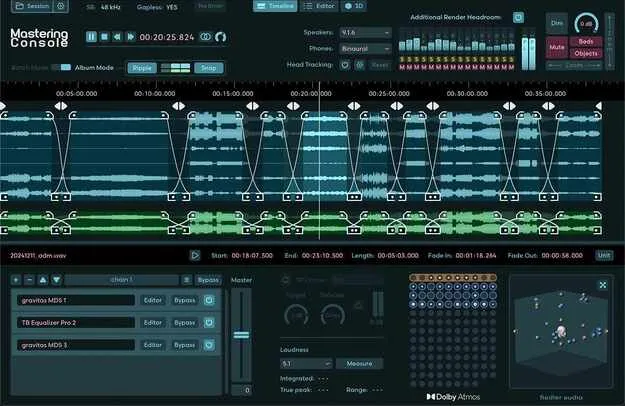
Mastering Console 2 by Fiedler Audio Dolby Atmos mastering plugin interface

Mastering Console 2: Dolby Atmos Mastering Plugin by Fiedler Audio

Mastering Console 2 is a VST3 mastering plugin from Fiedler Audio for Dolby Atmos and stereo mixes. It handles ADM/BWF mastering, album crossfades, loudness measurement and multichannel monitoring, and is approved by Dolby Labs.

VST3WindowsmacOS
AVAILABLE ATPlugin Boutique
Opens the store in a new tab
01Overview

Mastering Console 2 brings stereo-style mastering habits to Dolby Atmos mixes. It lets you process ADM/BWF files and their stereo counterparts side by side, hosts OBAM plug-ins on the Master Channel, and works with 48 kHz and 96 kHz sessions. The plugin also supports album building with crossfades, automated LKFS adjustment and a True Peak limiter for loudness compliance. Engineers who deliver both Atmos and stereo versions of a record will find the workflow focused on that task.

Best for

  • Dolby Atmos album mastering
  • Atmos and stereo delivery
  • Loudness compliance
  • Multichannel monitoring
  • Album sequencing with crossfades
Developer
Fiedler Audio
Category
Mastering
Store
Plugin Boutique
02Key features

What you get

  • Dolby Atmos mastering approved by Dolby Labs
  • Master Dolby Atmos and stereo mixes together
  • Hosts OBAM plug-ins and VST3 plug-ins on stereo tracks
  • Batch processing and gapless album crossfades
  • Automated loudness measurement and LKFS adjustment
  • True Peak limiter for loudness compliance
  • Monitoring across stereo, binaural and multichannel layouts
  • Per-speaker volume, delay and EQ calibration
  • Simultaneous high-speed export of multiple formats
03In depth

Monitoring and Speaker Routing for Atmos Mastering

Mastering Console 2 supports monitoring on stereo, binaural, several 5.1, 7.1 and 9.1 layouts, and Apple Spatial Audio. On Windows, Apple Spatial Audio is available without head tracking. Several head tracking options are included for binaural listening.

The routing system lets you monitor on speakers and headphones at the same time without rewiring your studio. Each speaker channel has calibration controls for volume, delay and EQ, and routing setups and calibrations can be saved as presets.

A 3D view shows beds and dynamic objects, and you can hide elements to isolate what is playing at a given point in the mix.
Album Building, Loudness and Export

Batch processing lets you run multiple ADM/BWF files and their stereo counterparts together. For albums, gapless transitions can be built on the timeline with crossfades.

Loudness tools include automated loudness measurement, LKFS adjustment and a True Peak limiter that the developer describes as ultra transparent. Export can run several formats at once, including ADM/BWF, multichannel rerenders, binaural, Apple Spatial Audio and stereo reference files. Batch downsampling from 96 kHz to 48 kHz is also available for ADM/BWF files.

04Specs

Will it run?

Formats, systems and requirements as listed by Plugin Boutique. Missing details are left out, not guessed.

DeveloperFiedler Audio
TypePlugin
CategoryMastering
FormatsVST3
Operating systemsWindows, macOS
05FAQ

Questions, answered

What formats and operating systems does Mastering Console 2 support?

Mastering Console 2 is available as a VST3 plugin for Windows and macOS.

What are the system requirements for Mastering Console 2?

On macOS, it requires macOS 11 to 15.x and an Intel CPU of at least 2 GHz with SSE3 support, or Apple Silicon. On Windows, it requires Windows 10 or 11 and an Intel CPU of at least 2 GHz with SSE3 support. Both platforms need a display of at least 1440 x 900 px with OpenGL 3.3 or newer, and at least 4 GB of RAM.

Does Mastering Console 2 support 48 kHz and 96 kHz sessions?

Yes. It supports both 48 kHz and 96 kHz workflows, and it can batch downsample ADM/BWF files from 96 kHz to 48 kHz.

Can I use Apple Spatial Audio on Windows?

Yes, Apple Spatial Audio monitoring is supported on Windows, but without head tracking.

07Developer

More from Fiedler Audio

All Fiedler Audio products →