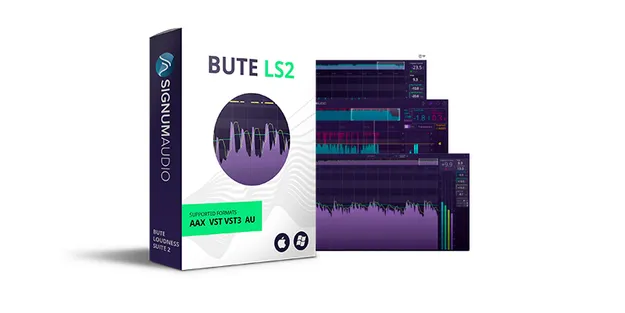
BUTE Loudness Suite 2 (Surround) by Signum Audio loudness metering and limiter plugin interface

BUTE Loudness Suite 2 (Surround): Loudness Meter and True Peak Limiter

Rated 5.0/5 on Plugin Boutique (13 ratings)

BUTE Loudness Suite 2 (Surround) is a loudness metering and True Peak limiting plugin by Signum Audio, built for mixing and mastering within loudness specifications. It is offered in a surround version that supports up to 7.1.2 channel configurations.

VST3VST2AUAAXWindowsmacOS64-bit
AVAILABLE ATPlugin Boutique
Opens the store in a new tab
01Overview

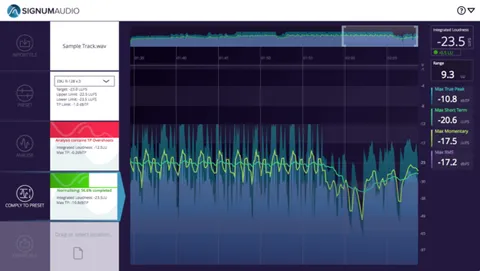
BUTE Loudness Suite 2 (Surround) is aimed at producers who need to check and control loudness in the same plugin they use for limiting. It brings short-term and momentary loudness, True Peak and RMS readings together with a limiter, so level adjustments can be made without leaving the metering view. The surround version auto-detects the DAW channel configuration and lets you select mono, stereo or surround setups. Built-in presets cover current loudness standards and recommendations.

Best for

  • Mastering to loudness specs
  • Broadcast level checks
  • Dialogue and music balancing
  • Streaming loudness compliance
  • Surround mix metering
  • Game audio level balancing
Developer
Signum Audio
Category
Mastering
Store
Plugin Boutique
02Key features

What you get

  • Integrated True Peak limiter and loudness metering in one plugin
  • Smart history overview for browsing up to 10 hours of loudness data
  • Custom red and yellow alerts on the history overview
  • Auto re-metering that syncs with the DAW on load
  • Resizable compact read-out view
  • Adaptive auto-release with a scale factor on the release knob
  • Three release curves: Transparent, Natural and Smooth
  • Mono, stereo and surround channel configuration selection (Surround version)
  • Short-term, momentary, True Peak and RMS read-outs
  • Save, load and export metering data
03In depth

Metering and Limiting Workflow

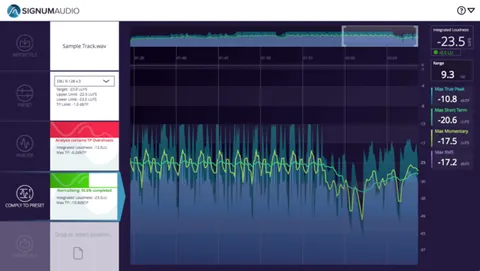
The plugin's smart history overview lets you browse up to 10 hours of loudness data at a glance and jump to any section of a track. A custom alert system marks areas that need attention with red or yellow pointers, and thresholds can be set in the settings panel.

Auto re-metering syncs with the DAW on load and reflects changes you make in the DAW on the graphical display, so you do not have to re-meter the whole mix after each adjustment. The compact read-out view is resizable both vertically and horizontally, keeping readings and limiting settings visible while saving screen space.
Limiting Character and Release Curves

The True Peak limiter offers three release curves, Transparent, Natural and Smooth. An adaptive auto-release function can be fine-tuned with a scale factor on the release knob. Signum Audio describes the limiting algorithm as ultra-transparent, aiming to keep mastered audio faithful to the original mix.

The suite also includes the BUTE Limiter 2 plugin, which adds Pumping and Linear release curves for more creative use.

04Specs

Will it run?

Formats, systems and requirements as listed by Plugin Boutique. Missing details are left out, not guessed.

DeveloperSignum Audio
TypePlugin
CategoryMastering
FormatsVST3, VST2, AU, AAX
Operating systemsWindows, macOS
Architecture64-bit
05FAQ

Questions, answered

What formats and operating systems does BUTE Loudness Suite 2 (Surround) support?

It is available in VST3, VST2, AU and AAX formats. It runs on Windows and macOS, and is 64-bit only.

What do I need to run BUTE Loudness Suite 2 (Surround)?

The listed requirements are OS X 10.9 or higher, or Windows 7 or higher (64-bit only). The AAX version requires Pro Tools 12.6 or higher.

Does the surround version support multichannel mixes?

Yes. The Surround version supports up to 7.1.2 configurations and auto-detects the DAW channel setup, with a dropdown to choose mono, stereo or surround.

Does the suite include other software?

It includes additional copies of the BUTE Loudness Normaliser standalone application and the BUTE Limiter 2 plugin. Signum Audio also lists free future updates.

07Developer

More from Signum Audio

All Signum Audio products →