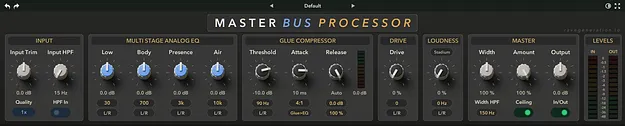
Master Bus Processor by Rave Generation mix bus effects plugin interface

Master Bus Processor: Mix Bus and Mastering Effects Plugin by Rave Generation

Master Bus Processor is a mastering effects plugin from Rave Generation that chains analog-modeled EQ, SSL-style bus compression, stereo width, multiband loudness and harmonic drive in a single processor for mix bus and mastering use.

VST3AUWindowsmacOS64-bit
AVAILABLE ATPlugin Boutique
Opens the store in a new tab
01Overview

Master Bus Processor combines the stages most producers apply at the end of a mix into one plugin: EQ, bus compression, stereo width, multiband loudness and saturation. Rave Generation designed it so the sections work together in a fixed order, with Drive always last. A single Amount knob scales the whole chain toward neutral, so you can shape the sound first and then decide how much of the processing you want.

Best for

  • Mix bus processing
  • Mastering chain finishing
  • Submix glue compression
  • Stereo width control
  • Drum bus loudness
  • Parallel bass saturation
Category
Mastering
Store
Plugin Boutique
02Key features

What you get

  • Six processing sections in one serial chain, with Drive always last
  • Four bipolar EQ bands at plus or minus 6 dB with per-band routing
  • SSL-style stereo-linked VCA bus compressor with sidechain high-pass
  • Parallel 3-band multiband loudness with Stadium, Tight and Soft Character
  • Harmonic-density saturation with a Curve control for harmonic balance
  • Mid/Side width from 0 to 200 percent with protected bass corner
  • Single Amount knob scales the full chain toward neutral
  • Up to 4x oversampling with latency reported to the host
03In depth

Sound Character and Analog-Style Processing

The EQ uses four bipolar bands of plus or minus 6 dB. The low and high presence bands are modeled on Pultec-style curves, and the body and air bands are modeled on MAAG-style shapes. The bus compressor follows the SSL-style VCA design, with stereo linking and familiar 2:1, 4:1 and 10:1 ratio settings.

The Drive stage is a saturation section calibrated against its hardware reference. Its Curve control moves the harmonic balance from softer and rounder to harder and brighter. Rave Generation says the character stays musical across the full range.

The Parallel Multiband Loudness section blends a 3-band upward and downward compressor with the dry signal. Its Character control switches between Stadium, Tight and Soft settings for different band behavior.
Workflow, Routing and Metering

Each processing section carries its own Left/Right, Mid or Side routing, so you can compress the center while adding air to the sides, or drive only the stereo field. The width control runs from 0 to 200 percent and has an adjustable corner from 50 to 800 Hz below which the bass keeps its natural width.

The Amount macro scales every effect toward neutral at once. It is not a dry/wet mix, so it avoids comb filtering. Oversampling at 1x, 2x or 4x reduces aliasing in the Drive stage, and latency is reported to your host.

The gain-reduction meter shows true reduction, and Peak In and Peak Out values are reported to the host.

04Specs

Will it run?

Formats, systems and requirements as listed by Plugin Boutique. Missing details are left out, not guessed.

DeveloperRave Generation
TypePlugin
CategoryMastering
FormatsVST3, AU
Operating systemsWindows, macOS
Architecture64-bit
05FAQ

Questions, answered

What formats does Master Bus Processor support?

Master Bus Processor is available in VST3 and AU formats. It runs on Windows and macOS.

What do I need to run Master Bus Processor?

You need a VST3 or AU compatible DAW. The developer lists Windows 10 or 11 (64-bit) or macOS 10.13 or later, an Intel Core i5 or AMD equivalent at 2 GHz or faster, 4 GB of RAM and 100 MB of free disk space.

What does the Amount knob do?

The Amount knob scales every effect in the processor toward neutral at the same time, including EQ, compression, drive, loudness and width. It is not a dry/wet mix, so it avoids comb filtering.

Does Master Bus Processor add latency?

Oversampling at 2x or 4x can add latency. The plugin reports its latency to the host so your tracks stay in time.

07Developer

More from Rave Generation

All Rave Generation products →