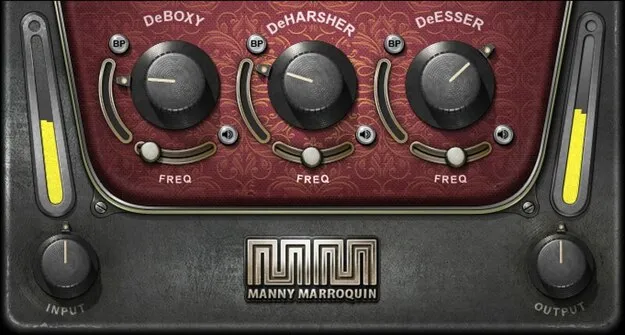
Manny Marroquin Triple D vocal plugin interface by Waves

Manny Marroquin Triple D: Vocal Problem-Fixing Plugin by Waves

Manny Marroquin Triple D is a vocal processing plugin from Waves that uses dynamic EQ to reduce boxy, harsh, or sibilant sounds only when they are present.

VST2AUAAXWindowsmacOS
AVAILABLE ATPlugin Boutique
Opens the store in a new tab
01Overview

Manny Marroquin Triple D is an effects plugin from Waves, filed under vocal processing. It was created with mix engineer Manny Marroquin, and it targets the problems that often show up in vocal recordings. Instead of cutting set frequencies all the time, it reacts when a problem sound crosses a threshold, so passages without the issue are left alone. Three independent controls handle the common trouble areas, and each stage can be auditioned or bypassed on its own.

Best for

  • Vocal de-essing
  • Boxy vocal cleanup
  • Podcast voice processing
  • Voiceover cleanup
  • Harsh vocal taming
Developer
Waves
Store
Plugin Boutique
02Key features

What you get

  • Created with mix engineer Manny Marroquin
  • Independent controls for boxy, harsh, or sibilant sounds
  • Based on dynamic EQ, optimized for ease of use
  • Threshold setting triggers attenuation of problem sounds
  • Listen buttons isolate each of the three processes
  • Frequency trims select problematic frequencies per stage
  • Attenuation meter shows reduction at the chosen frequency
  • Bypass buttons compare each section's effect
03In depth

How Triple D Handles Boxy, Harsh and Sibilant Vocals

Triple D is built on dynamic EQ, but its controls are designed for quick use rather than detailed curve editing. Each of the three independent sections targets a specific kind of problem: boxy, harsh, or sibilant sound.

A threshold setting determines when attenuation is triggered, so the plugin only reduces a frequency when it exceeds the level you choose. Frequency trims let you pick the problematic frequency for each stage, and an attenuation meter shows how much reduction is happening at that point.
Workflow, Listen Buttons and Bypass Controls

The listen buttons isolate each of the three processes, which makes it easier to hear exactly what a stage is removing before you adjust it. Bypass buttons let you compare each section's effect against the unprocessed signal.

The developer positions Triple D for vocals, podcasts and voiceover work, where it is meant to fix issues while keeping the voice's natural character.

04Specs

Will it run?

Formats, systems and requirements as listed by Plugin Boutique. Missing details are left out, not guessed.

DeveloperWaves
TypePlugin
CategoryVocal Processing
FormatsVST2, AU, AAX
Operating systemsWindows, macOS
05FAQ

Questions, answered

What does Manny Marroquin Triple D do?

It reduces boxy, harsh, or sibilant sounds in vocals using dynamic EQ. Attenuation is triggered only when a problem sound crosses the threshold you set.

Which formats and operating systems does Triple D support?

Triple D is available in VST2, AU and AAX formats. It runs on Windows and macOS, and the listed macOS versions are Monterey 12 through Sequoia 15.

Who is Triple D designed for?

It is aimed at vocals, podcasts and voiceover work, where the goal is to fix problem frequencies without losing the voice's natural characteristics.

07Developer

More from Waves

All Waves products →