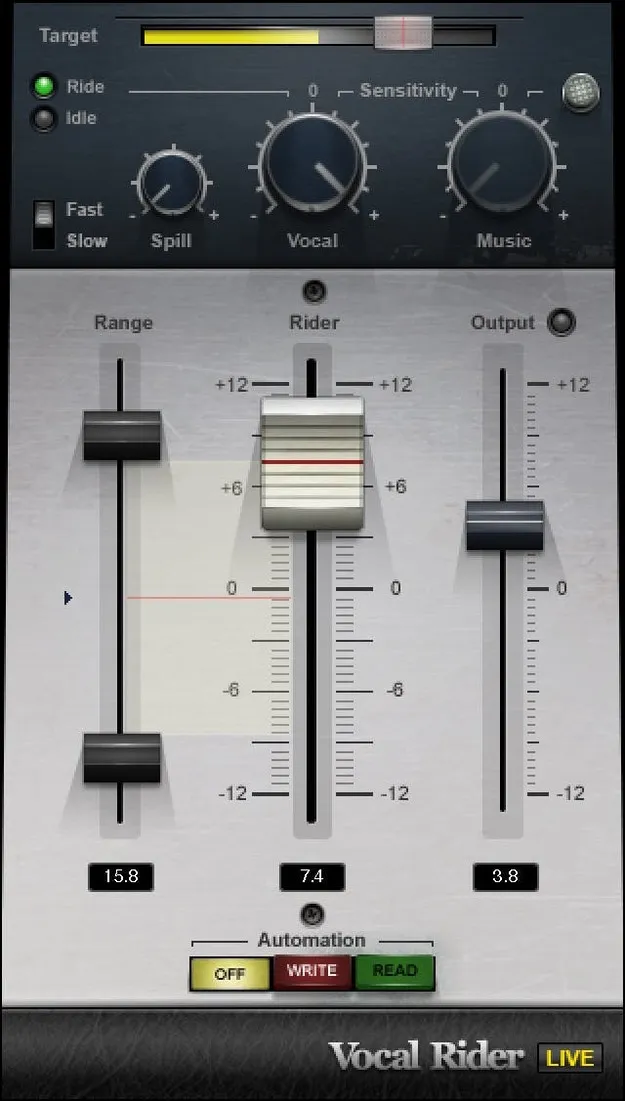
Vocal Rider by Waves vocal level plugin interface

Vocal Rider: Automatic Vocal Level Plugin by Waves

Rated 4.5/5 on Plugin Boutique (32 ratings)

Vocal Rider is an effects plugin from Waves that automatically raises and lowers vocal gain to keep a set target level. It is designed for music, podcast and video narration vocals.

VST2AUAAXWindowsmacOS
AVAILABLE ATPlugin Boutique
Opens the store in a new tab
01Overview

Consistent vocal levels matter in almost every style of popular music, yet riding faders by hand is slow. Waves describes Vocal Rider as a way to handle that job automatically. You set a target level for the vocal, and the plugin adjusts gain in real time to hold it. The developer positions it as an alternative to heavy compression, which can change the character of a voice. The plugin is also aimed at podcast and video narration work.

Best for

  • Lead vocal levelling
  • Podcast voice consistency
  • Video narration mixing
  • Live vocal mixing
  • Vocal tracking and recording
Developer
Waves
Store
Plugin Boutique
02Key features

What you get

  • Automatic gain riding to hold a set vocal target level
  • No manual drawing of automation curves required
  • Avoids over-compression that can suffocate the voice
  • Real-time operation with no added latency
  • Suitable for both studio and live mixing
  • Writes an automation track for easy level fine-tuning
  • Designed for music vocals, podcasts and narration
03In depth

How Vocal Rider Controls Vocal Levels

Vocal Rider works by riding gain rather than compressing dynamics. Waves says it raises or lowers the vocal to maintain the target level, much as an engineer would with fast, precise fader moves.

Because the plugin writes an automation track, you can review the level changes afterward and fine-tune them. This lets you keep manual control over the final balance while avoiding drawn automation curves.

Real-time operation adds no latency, so the plugin can be used during live tracking and live mixing as well as in the studio.
Who Vocal Rider Is For

Vocal Rider is built for vocals and voice work. Waves lists music vocals, podcasts and video narration as its main uses.

The plugin is a good fit for producers who need steady vocal levels without the coloration that heavy compression can add. It is available in VST2, AU and AAX formats, so it can be used in most common digital audio workstations on both macOS and Windows.

04Specs

Will it run?

Formats, systems and requirements as listed by Plugin Boutique. Missing details are left out, not guessed.

DeveloperWaves
TypePlugin
CategoryVocal Processing
FormatsVST2, AU, AAX
Operating systemsWindows, macOS
05FAQ

Questions, answered

What formats does Vocal Rider support?

Vocal Rider is available in VST2, AU and AAX formats.

Which operating systems can run Vocal Rider?

Vocal Rider runs on macOS and Windows. Waves lists macOS Monterey 12 through Sequoia 15, and Windows 10 or later for the VST and AAX versions.

Does Vocal Rider add latency?

No. Waves states that real-time operation adds no latency, so it can be used during live mixing.

Can I edit the level changes Vocal Rider makes?

Yes. The plugin writes an automation track, so you can review and fine-tune the levels it applies.

07Developer

More from Waves

All Waves products →