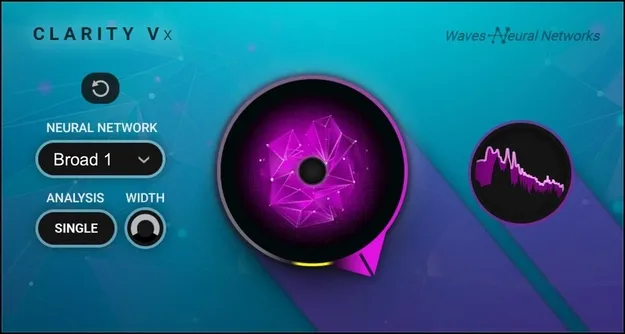
Clarity Vx by Waves vocal noise cleaning plugin interface

Clarity Vx: AI Vocal Noise Cleaner by Waves

Rated 4.8/5 on Plugin Boutique (36 ratings)

Clarity Vx is a Waves vocal effects plugin that uses neural networks to separate vocals from unwanted background noise such as air conditioning, room rumble, rain and traffic. It works in real time on music, voiceover and dialogue recordings.

VST2AUAAXWindowsmacOS
AVAILABLE ATPlugin Boutique
Opens the store in a new tab
01Overview

Clarity Vx targets a common problem in vocal recording: a good take ruined by constant background sound. It is built on Waves Neural Networks technology, which is trained to recognize voices and separate them from noise. The developer positions it for music vocals as well as voiceovers, podcasts and dialogue for video and film. Because processing happens in real time and is non-destructive, you can apply it during a session without rendering or consolidating audio first.

Best for

  • Vocal noise removal
  • Podcast dialogue cleanup
  • Voiceover cleaning
  • Film dialogue post-production
  • Rescuing noisy vocal takes
  • Low-CPU dialogue editing
Developer
Waves
Store
Plugin Boutique
02Key features

What you get

  • Neural Networks trained to separate vocals from background noise
  • Single balance knob for the vocal and noise mix
  • Two Broad Neural Networks for different noise characters
  • ECO Neural Network for low-CPU dialogue cleaning
  • Double analysis and width control for stereo sources
  • Real-time, non-destructive processing with no rendering required
  • Suited to music, voiceovers and dialogue post-production
  • Powered by Waves Neural Networks technology
03In depth

Noise Removal and Control for Vocal Tracks

Clarity Vx gives you a single knob to set the balance between the vocal and the noise. You decide how much of the original character to keep and how much cleaning to apply, so the result can be adjusted to the material rather than applied as a fixed setting.

Two Broad Neural Networks are available to handle different noise characters, so you can choose the model that suits the recording. A third ECO Neural Network is aimed at low-CPU dialogue cleaning, which the developer says delivers two to three times the performance efficiency of the main models.

For stereo sources, a Double analysis mode and width control are included, giving you more say over how the cleaned signal sits in the mix.
Workflow for Music, Voiceover and Dialogue

Clarity Vx fits into a standard session as an insert on the vocal channel. Because it is non-destructive, you can change settings or disable it at any point in the project. Waves highlights real-time workflow and automation as a way to save time on each session.

The plugin is aimed at music producers who need to rescue a vocal take, as well as voiceover artists, podcasters and post-production editors working with dialogue.

04Specs

Will it run?

Formats, systems and requirements as listed by Plugin Boutique. Missing details are left out, not guessed.

DeveloperWaves
TypePlugin
CategoryVocal Processing
FormatsVST2, AU, AAX
Operating systemsWindows, macOS
05FAQ

Questions, answered

What formats does Clarity Vx support?

Clarity Vx is available in VST2, AU and AAX formats.

Which operating systems does Clarity Vx run on?

It is listed for Windows and macOS. Mac versions support macOS Monterey 12 through Sequoia 15, and PC versions require Windows 10 or later. Mac builds are available as VST or AU, and PC builds as VST or AAX.

What kinds of noise can Clarity Vx remove?

The developer lists air conditioner hum, room rumble, rain, traffic, airplane flyovers and background talking as examples of noise it can clean from vocal recordings.

Can Clarity Vx be used for dialogue and podcasts?

Yes. The developer positions it for voiceovers, dialogue post-production and podcasting, and includes an ECO Neural Network designed for low-CPU dialogue cleaning.

07Developer

More from Waves

All Waves products →