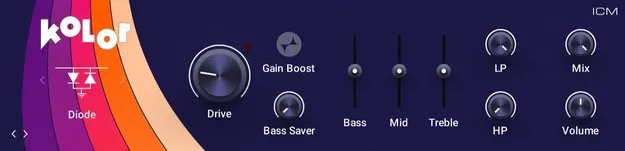
Kolor distortion plugin interface by Native Instruments

Kolor: Distortion Plugin by Native Instruments

Rated 4.6/5 on Plugin Boutique (19 ratings)

Kolor is a distortion effect plugin from Native Instruments that offers 10 distortion algorithms, from subtle saturation to aggressive crunch. It is available in VST3, AU and AAX formats for Windows and macOS.

VST3AUAAXWindowsmacOS64-bit
AVAILABLE ATPlugin Boutique
Opens the store in a new tab
01Overview

Kolor is a distortion plugin built around 10 distinct algorithms. The developer describes them as emulations of iconic analog distortion, meant to add character and color to a track. Its range runs from light saturation to heavy crunch, so the same plugin can warm up a bus or push a sound into obvious grit. Kolor is part of Native Instruments' effects lineup and ships in the common plugin formats for both major desktop operating systems.

Best for

  • Saturation on drums
  • Guitar crunch
  • Bass grit
  • Lo-fi vocal effects
  • Synth warmth
Category
Distortion
Store
Plugin Boutique
02Key features

What you get

  • 10 distinct distortion algorithms in one plugin
  • Analog-style distortion emulations of vintage gear
  • Range from subtle saturation to aggressive crunch
  • Lo-fi effects derived from Guitar Rig 7 Pro
  • Emulates popular hardware distortion circuits
  • Available as standalone components
  • VST3, AU and AAX formats, 64-bit
03In depth

Sound Character and Distortion Range

Native Instruments says Kolor captures the essence of popular hardware distortion circuits. Its 10 algorithms cover a wide span, from subtle saturation that adds warmth without obvious breakup to aggressive crunch for sounds that need more edge.

The developer also describes the plugin's lo-fi effects as coming from Guitar Rig 7 Pro, which points to a shared sonic lineage with that product. Because the algorithms are separate choices, you can select the one that suits each source rather than relying on a single generic drive.
Formats, Systems and Standalone Use

Kolor is available in VST3, AU and AAX formats and runs as a 64-bit plugin. AAX is supported on both Windows and macOS, while AU is listed for macOS only.

Native Instruments has made Kolor available as standalone components, so it can be run outside a host DAW. Check the system requirements before installing, since the Windows and macOS details differ by format.

04Specs

Will it run?

Formats, systems and requirements as listed by Plugin Boutique. Missing details are left out, not guessed.

DeveloperNative Instruments
TypePlugin
CategoryDistortion
FormatsVST3, AU, AAX
Operating systemsWindows, macOS
Architecture64-bit
05FAQ

Questions, answered

What formats does Kolor support?

Kolor is available in VST3, AU and AAX formats. It is a 64-bit plugin.

Which operating systems does Kolor run on?

Kolor supports Windows and macOS. On Windows it is listed for VST3 and AAX, and on macOS for VST3, AU and AAX.

What do I need to run Kolor?

On Windows 10 or 11 you need an Intel Core i5 or equivalent CPU, 4 GB RAM and graphics hardware with Direct3D 11.1 (Feature Level 11_1) support or higher. On macOS you need version 12, 13 or 14 with the latest update, and Apple Silicon Macs can run it through Rosetta 2 or natively in supported hosts.

Can Kolor be used as a standalone app?

Yes. Native Instruments has made Kolor available as standalone components.

07Developer

More from Native Instruments

All Native Instruments products →