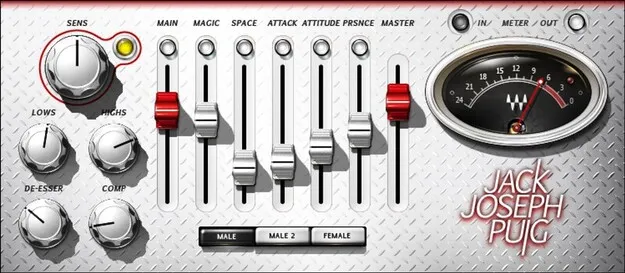
JJP Vocals by Waves vocal processing plugin interface with five sliders

JJP Vocals: Vocal Processing Plugin by Waves

Rated 4.8/5 on Plugin Boutique (5 ratings)

JJP Vocals is a vocal processing plugin from Waves that shapes vocals with five sliders, Magic, Space, Attack, Attitude and Presence, instead of conventional effect settings.

VST2AUAAXWindowsmacOS
AVAILABLE ATPlugin Boutique
Opens the store in a new tab
01Overview

JJP Vocals is built around a set of parallel processing chains that combine compression, vocal-oriented equalization, delay and other effects. Rather than exposing those parts individually, the plugin puts them behind five sliders. Waves says the design was developed with Grammy-winning producer and engineer Jack Joseph Puig. Its controls target how a vocal feels and sits in a mix, and the same approach is aimed at spoken-word material such as podcasts, voiceover and audiobooks.

Best for

  • Rap vocal processing
  • Vocal mixing
  • Podcast voice treatment
  • Voiceover processing
  • Audiobook narration
  • Vocal character enhancement
Developer
Waves
Store
Plugin Boutique
02Key features

What you get

  • Five sliders: Magic, Space, Attack, Attitude and Presence
  • Parallel processors layer effects with the vocal track
  • Attack boosts initial consonants for rap vocals
  • Presence slider for articulation and clarity
  • Attitude slider for added authority and power
  • Space control adds slapback-style ambience
  • Adjustable de-esser, low and high EQ and compression
  • Dry and processed signal blend control
03In depth

Sound Shaping With Five Sliders

The interface centers on the Attack, Attitude, Presence, Space and Magic controls. Attack boosts the initial consonants of a vocal, which the developer positions as a way to add power to rap delivery. Presence targets articulation and clarity, while Attitude adds authority and weight. Space adds a slapback-style ambience, and Magic subtly spotlights the character of a voice.

The plugin also includes two male voice options and one female voice option as starting points. A blend control lets you vary the mix of dry and processed signal, so you can keep the natural sound of the performance under the effect.
Processing Controls and Workflow

Beneath the main sliders, JJP Vocals provides further adjustment of de-esser, low and high EQ, and compression. This gives you a route to refine the result after setting the broad character with the sliders.

The parallel layout means the processed signal is layered with the original vocal track rather than replacing it. Because the main interface is limited to five sliders, the plugin is suited to producers who prefer quick, intuitive shaping over building a chain from separate tools.

04Specs

Will it run?

Formats, systems and requirements as listed by Plugin Boutique. Missing details are left out, not guessed.

DeveloperWaves
TypePlugin
CategoryVocal Processing
FormatsVST2, AU, AAX
Operating systemsWindows, macOS
05FAQ

Questions, answered

What formats does JJP Vocals support?

JJP Vocals is available in VST2, AU and AAX formats.

Which operating systems does JJP Vocals run on?

It supports Windows and macOS. On Mac, the listed requirements cover macOS Monterey 12 through Sequoia 15, and on PC, Windows 10 and later.

Can JJP Vocals be used for spoken word?

Yes. Waves lists podcasts, voiceover and audiobooks as intended uses alongside music vocals.

07Developer

More from Waves

All Waves products →