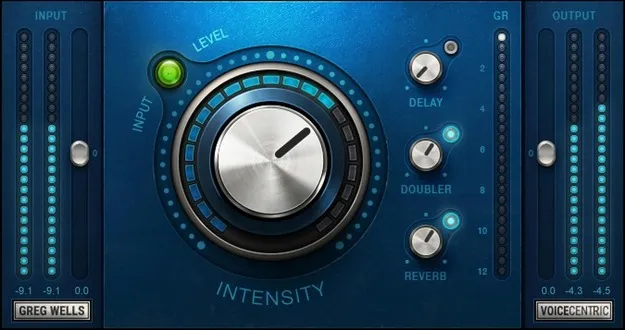
Greg Wells VoiceCentric vocal processing plugin interface by Waves

Greg Wells VoiceCentric: Vocal Processing Plugin by Waves

Rated 4.6/5 on Plugin Boutique (5 ratings)

Greg Wells VoiceCentric is a vocal processing plugin from Waves, created with Grammy-winning producer and mixer Greg Wells. It uses a single Intensity knob to control combined EQ and compression chains for polished vocal sound.

VST2AUAAXWindowsmacOS
AVAILABLE ATPlugin Boutique
Opens the store in a new tab
01Overview

Greg Wells VoiceCentric is built around one main control. The Intensity knob drives a set of EQ and compression chains, with some elements engaging only at higher settings, so a single adjustment can shift the vocal from subtle to heavily processed. The plugin also includes Delay, Reverb and Doubler effects. It is designed for lead and backing vocals and is also suited to video and podcast voice work. Waves lists VST2, AU and AAX formats for Mac and Windows.

Best for

  • Lead vocal polishing
  • Backing vocal processing
  • Podcast voice enhancement
  • Video voiceover treatment
  • Quick vocal mixing
Developer
Waves
Store
Plugin Boutique
02Key features

What you get

  • Single Intensity knob controls combined EQ and compression chains
  • Created with Grammy-winning producer and mixer Greg Wells
  • Built-in Delay, Reverb and Doubler effects
  • Input and output gain controls with metering
  • Designed for lead and backing vocals in all genres
  • Suited to enhancing video and podcast voice quality
  • Available in VST2, AU and AAX formats
03In depth

How the Intensity Knob Shapes the Vocal Sound

The Intensity knob is the core of VoiceCentric. According to Waves, complex EQ and compression chains sit behind this one control, and certain elements only come in once the knob passes about 60 or 80 percent. This gives a range of different tonal and dynamic flavors without adjusting multiple parameters.

The plugin is presented as a way to get a mixed vocal sound quickly. Its character comes from the chains and the added effects rather than from manual setup of each stage.
Gain Staging, Effects and Workflow

VoiceCentric includes simple input and output gain controls with metering, which helps keep levels consistent as you adjust Intensity. The Delay, Reverb and Doubler effects are built in, so you can add space and width without loading separate plugins.

Because the interface is kept to a few main controls, it suits quick vocal treatment on any track. Waves positions it for both lead and backing vocals across genres.

04Specs

Will it run?

Formats, systems and requirements as listed by Plugin Boutique. Missing details are left out, not guessed.

DeveloperWaves
TypePlugin
CategoryVocal Processing
FormatsVST2, AU, AAX
Operating systemsWindows, macOS
05FAQ

Questions, answered

Which formats does Greg Wells VoiceCentric support?

Waves lists VST2, AU and AAX formats. The plugin is available for Windows and macOS.

What operating systems are required for VoiceCentric?

The listed requirements cover macOS Monterey 12, Ventura 13, Sonoma 14 and Sequoia 15 for Mac, and Windows 10 or later for PC. VST and AU are listed for Mac, and VST and AAX for PC.

Is VoiceCentric only for lead vocals?

No. Waves describes it as ideal for both lead and backing vocals in all genres.

07Developer

More from Waves

All Waves products →