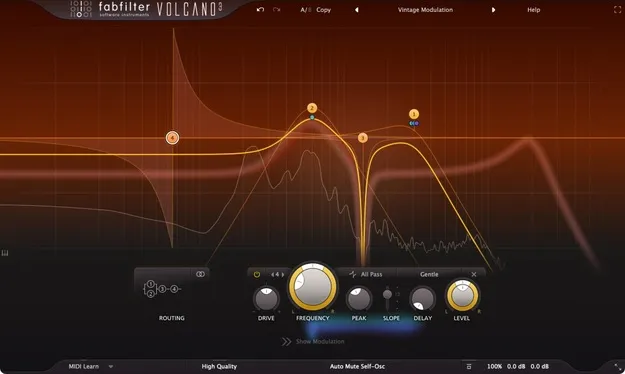
FabFilter Volcano 3 filter plugin interface

FabFilter Volcano 3: Multimode Filter Plugin for Effects Free Download

Rated 4.7/5 on Plugin Boutique (49 ratings)

FabFilter Volcano 3 is a filter plugin from FabFilter for shaping sound with analog-style cut-off filters. It offers four filters with flexible routing, vintage-sounding EQ-type shapes and a modulation system.

VST3VST2AUAAXWindowsmacOS64-bit
AVAILABLE ATPlugin Boutique
Free trial available from the developer
01Overview

FabFilter Volcano 3 is the latest version of a filter plugin the developer has offered since 2005. It is built around four filters that can be routed in series, in parallel or per channel, including mid/side modes. Each filter offers several shapes, among them bell, low and high shelf, notch and all-pass types, which the developer describes as vintage-sounding. The interface has been redesigned to simplify the workflow, and the plugin is available in VST3, VST2, AU and AAX formats for Windows and macOS.

Best for

  • Sound design filtering
  • Synth filter sweeps
  • Parallel filter processing
  • Modulated filter effects
  • Mid/side filtering
  • Vintage-style filter tones
Developer
FabFilter
Category
Filters
Store
Plugin Boutique
02Key features

What you get

  • Four filters with flexible routing, including mid/side mode
  • Vintage-sounding EQ-type shapes: bell, shelf, notch and all-pass
  • Per-filter Drive setting for internal saturation
  • Modulation from XLFOs, envelope generators, followers and MIDI
  • Drag-and-drop modulation connections with live visualization
  • Level and Pan control per filter for parallel routing
  • Optional 6 dB/oct slope and High Quality oversampling
  • Undo, redo, A/B switching and interactive MIDI Learn
03In depth

Filter Shapes, Drive and Routing

Volcano 3 includes four filters with a range of shapes, including EQ-type bell, low and high shelf, notch and all-pass filters. A Drive setting on each filter adjusts internal saturation, which the developer says adds variety and smoothness to the sound. A 6 dB per octave slope option is available for gentler filtering.

Routing is flexible. Filters can be arranged per channel or in mid/side mode, and a Level and Pan control on each filter is useful when running filters in parallel. A High Quality option enables maximum internal oversampling for the best results, at the cost of more processing.
Modulation and Workflow

Modulation sources include 16-step XLFOs, XY controllers, envelope generators, envelope followers and MIDI sources. Modulation connections are set up by dragging and dropping, and live visualization shows the targets and sources as they move.

The interface has a large interactive filter display with an optional piano display, several interface sizes and a full screen mode. Undo, redo and A/B switching help when comparing settings. Interactive MIDI Learn and an extensive help file with interactive hints are included, and the plugin ships with factory presets and supports presets from earlier Volcano versions.

04Specs

Will it run?

Formats, systems and requirements as listed by Plugin Boutique. Missing details are left out, not guessed.

DeveloperFabFilter
TypePlugin
CategoryFilter
FormatsVST3, VST2, AU, AAX
Operating systemsWindows, macOS
Architecture64-bit
Free trialYes
05Upgrades

Upgrade and crossgrade options

06FAQ

Questions, answered

What formats does FabFilter Volcano 3 support?

Volcano 3 is available in VST3, VST2, AU and AAX formats. The developer also lists all FabFilter plug-ins as available in AudioSuite format.

Which operating systems can run Volcano 3?

Volcano 3 runs on Windows and macOS. On Windows, the listed versions are Windows 11, 10, 8, 7 and Vista, in 32 or 64-bit. On macOS, it requires macOS 10.12 or higher on Intel or M1 Apple Silicon, in 64-bit only.

Does Volcano 3 include presets?

Yes. It includes factory presets that the developer describes as carefully designed and curated, and it supports presets from earlier Volcano versions.

Is there a trial version?

Yes, Volcano 3 has a trial version available.

08Developer

More from FabFilter

All FabFilter products →