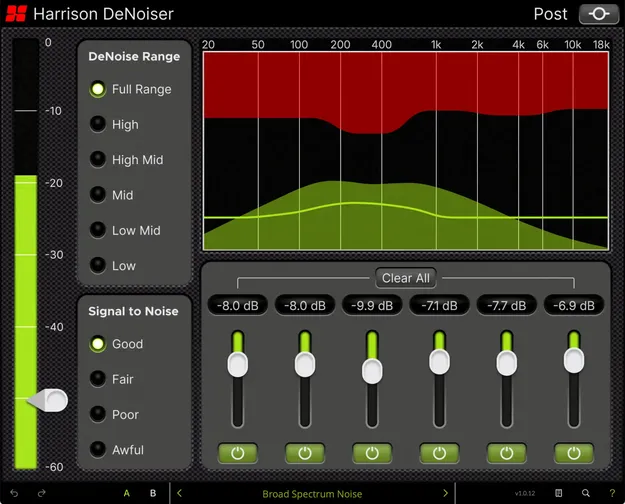
DeNoiser by Harrison Consoles noise reduction plugin interface with spectrum display

DeNoiser: Zero-Latency Noise Reduction Plugin by Harrison Consoles

DeNoiser is a zero-latency audio repair plugin by Harrison Consoles for reducing noise in dialogue, voice and vocal recordings. It is available in VST3, VST2, AU and AAX formats.

VST3VST2AUAAXWindowsmacOSLinux
AVAILABLE ATPlugin Boutique
Opens the store in a new tab
01Overview

DeNoiser is built for cleaning up speech and vocals recorded with poor signal-to-noise ratios or common environmental problems such as hum, hiss and room tone. Harrison Consoles positions it for post-production, broadcast, live sound and music production. Five denoise frequency ranges and four signal-to-noise modes help you narrow in on the problem quickly. Six multiband gain reduction sliders and a real-time spectrum display let you shape the response to the source. Ready-made presets cover common noise issues.

Best for

  • Dialogue clean-up
  • ADR and production audio
  • Podcast and interview cleanup
  • Broadcast speech
  • Live venue noise reduction
  • Vocal and voiceover denoising
  • Archival sample restoration
Store
Plugin Boutique
02Key features

What you get

  • Zero-latency real-time processing for live and broadcast use
  • Five denoise frequency ranges from Full Range to Low
  • Four signal-to-noise modes from Good to Awful
  • Six multiband gain reduction sliders from 0 to -24 dB
  • Real-time display of input, noise fingerprint and gain reduction
  • Ready-made presets for common noise problems
03In depth

Frequency Control and Noise Modes

DeNoiser lets you choose the frequency range where processing is applied. Full Range covers 20 Hz to 18 kHz, while narrower options such as Mid (200 Hz to 6 kHz) or Low (20 Hz to 400 Hz) leave untouched bands alone. This is useful when noise sits in a known part of the spectrum.

Four signal-to-noise settings control how aggressive the processing is. Good suits common background hiss, Fair handles higher-than-average hiss, Poor addresses noise such as wind, and Awful is the most aggressive setting for heavily degraded audio.

For finer work, the six gain reduction sliders each cover an associated band, with reduction adjustable from 0 to -24 dB. Each slider has a power button for quick bypass comparisons, and a Clear All button resets the sliders to 0 dB.
Visual Feedback and Workflow

The dynamic spectrum display overlays three elements at once: the input signal FFT in green, the detected noise fingerprint as a green line, and applied gain reduction in red. Seeing these together makes it easier to judge where noise sits and how much is being removed.

Harrison Consoles states that DeNoiser processes with zero samples of latency, which it links to live, broadcast and fast-turn post work. Presets give a starting point for common problems, and the detailed controls remain available when you need manual adjustment.

04Specs

Will it run?

Formats, systems and requirements as listed by Plugin Boutique. Missing details are left out, not guessed.

DeveloperHarrison Consoles
TypePlugin
CategoryAudio Restoration
FormatsVST3, VST2, AU, AAX
Operating systemsWindows, macOS, Linux
05FAQ

Questions, answered

What formats does DeNoiser support?

DeNoiser is available in VST3, VST2, AU and AAX formats.

Which operating systems can run DeNoiser?

The listed platforms are Windows, macOS and Linux. Mac requires macOS 13 or later, and Windows requires Windows 10 or later. Linux support is listed for supported products and needs GCC 5 compatible systems, OpenGL 3.2 or higher and libcurl-gnutls installed.

Does DeNoiser add latency?

Harrison Consoles describes DeNoiser as zero-latency, processing with 0 samples of latency.

What types of noise can DeNoiser reduce?

According to Harrison Consoles, DeNoiser targets hiss, hum, wind, room tone, heating and ventilation noise, and traffic or camera noise in dialogue, voice and vocal recordings.

07Developer

More from Harrison Consoles

All Harrison Consoles products →