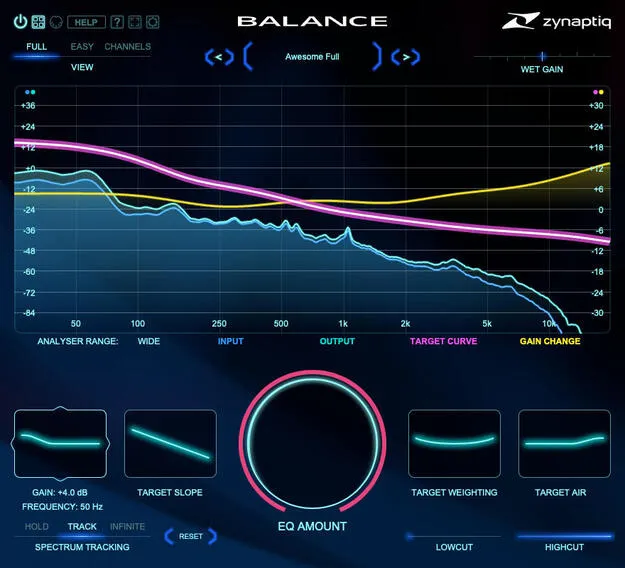
BALANCE by Zynaptiq adaptive EQ plugin interface

BALANCE: Adaptive Balancing EQ Plugin by Zynaptiq

Rated 4.7/5 on Plugin Boutique (24 ratings)

BALANCE is an adaptive balancing equalizer plugin by Zynaptiq that shapes the overall frequency response of a signal toward a target EQ curve set with a few controls. It is available in VST3, AU and AAX formats for Windows and macOS.

VST3AUAAXWindowsmacOS64-bit
AVAILABLE ATPlugin Boutique
Opens the store in a new tab
01Overview

BALANCE works on the overall frequency distribution of a track, bus or full mix rather than individual bands. Zynaptiq describes it as working similarly to a match EQ and handling like a tilt EQ. You set a target response with SLOPE, WEIGHTING, BASS and AIR, then the plugin adjusts itself to move your audio toward that curve. The developer positions it for mix engineers, sound designers, re-recording mixers, composers and producers.

Best for

  • Rebalancing full mixes
  • Matching source tonal balance
  • Immersive multichannel mixing
  • Dialogue and film tonal matching
  • Adding polish to recordings
Developer
Zynaptiq
Category
EQ
Store
Plugin Boutique
02Key features

What you get

  • Adaptive balancing EQ for adjusting overall frequency response
  • Minimum phase filtering with 3 samples of latency
  • Up to 16 channels for immersive workflows
  • Target curve set with SLOPE, WEIGHTING, BASS and AIR
  • Global EQ amount control
  • Wet gain control scaled by EQ amount
  • 12dB/octave low-cut and high-cut filters
  • Optional double precision processing
  • Metal/Direct 3D accelerated analyser display
  • Compact EASY view
03In depth

Sound and Processing Approach

BALANCE uses custom minimum phase filtering. Zynaptiq says this keeps the processing clean and avoids the pre-ringing that linear phase designs can introduce. The plugin adds 3 samples of latency, which the developer notes is low, and it is designed to use little CPU.

The EQ amount control sets how strongly the global curve is applied. A wet gain control scales with the EQ amount and helps match input loudness, so you can compare the processed and unprocessed sound at similar levels. Optional double precision processing is available when you want it.
Workflow, Controls and Channel Support

The core controls are SLOPE, WEIGHTING, BASS and AIR, which define the target response curve. Built-in 12dB/octave low-cut and high-cut filters let you trim the ends of the spectrum alongside the balancing.

BALANCE supports channel counts from mono up to 16, which suits immersive and surround workflows. The interface is fully vectorized and scalable. A Metal/Direct 3D accelerated analyser display can be used, and a compact EASY view hides it to save screen space and system resources.

04Specs

Will it run?

Formats, systems and requirements as listed by Plugin Boutique. Missing details are left out, not guessed.

DeveloperZynaptiq
TypePlugin
CategoryEQ
FormatsVST3, AU, AAX
Operating systemsWindows, macOS
Architecture64-bit
05FAQ

Questions, answered

What formats does BALANCE support?

BALANCE is available in VST3, AU and AAX formats. It runs on Windows and macOS, in 64-bit versions.

What do I need to run BALANCE?

BALANCE requires a free iLok.com account. You can activate it to your computer's hard drive or to an iLok 2 or newer USB dongle. The license is single user per seat, with dual activations allowed for convenience.

Does BALANCE work with multichannel audio?

Yes. BALANCE supports channel counts from mono up to 16 and sampling rates from 44.1kHz to 192kHz, depending on available CPU resources.

07Developer

More from Zynaptiq

All Zynaptiq products →