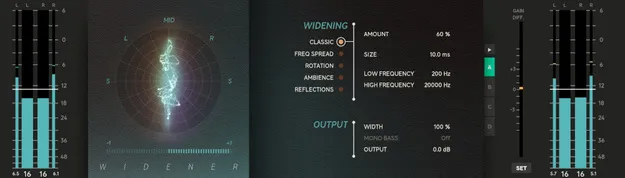
Widener by Softube stereo widening plugin interface with goniometer

Widener: Stereo Widening Dynamics Processor by Softube

Rated 4.8/5 on Plugin Boutique (317 ratings)

Widener is a stereo widening plugin from Softube that turns mono tracks into stereo or widens and narrows existing stereo tracks using five different algorithms.

VST3VST2AUAAXWindowsmacOS64-bit
AVAILABLE ATPlugin Boutique
Opens the store in a new tab
01Overview

Widener is a plugin in the Effects category, classified as a dynamics processor, developed by Softube. It works on both mono and stereo sources, so you can create a stereo image from a mono track or adjust the width of a track that is already stereo. Softube says its five algorithms each have a different strength, which gives you a way to find a width setting with fewer unwanted artifacts. A goniometer and correlation meter show the stereo field while you work.

Best for

  • Mono-to-stereo conversion
  • Stereo mix widening
  • Mastering stereo imaging
  • Making tracks stand out
  • Narrowing mix focus
Developer
Softube
Store
Plugin Boutique
02Key features

What you get

  • Converts mono sources into stereo
  • Widens or narrows existing stereo tracks
  • Five algorithms: Classic, Frequency Spread, Rotation, Ambience, Reflections
  • Frequency Spread and Classic options aim for mono compatibility
  • Goniometer for visual stereo field monitoring
  • Correlation meter for phase relationship feedback
  • Crossfeed algorithms for mastering-stage imaging
  • Console 1-ready, compatible with all Console 1 generations
03In depth

Stereo width algorithms and how they work

Widener offers five widening algorithms: Classic, Frequency Spread, Rotation, Ambience and Reflections. According to Softube, these use phase shifting, Mid/Side processing or reverberation techniques to build the stereo image, and each one suits different material.

The Classic and Frequency Spread algorithms are the ones Softube points to when you need the widened signal to stay mono-compatible. Ambience and Reflections take a more reverberant approach to create space.

The goniometer and correlation meter give real-time feedback on stereo width, so you can check what you hear against what the display shows before you commit to a setting.
Using Widener on mono and stereo sources

On a mono track, Widener can create a stereo signal that helps a sound stand out in a dense mix. On a stereo track, you can widen the image to add a sense of depth, or narrow it to bring focus to the center.

Softube also notes that Widener's crossfeed algorithms can be used during mastering to create a more natural and cohesive sound image.

For problem-solving, Softube suggests listening to only the left or right channel while moving the Size parameter on the Classic algorithm. This makes the comb-filter effects easier to hear.

04Specs

Will it run?

Formats, systems and requirements as listed by Plugin Boutique. Missing details are left out, not guessed.

DeveloperSoftube
TypePlugin
CategoryDynamics Processor
FormatsVST3, VST2, AU, AAX
Operating systemsWindows, macOS
Architecture64-bit
05FAQ

Questions, answered

What formats does Widener support?

Widener is available in VST3, VST2, AU and AAX formats.

Which operating systems can run Widener?

Widener runs on Windows and macOS. Supported versions include Windows 10 and 11 (64-bit) and macOS Big Sur 11 through Ventura 13.

What do I need to use Widener?

You need a computer with an AU, VST, VST3 or AAX compatible DAW host, a Softube account and an iLok account, plus internet access to download installers and manage licenses.

Can Widener work with Console 1?

Yes. Widener is listed as Console 1-ready and compatible with all generations of the Console 1 Mixing System.

07Developer

More from Softube

All Softube products →