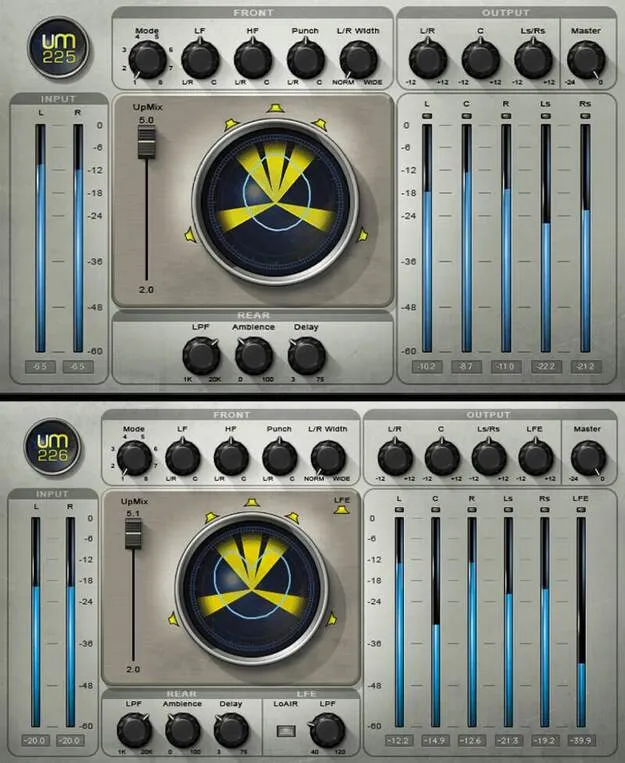
UM225 / UM226 by Waves surround upmixer plugin interface

UM225 / UM226: Stereo-to-Surround Upmixer by Waves

UM225 / UM226 is a pair of Waves surround upmixing plugins that convert stereo audio to 5.0 (UM225) or 5.1 (UM226) surround. They are available as VST2, AU and AAX.

VST2AUAAXWindowsmacOS
AVAILABLE ATPlugin Boutique
Opens the store in a new tab
01Overview

UM225 and UM226 are upmixing plugins from Waves for converting stereo material into surround. UM225 targets 5.0 output, while UM226 adds a 5.1 configuration with an LFE channel. The plugins are aimed at stereo music, films and TV shows that need a surround version. Eight modes distribute program material across the left, right and surround speakers, and dedicated controls shape the size of the surround stage and how transients are split between the front channels and center.

Best for

  • Stereo music to surround
  • Film and TV upmixing
  • 5.1 mix conversion
  • Surround sound design
  • Stereo widening and remixing
Developer
Waves
Store
Plugin Boutique
02Key features

What you get

  • Two upmixing components: UM225 for 5.0 and UM226 for 5.1
  • Eight modes spread sound to L/R and L/R surround speakers
  • Ambience controls create smaller or larger surround stages
  • Punch controls spread transients between L/R and center
  • UM226 LoAir adds an octave-lower harmonic for rumble and FX
  • UM226 includes a 4th-order low frequency filter for LFE
  • Visual display of energy spread across the surround field
  • Output trims for each speaker stage, with LFE on UM226
03In depth

Surround Stage and Ambience Control

Upmixing is mostly a question of how much of the signal moves into the surround speakers and how wide the result feels. The UM225 and UM226 handle this with eight modes that spread different kinds of program material to the L/R and L/R surround speakers, so you can match the mode to the source.

Ambience controls make the surround stage smaller or larger, which helps when a mix needs to stay close to the front or open up around the listener. Punch controls place transients between the left, right and center channels, which keeps percussive hits focused where you want them.

A global upmix control balances the stereo and surround versions of the mix against each other.
Low End, LFE and Output Trims

UM226 adds an LFE path for 5.1 work. It includes a 4th-order low frequency filter for the LFE speaker and a LoAir function that adds an octave-lower harmonic, which can be used to add rumble or sub-heavy effects.

Output trims for the L/R, center, L/R surround and, on UM226, LFE stages let you set the level of each speaker group. An energy display shows how sound is spread across the surround field, so you can see the balance as you adjust the settings.

For stereo-only remixing, the plugin can widen the image and control lows and punch without moving to a full surround layout.

04Specs

Will it run?

Formats, systems and requirements as listed by Plugin Boutique. Missing details are left out, not guessed.

DeveloperWaves
TypePlugin
CategorySurround Tools
FormatsVST2, AU, AAX
Operating systemsWindows, macOS
05FAQ

Questions, answered

What is the difference between UM225 and UM226?

UM225 upmixes stereo to 5.0 surround. UM226 upmixes to 5.1, adding an LFE channel with a 4th-order low frequency filter and the LoAir octave-lower harmonic.

Which formats and operating systems does UM225 / UM226 support?

The plugins are available in VST2, AU and AAX formats. They run on Windows and macOS. The listed Mac requirement is macOS Monterey 12 or later, and the listed PC requirement is Windows 10 or later.

Can I use UM225 / UM226 only for stereo remixing?

Yes. The plugin can widen the stereo image and control lows and punch, which makes it useful for stereo-only remixing without a surround output.

07Developer

More from Waves

All Waves products →