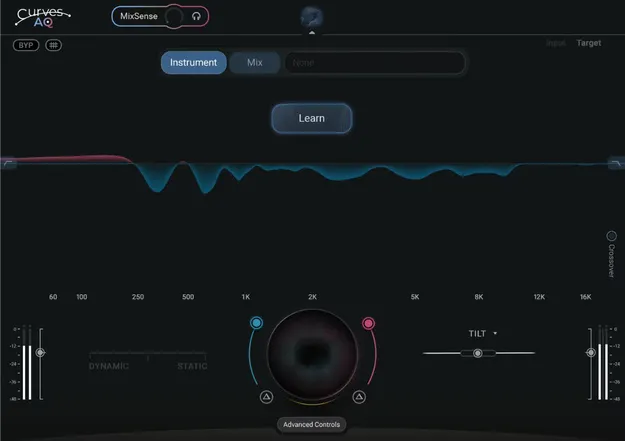
Curves AQ by Waves AI autonomous EQ plugin interface

Curves AQ: AI-Powered Autonomous EQ Plugin by Waves

Rated 4.6/5 on Plugin Boutique (92 ratings)

Curves AQ is an AI-powered EQ plugin from Waves that analyzes your audio and generates original spectral curves, offering five EQ profiles to choose from along with five EQ controls for shaping the result.

VST2AUAAXWindowsmacOS
AVAILABLE ATPlugin Boutique
Opens the store in a new tab
01Overview

Curves AQ is built around a simple idea: you click learn, and the plugin analyzes the audio you feed it. Rather than applying a fixed preset curve, it generates EQ curves based on the natural qualities of the material, whether that is a vocal, an instrument or a full mix. Waves describes it as an autonomous EQ, and it offers five unique EQ profiles so you can compare different results before settling on one. Five reimagined EQ controls let you refine the curve from there.

Best for

  • Vocal EQ
  • Mix channel tonal balancing
  • Instrument tone shaping
  • Live and tracking chains
  • Full mix EQ
Developer
Waves
Category
EQ
Store
Plugin Boutique
02Key features

What you get

  • AI-powered EQ that generates curves after you click learn
  • Five unique EQ profiles to choose from
  • Five reimagined EQ controls for shaping the sound
  • MixSense adjusts processing in the context of the mix
  • Blend static EQ and dynamic EQ in any amount
  • Independent boost and cut, globally and per band
  • Smart Tilt control for overall tonal balancing
  • Offset feature shifts the curve along the X-axis
  • Includes Curves AQ LIVE, a zero-latency version
03In depth

How Curves AQ Shapes Your Sound

Curves AQ generates five EQ profiles from the audio it learns, and you choose the one that fits the track. The developer describes the curves as original rather than preset-based. From there, the plugin's five EQ controls let you adjust the result.

Boost and cut can be adjusted independently, both globally and per band. A Smart Tilt control handles overall tonal balance, and an Offset feature moves the curve along the X-axis to change the focal point of the processing.

The balance between static and dynamic EQ is also adjustable, so you can use either approach or blend them.
Context-Aware Processing for Mixing

MixSense is the feature that adjusts processing in the context of the mix. Instead of treating a channel in isolation, the plugin responds to what else is happening in the mix, which makes it suited to working on individual tracks within a full arrangement.

Curves AQ LIVE is included as a zero-latency version, which is relevant when you need the plugin in a live or tracking chain where delay matters.

04Specs

Will it run?

Formats, systems and requirements as listed by Plugin Boutique. Missing details are left out, not guessed.

DeveloperWaves
TypePlugin
CategoryEQ
FormatsVST2, AU, AAX
Operating systemsWindows, macOS
05FAQ

Questions, answered

What is Curves AQ?

Curves AQ is an AI-powered EQ plugin from Waves. After you click learn, it analyzes your audio and generates original EQ curves, offering five profiles to choose from.

What formats and operating systems does Curves AQ support?

Curves AQ is available in VST2, AU and AAX formats. It runs on Windows and macOS, with the developer listing macOS Monterey 12 through Sequoia 15 and Windows 10 and later as system requirements.

Does Curves AQ have a zero-latency version?

Yes. Curves AQ LIVE is included as a zero-latency version of the plugin.

What do I need to use Curves AQ?

Curves AQ runs as a plug-in in a compatible host that supports its formats, which are VST2, AU and AAX, on the Windows or macOS systems listed above.

07Developer

More from Waves

All Waves products →