SuperRack SoundGrid by Waves plugin rack interface for live sound consoles

SuperRack SoundGrid: Plugin Rack for Live Sound Consoles by Waves

SuperRack SoundGrid is a plugin rack from Waves for live sound engineers that runs Waves plugins on an external SoundGrid DSP server. It is built for FOH, monitor, broadcast and AV work.

WindowsmacOS
AVAILABLE ATPlugin Boutique
Opens the store in a new tab
01Overview

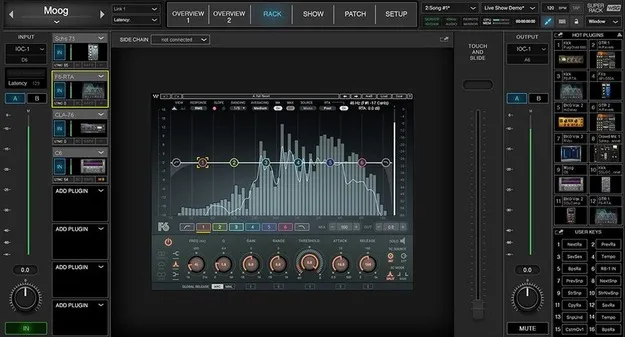
SuperRack SoundGrid brings Waves plugin processing into live console workflows. The developer says it handles plugin processing on an external SoundGrid DSP server, which can increase the plugin count, reduce latency and let the host and I/O devices sit far apart in complex setups. It is aimed at FOH, monitor, broadcast and AV engineers who need fast setup, a touch-friendly workspace and flexible recall.

Best for

  • Live FOH mixing
  • Monitor mixing
  • Broadcast audio processing
  • AV installations
  • Complex multi-host setups
  • Show recall and snapshots
Developer
Waves
Category
Utilities
Store
Plugin Boutique
02Key features

What you get

  • ProLink Console Remote Integration Protocol for DiGiCo and LAWO consoles
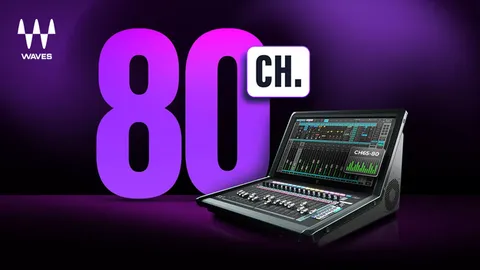
  • Up to 64 stereo multi-channel racks with Waves plugin instances
  • Processing offloaded to an external SoundGrid DSP server
  • Up to four active and four redundant DSP servers
  • Host mirroring (DiGiCo) and DSP server redundancy
  • Share SoundGrid I/Os across a network
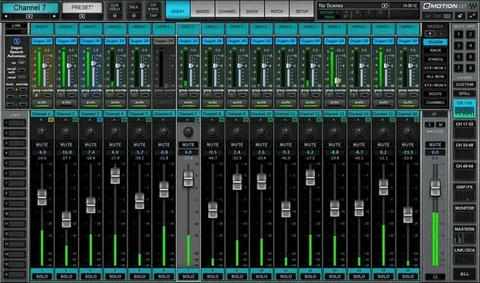
  • Multitouch-friendly interface with plugin resizing
  • Snapshot recall via scope filter and mRecall app
  • Touch & Slide fader for small plugin parameters
  • Map app and plugin controls to MIDI and computer keyboards
  • Support for multiple languages
03In depth

Workflow and Setup for Live Console Plugin Racks

SuperRack SoundGrid can run up to 64 stereo multi-channel racks, with multiple instances of Waves plugins in each. Waves describes the setup as quick, and the interface is designed for multitouch use and plugin resizing to fit monitor resolutions. Up to four standard or touch monitors can extend the workspace.

Recall is handled in several ways. Snapshots can be recalled selectively through a scope filter, and the Waves mRecall app can recall pre-programmed audio settings from phones and tablets over Wi-Fi. Inputs and outputs can be switched while processing chains stay intact, and app and plugin controls can be mapped to MIDI and computer keyboards.

Redundancy, Networking and Console Integration

For larger systems, SuperRack SoundGrid supports up to four active and four redundant SoundGrid DSP servers. Host mirroring is available with DiGiCo consoles, and SoundGrid I/Os can be shared across a network to build complex setups.

The ProLink Console Remote Integration Protocol is now available for DiGiCo and LAWO consoles. Device and network monitoring, along with advanced latency alignment management, help engineers keep an eye on the system during a show.

04Specs

Will it run?

Formats, systems and requirements as listed by Plugin Boutique. Missing details are left out, not guessed.

DeveloperWaves
TypePlugin
CategoryUtility
Operating systemsWindows, macOS
05FAQ

Questions, answered

What operating systems does SuperRack SoundGrid support?

SuperRack SoundGrid runs on Windows and macOS. The listed system requirements include macOS Monterey 12 through Sequoia 15 and Windows 10 or later.

What do I need to use SuperRack SoundGrid?

SuperRack SoundGrid requires a SoundGrid DSP server, since it handles plugin processing on that external hardware. Mac and Windows computers meeting the listed system requirements are needed as the host.

Which consoles work with the ProLink integration?

The ProLink Console Remote Integration Protocol is available for DiGiCo and LAWO consoles. DiGiCo also supports host mirroring.

Can I recall settings from a phone or tablet?

Yes. The Waves mRecall app recalls pre-programmed audio settings and works over Wi-Fi from phones and tablets.

07Developer

More from Waves

All Waves products →