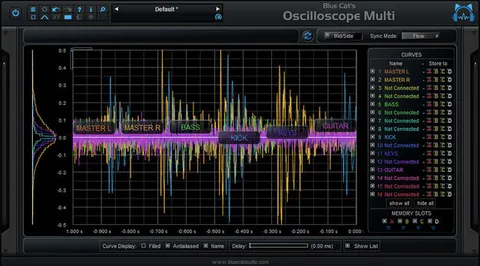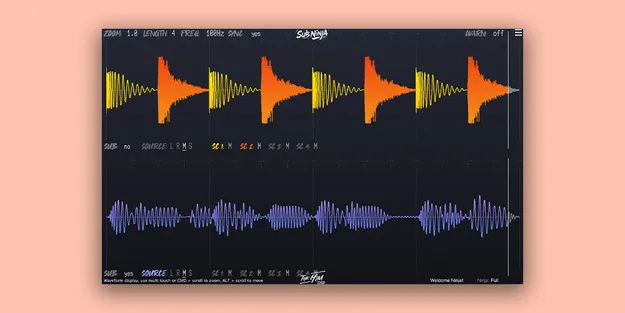
Sub Ninja plugin waveform interface by The Him DSP showing sub bass and kick visualization

Sub Ninja: Waveform Analyzer for Sub Bass and Kick Mixing

Rated 4.6/5 on Plugin Boutique (121 ratings)

Sub Ninja is a visual effects plugin by The Him DSP that shows sub bass and kick content as synced audio waveforms, helping producers judge low-end balance, levels, length and frequency.

VST3AUAAXWindowsmacOS64-bit
AVAILABLE ATPlugin Boutique
Opens the store in a new tab
01Overview

Sub Ninja is built around the low end of a mix. Instead of relying on a spectrum analyzer, it draws the bass as a waveform over time, so you can see how the sub and kick behave from moment to moment. The developer says this gives more detailed bass insight than traditional spectrum analyzers, which only show brief snapshots of frequency response. A lowpass filter control lets you adjust the cutoff while watching the waveform redraw, and four separate sidechain inputs let you view individual channels side by side.

Best for

  • Sub bass mixing
  • Kick and bass balance
  • Low-end clarity checks
  • Lowpass filter tuning
  • Sidechain visualization
Developer
The Him DSP
Store
Plugin Boutique
02Key features

What you get

  • Visual tool for perfecting sub/bass and kick mixes
  • Real-time synced audio-waveform visualization for low-end clarity
  • Waveform display shows bass over time, not just frequency snapshots
  • Shows balance, levels, length and frequency of low-end content
  • Instant lowpass filter control with waveforms that redraw in silence
  • Four separate sidechain inputs for visualizing individual channels
  • Zoom to sample-level detail for in-depth waveform analysis
  • Intuitive controls for low-end waveform analysis
03In depth

Waveform visualization for bass and kick balance

The core of Sub Ninja is its real-time, synced waveform display. It shows the level, length and shape of your bass over time, so you can see how a kick and a sub sit against each other rather than guessing from a static frequency curve.

The waveform can be zoomed in to sample-level detail, which helps when you want to examine transients or the exact start and end of a low-frequency event. The developer describes the visual clarity at this zoom level as unmatched.
Filter control and sidechain routing

The lowpass filter can be adjusted instantly, and the waveforms redraw right away, even when there is no signal playing. This makes it practical to tune the frequency cutoff with precision while watching the result.

Four separate sidechain inputs let you route individual channels into the plugin and visualize each one where you need it. This is useful when you want to compare a kick against a bass line or check how two low-end sources interact.

04Specs

Will it run?

Formats, systems and requirements as listed by Plugin Boutique. Missing details are left out, not guessed.

DeveloperThe Him DSP
TypePlugin
CategorySpectral Analysis
FormatsVST3, AU, AAX
Operating systemsWindows, macOS
Architecture64-bit
05FAQ

Questions, answered

Which formats does Sub Ninja support?

Sub Ninja is available in VST3, AU and AAX formats. It runs on Windows and macOS and is a 64-bit plugin.

What do I need to run Sub Ninja?

On macOS, it requires macOS Mojave 10.14 or later with an Intel Core i5 or better, or an Apple Silicon M1 or better. On Windows, it requires Windows 7 64-bit or later. An internet connection is also listed as required.

Can I use multiple sidechain inputs in Logic Pro, Bitwig and Pro Tools?

No. In Logic Pro, Bitwig and Pro Tools you can use only one sidechain input, a limitation of those DAWs according to the developer.

07Developer

More from The Him DSP

All The Him DSP products →