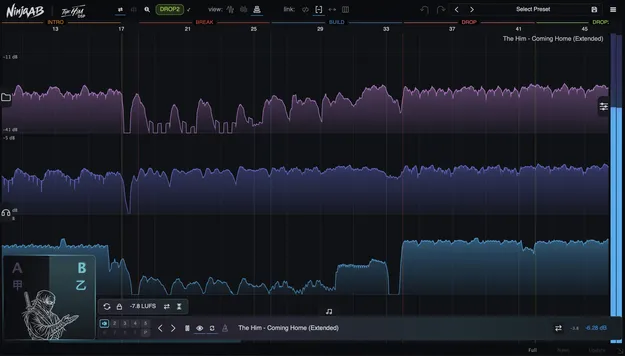
Ninja AB referencing plugin by The Him DSP interface showing loudness and dynamics overview

Ninja AB: Referencing Tool for Section-by-Section Mix Comparison

Ninja AB is a referencing plugin from The Him DSP that captures your project and reference tracks on the same loudness and dynamics map, then keeps them locked together section by section.

VST3AUAAXWindowsmacOS64-bit
AVAILABLE ATPlugin Boutique
Opens the store in a new tab
01Overview

Ninja AB is built for comparing a mix against reference tracks in a structured way. Drop it on the master bus and it captures your project as you listen, using the same loudness and dynamics view it applies to references. You can tag sections such as intro, verse, chorus and drop in both your project and your references, so switching to a reference jumps to the matching part of the song. The plugin holds up to nine references per instance and switches between them without gaps.

Best for

  • Mix referencing
  • Mastering comparison
  • Section-by-section analysis
  • Loudness matching
  • Low end comparison
  • Arrangement checks
Developer
The Him DSP
Store
Plugin Boutique
02Key features

What you get

  • Live project capture on the master bus, read on the same scale as references
  • Section tagging stored in a sidecar file next to each reference
  • Four sync modes from section seek to bar-for-bar position mapping
  • Beat-matched playback that time-stretches references to project tempo
  • Waveform, RMS and multiband visual overviews
  • Automatic LUFS matching for fair loudness comparison
  • Auditioning section with HP/LP filters and stereo, mid and side monitoring
  • Full metering including true peak, K-14/K-20 and LUFS, plus BPM detection
03In depth

Section-based referencing and sync

Ninja AB stores section tags for each reference in a sidecar file beside the audio, so the tags persist between sessions. Once your project is tagged the same way, changing references moves playback to the corresponding section.

Four sync modes cover different levels of precision, from simple section seeking to bar-for-bar position mapping. Beat-matched playback time-stretches references to your project tempo, and BPM is detected automatically for reference tracks.
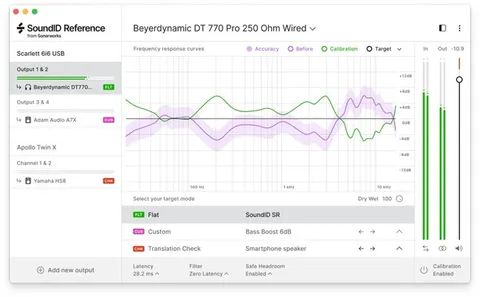
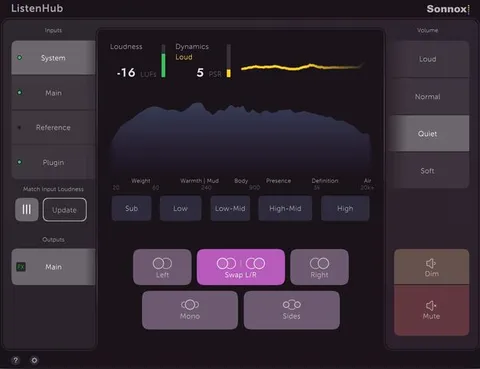
Loudness matching, visual overviews and metering

Automatic LUFS matching levels references against your mix, so a louder reference does not sound better simply because it is louder. An auditioning section adds HP and LP filters and stereo, mid and side monitoring, which helps isolate low end against low end or sides against sides.

Three visual overviews show waveform shape, RMS loudness and a multiband view of where the energy sits. Metering includes peak, true peak, VU, RMS, K-14, K-20 and momentary and short-term LUFS.

04Specs

Will it run?

Formats, systems and requirements as listed by Plugin Boutique. Missing details are left out, not guessed.

DeveloperThe Him DSP
TypePlugin
CategoryReferencing Tools
FormatsVST3, AU, AAX
Operating systemsWindows, macOS
Architecture64-bit
05FAQ

Questions, answered

What formats does Ninja AB support?

Ninja AB is available in VST3, AU and AAX formats.

Which operating systems can run Ninja AB?

Ninja AB runs on macOS, including Intel and Apple Silicon machines, and on 64-bit Windows.

How many reference tracks can I load?

Each instance of Ninja AB holds up to nine reference tracks, with instant, gapless switching between them.

Does Ninja AB match loudness between my mix and references?

Yes. Automatic loudness matching using LUFS equalizes references against your mix, so the louder track does not win the comparison by default.

07Developer

More from The Him DSP

All The Him DSP products →