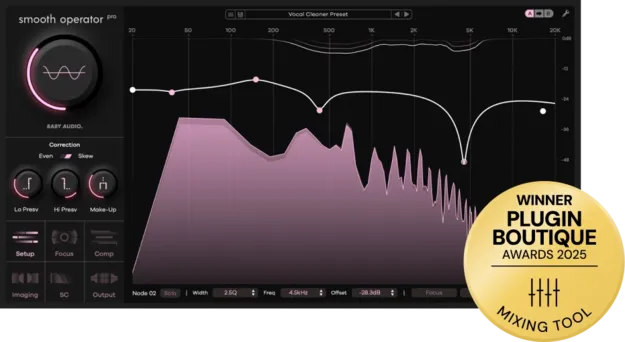
Smooth Operator Pro by Baby Audio dynamic spectral balancer plugin interface

Smooth Operator Pro: Dynamic Spectral Balancer by Baby Audio Free Download

Rated 4.7/5 on Plugin Boutique (124 ratings)

Smooth Operator Pro is a dynamic spectral balancer plugin by Baby Audio that removes unwanted frequency energy, such as mud, harsh resonances and masking, to improve clarity in a mix. It is available in VST3, VST2, AU and AAX formats.

VST3VST2AUAAXWindowsmacOS64-bit
AVAILABLE ATPlugin Boutique
Free trial available from the developer
01Overview

Smooth Operator Pro works by setting a target tonal curve and then adjusting a global threshold until the plugin starts balancing the audio. It removes fatiguing frequency energy where it occurs rather than applying a fixed cut. Users can go deeper with per-node settings, or sidechain it to another track so two signals share space in the mix. The plugin is listed as a Pro upgrade from Smooth Operator 1.

Best for

  • Mix clarity
  • Taming harsh cymbals
  • Bass cleanup
  • Vocal frequency control
  • Mud removal
  • Sidechain tonal balancing
Developer
Baby Audio
Category
EQ
Store
Plugin Boutique
02Key features

What you get

  • Dynamic spectral balancing with a global threshold control
  • Target curve selection for setting the desired tonal balance
  • Per-node override for individual dynamic profiles across the spectrum
  • Freely add and remove frequency nodes
  • Two correction algorithms: Even and Skew
  • Full control over dynamic and imaging parameters
  • Sidechain mode for rebalancing one track against another
  • 184 presets created by professional engineers
03In depth

Spectral balancing for clarity and tonal control

Baby Audio describes Smooth Operator Pro as a spectral workstation that splits a sound into its individual components and rebalances them. Instead of relying only on traditional EQ and compression, the plugin works on the harmonic material of the signal.

The main workflow is simple. Choose a target curve, then turn the global threshold until the plugin begins balancing the audio. Deeper settings are available for those who want more control.

For specific problems, the plugin can be applied surgically. You can target a single frequency to tame a harsh cymbal, clean up low-end on the sides only, or apply a softer compression profile to a vocal.
Per-node control and sidechain mode

Smooth Operator Pro lets you override the global settings for any frequency node and set its own dynamic profile. Nodes can be added and removed freely across the spectrum, and each node offers full control over its dynamic and imaging parameters.

The plugin includes two correction algorithms, Even and Skew. Sidechain mode uses the spectral content of another track to rebalance the current signal. For example, a lead vocal can be used as the input on a guitar track so the guitar is tamed where the vocal has the most energy.

04Specs

Will it run?

Formats, systems and requirements as listed by Plugin Boutique. Missing details are left out, not guessed.

DeveloperBaby Audio
TypePlugin
CategoryEQ
FormatsVST3, VST2, AU, AAX
Operating systemsWindows, macOS
Architecture64-bit
Free trialYes
05Upgrades

Upgrade and crossgrade options

06FAQ

Questions, answered

What formats is Smooth Operator Pro available in?

Smooth Operator Pro is available in VST3, VST2, AU and AAX formats. It is 64-bit.

What do I need to run Smooth Operator Pro?

It runs on macOS 10.11 and later, including native Apple Silicon M1, M2 and M3 support, and on Windows 10 and newer. The developer states it works with all major DAWs, including Ableton Live, Pro Tools, Logic Pro, FL Studio, Cubase, Studio One, Bitwig, Reaper and Reason.

Does Smooth Operator Pro include presets?

Yes. The plugin ships with 184 presets created by engineers, including Craig Bauer, Max Jaeger, Preston Reid and Ryan Shanahan, for use in their own sessions.

Is there a trial version?

Yes, a trial is available for Smooth Operator Pro.

08Developer

More from Baby Audio

All Baby Audio products →