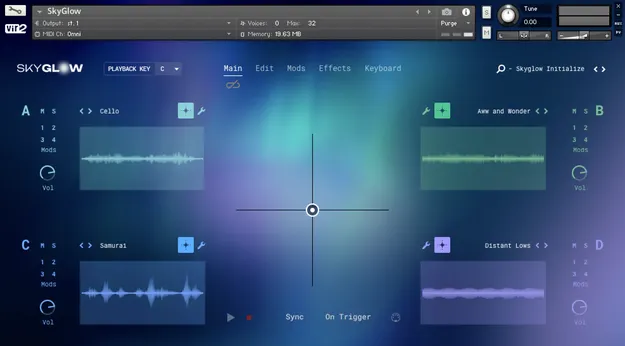
SkyGlow: Light Atmosphere Designer Kontakt instrument interface by Vir2 Instruments

SkyGlow: Light Atmosphere Designer for Kontakt by Vir2 Instruments

SkyGlow: Light Atmosphere Designer is a Kontakt instrument from Vir2 Instruments for building luminous drones, atmospheres and textures. It combines four sound engines with over 800 tonal and atonal sound sources.

REQUIRESKontaktHost player sold separately
KontaktWindowsmacOS64-bit
AVAILABLE ATPlugin Boutique
Opens the store in a new tab
01Overview

SkyGlow is built around a sound library of processed instruments, vintage hardware and field recordings. Vir2 Instruments describes the result as airy, analog-leaning and open, with textures that bloom and recede. A central X/Y pad lets you morph between layers in real time. Sounds range from shimmering, pulsing material to spacious, floating pads. The instrument runs in Kontakt and includes 130 presets, and you can also load your own samples into any of its four engines.

Best for

  • Cinematic atmospheres
  • Ambient production
  • Drone and pad layers
  • Uplifting pop textures
  • Sound design beds
Requires
Kontakt
Store
Plugin Boutique
02Key features

What you get

  • Over 800 tonal and atonal sound sources
  • Luminous drones and atmospheres
  • Tempo-synced textures and rhythms
  • Four separate sound engines
  • Real-time performance with central X/Y pad
  • 130 presets included
  • Load any external sample into the engines
  • Modulation tools for reshaping imported audio
03In depth

Sound sources and character

The core of SkyGlow is a large collection of manipulated and processed sources. Guitars, cellos and pianos are reworked alongside vintage hardware, synthesizers and effects. Tempo-synced melodic and percussive content adds subtle motion and pulse to the atmospheres.

Field recordings from Hawaii, including bird calls and ocean wash, add an organic layer beneath the synthetic textures. Vir2 Instruments says the sources were processed to create harmonic textures that swell and fade.
Workflow and sound engines

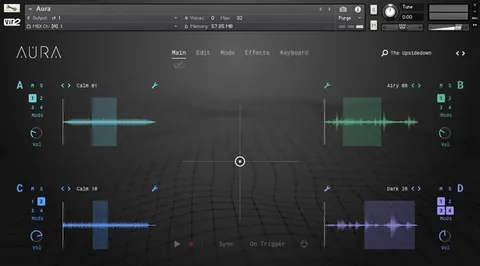
SkyGlow uses four separate sound engines. Each engine can hold one of the included sources or a sample you import by dragging and dropping audio into it.

The X/Y pad sits at the center of the interface and lets you morph between layers while you play or record. The instrument's modulation tools can reshape imported samples into new forms.

04Specs

Will it run?

Formats, systems and requirements as listed by Plugin Boutique. Missing details are left out, not guessed.

DeveloperVir2 Instruments
TypePlugin
CategoryKontakt Instrument
RequiresKontakt
FormatsKontakt
Operating systemsWindows, macOS
Architecture64-bit
05FAQ

Questions, answered

What is SkyGlow: Light Atmosphere Designer?

It is a Kontakt instrument from Vir2 Instruments for creating luminous drones, atmospheres and textures. It contains over 800 sound sources across four sound engines.

What do I need to use SkyGlow?

SkyGlow requires Kontakt. Kontakt 7 Player or Kontakt 7 (version 7.10.9) is needed, and the library takes up approximately 4 GB once installed. 8 GB of RAM or more is recommended.

Which operating systems does SkyGlow support?

SkyGlow is listed for Windows and macOS, both 64-bit. On Mac, OS 12 or higher is required, and Apple Silicon Macs are supported.

Can I use my own samples with SkyGlow?

Yes. You can drag and drop any audio file into one of the four playback engines and shape it with the instrument's modulation tools.

07Developer

More from Vir2 Instruments

All Vir2 Instruments products →