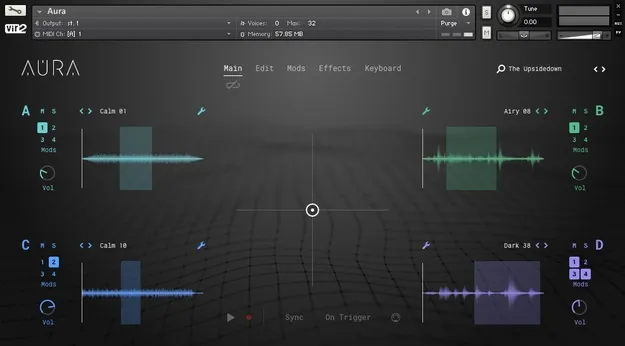
Aura Atmospheric Drone Builder by Vir2 Instruments Kontakt instrument interface

Aura: Atmospheric Drone Builder for Kontakt by Vir2 Instruments

Rated 4.9/5 on Plugin Boutique (8 ratings)

Aura: Atmospheric Drone Builder is a Kontakt instrument from Vir2 Instruments for creating drones, pads and atmospheres. It combines four sound engines, an X/Y performance pad and 24 effects, and it can also play your own WAV or AIFF samples.

REQUIRESKontaktHost player sold separately
KontaktWindowsmacOS64-bit
AVAILABLE ATPlugin Boutique
Opens the store in a new tab
01Overview

Aura is built around the idea of soundscaping: layering sounds into evolving textures that move over time. Vir2 Instruments describes it as a tool for sound design, with four engines that blend into a single sound. A central X/Y pad lets you shape that blend in real time, and the pad's movement can be recorded for automation. The library includes 414 drones, pads and atmospheres, plus 102 presets to start from.

Best for

  • Ambient drone design
  • Cinematic pad textures
  • Live X/Y performance
  • Sample-based atmospheres
  • Evolving soundscapes
Requires
Kontakt
Store
Plugin Boutique
02Key features

What you get

  • 414 drones, pads and atmospheres in the library
  • Four separate sound engines blended by one pad
  • Real-time scoring with a central X/Y pad
  • Pad movement can be recorded for automation
  • Control the X/Y pad with a mouse or MIDI controller
  • Load any WAV or AIFF sample into an engine
  • Adjust sample start, loop points and keyboard mapping
  • 24 effects, with four modulatable effect slots
  • 102 presets as starting points
  • Works with the free Kontakt Player
03In depth

Four Engines and the X/Y Performance Pad

Aura's four sound engines are blended through a central X/Y pad. Moving the pad changes the balance between engines, so a patch can continue to shift while you play it. Vir2 Instruments says you can record the pad movement to automate it, and you can control the pad with a mouse or an external MIDI controller.

This makes Aura suited to live scoring of evolving textures, where the motion of the sound is part of the performance rather than a fixed loop.
Using Your Own Samples in Aura

Aura is not limited to its built-in library. Any WAV or AIFF file can be loaded into one of the four engines. Once loaded, you can adjust the sample start point, loop points and keyboard mapping.

This lets you build drones from field recordings, instruments or other material you already own, and process them with the same engines and effect chain as the factory sounds.

The effects are a separate layer of control. Four effect slots can each be modulated, so the effect parameters can move independently of the source sound.

04Specs

Will it run?

Formats, systems and requirements as listed by Plugin Boutique. Missing details are left out, not guessed.

DeveloperVir2 Instruments
TypePlugin
CategoryKontakt Instrument
RequiresKontakt
FormatsKontakt
Operating systemsWindows, macOS
Architecture64-bit
05FAQ

Questions, answered

What do I need to run Aura?

Aura requires Kontakt. It is compatible with the free Kontakt Player, and the listed minimum version is Kontakt Player 6.4.1 or higher.

Which operating systems does Aura support?

Aura is available for Windows and macOS. On Windows, Windows 7, 8 or 10 is listed, in 32-bit or 64-bit. On macOS, Mac OS X 10.12 and above is listed.

How much disk space does Aura need?

The listed requirement is approximately 6GB of available disk space, with a minimum of 8GB of RAM and an Intel Core i5 or equivalent CPU.

Can I use my own sounds with Aura?

Yes. Any WAV or AIFF file can be dragged into one of the four engines, and you can then adjust its start point, loop points and keyboard mapping.

07Developer

More from Vir2 Instruments

All Vir2 Instruments products →