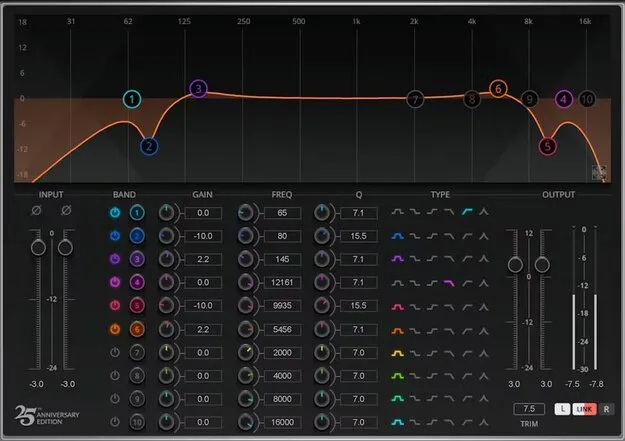
Q10 Equalizer by Waves parametric EQ plugin interface

Q10 Equalizer: 10-Band Parametric EQ by Waves

Q10 Equalizer is a 10-band parametric equalizer plugin from Waves, available in VST2, AU and AAX formats for Windows and macOS. It offers six filter curve types per band and a proportional-Q curve.

VST2AUAAXWindowsmacOS
AVAILABLE ATPlugin Boutique
Opens the store in a new tab
01Overview

Q10 Equalizer is a parametric EQ plugin from Waves that the developer has been updating since its introduction 30 years ago. It provides ten bands, each with adjustable frequency, gain and Q, and can process the left and right channels independently or linked together. The interface can be shown in a modern multitouch-friendly layout or a space-saving legacy layout. A focus view expands the display to show the controls for one band. The plugin ships with 50 factory and artist presets.

Best for

  • Surgical corrective EQ
  • Mixing tone shaping
  • Mastering-stage EQ
  • Channel-specific stereo EQ
  • Filter sweeps and cuts
Developer
Waves
Category
EQ
Store
Plugin Boutique
02Key features

What you get

  • 10 parametric bands with six curve types per band
  • Independent or linked left and right channel EQ
  • Hipass, lowpass, bell, proportional, and shelf filter types
  • Proportional-Q curve keeps Q proportional to gain
  • Filters can be combined and stacked for steeper curves
  • Numeric value entry for exact frequency, gain and Q
  • Focus view shows controls for a single band
  • Modern multitouch-friendly or legacy space-saving interface
  • 50 factory and artist presets included
03In depth

Filter Shapes and Curve Control in the Q10

Each of the Q10's ten parametric bands offers six filter types: hipass, lowpass, bell, proportional, high shelf and low shelf. Filters can be combined and stacked to build steep, deep or broad curves.

The proportional-Q curve keeps the Q proportional to gain, so the bandwidth of a boost or cut changes with its depth. For precise work, you can type exact numeric values for frequency, gain and Q instead of dragging controls.

Waves describes the Q10 as accurate enough for surgical fixes while staying transparent enough for broader tone shaping.
Interface, Presets and Workflow

The Q10 offers two interface layouts. The modern version is built for multitouch-friendly use, while the legacy layout takes up less space in a session. Either way, you can view all bands at once or switch to focus view, which enlarges the display and shows the controls for a single band.

The plugin includes 50 factory and artist presets, which can serve as starting points for common corrections or as examples of how the bands can be set.

Since the Q10 supports independent or linked stereo processing, it can be used on mono and stereo material where channel-specific or matched EQ is needed.

04Specs

Will it run?

Formats, systems and requirements as listed by Plugin Boutique. Missing details are left out, not guessed.

DeveloperWaves
TypePlugin
CategoryEQ
FormatsVST2, AU, AAX
Operating systemsWindows, macOS
05FAQ

Questions, answered

What formats does the Q10 Equalizer support?

The Q10 Equalizer is available in VST2, AU and AAX formats.

Which operating systems does the Q10 Equalizer run on?

It runs on Windows and macOS. The listed macOS versions are Monterey 12, Ventura 13, Sonoma 14 and Sequoia 15, and the listed Windows version is Windows 10 or later. VST and AU are supported on Mac, and VST and AAX on PC.

How many bands does the Q10 have?

The Q10 has 10 parametric bands, each with controls for Q, frequency and gain.

Does the Q10 come with presets?

Yes. It includes 50 factory and artist presets.

07Developer

More from Waves

All Waves products →