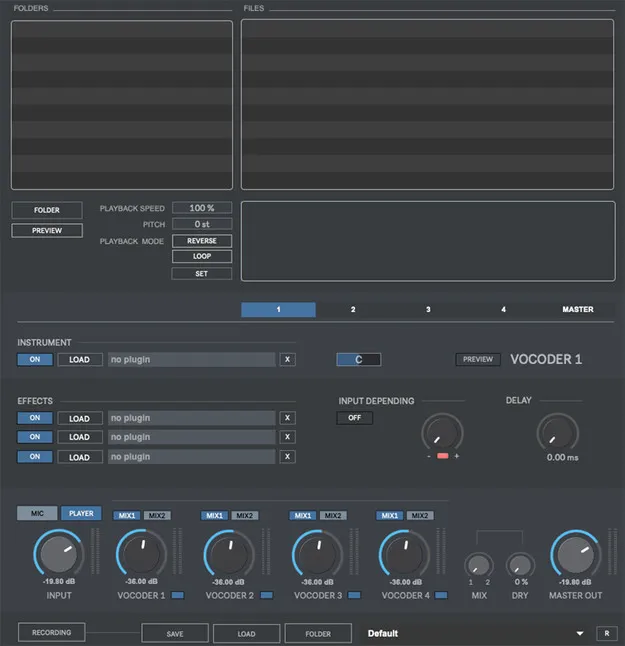
Multiplex Vocoder 3 by Digital Brain Instruments vocoder plugin interface

Multiplex Vocoder 3: Multi-Layer Vocoder Plugin by Digital Brain Instruments Free Download

Multiplex Vocoder 3 is a vocoder effects plugin from Digital Brain Instruments that processes your microphone input or audio files through four vocoders at the same time. It is available as a standalone application for Windows and macOS.

StandaloneWindowsmacOS64-bit
AVAILABLE ATPlugin Boutique
Free trial available from the developer
01Overview

Multiplex Vocoder 3 is built for sound design and music production. Its main idea is to use any instrument as the carrier signal for the vocoder, so your voice or a recorded audio file can be shaped by sounds you choose. Four vocoder layers run simultaneously, and the developer describes the tool as a way to create vocal and sound effects for tracks. The product is offered as a 64-bit standalone application with a trial available.

Best for

  • Vocal effects
  • Robotic voice sound design
  • Vocoder pads from audio files
  • Dynamic input-driven textures
  • Layered vocoder recording
Category
Vocoders
Store
Plugin Boutique
02Key features

What you get

  • Four vocoders processing your input simultaneously
  • Microphone and audio player inputs
  • Processes WAV, AIFF and MP3 files
  • Input-dependent mode with adjustable activation threshold
  • Sample editor with playback speed, reverse, loop and pitch shifting
  • Master Rack with three VST/AU plugins and frequency shifting
  • Dry-wet and vocoder cross-morphing controls
  • Autokey for playing without a MIDI keyboard
  • WAV or AIFF recording up to 192kHz / 32-bit
  • Separate source and per-layer recording
03In depth

Vocoder Layers, Input Control and Sample Editing

The core of Multiplex Vocoder 3 is four vocoders running in parallel. Each layer's output can be activated or deactivated by input level, and you can set a minimum threshold to switch the outputs on or off individually. This gives more dynamic results as the input changes.

You can feed the vocoders from a microphone or from WAV, AIFF and MP3 files. A built-in sample editor lets you select the part of the file to process, adjust playback speed, reverse playback, loop the region and apply pitch shifting. A file browser helps you load material quickly.
Master Rack, Mixing and Recording Options

The Master Rack hosts three VST/AU plugins on the master output, along with pitch shifting and frequency shifting. A dry-wet mix control morphs between the unprocessed and processed signal, and a vocoders mix control morphs between the vocoder outputs.

For capturing results, the product can record the processed output as WAV or AIFF files at up to 192kHz / 32-bit, depending on your soundcard. You can record the source input separately, or record each vocoder layer to its own file. Autokey lets you play the vocoders without a MIDI keyboard, and MIDI control is supported through your own device.

04Specs

Will it run?

Formats, systems and requirements as listed by Plugin Boutique. Missing details are left out, not guessed.

DeveloperDigital Brain Instruments
TypePlugin
CategoryVocoder
FormatsStandalone
Operating systemsWindows, macOS
Architecture64-bit
Free trialYes
05Upgrades

Upgrade and crossgrade options

06FAQ

Questions, answered

What formats and operating systems does Multiplex Vocoder 3 support?

Multiplex Vocoder 3 is listed as a standalone application for Windows and macOS. It is a 64-bit product.

What do I need to run Multiplex Vocoder 3?

On Mac, an Intel machine running OS X 10.11.6 or later, or an Apple M1 machine running macOS 11.0 or later. On Windows, Windows 8 or later with a multi-core processor. The developer recommends 4GB of RAM on both platforms.

Can I process my own voice and audio files?

Yes. You can use a microphone as input, or process WAV, AIFF and MP3 files, including selected regions of a file.

Does it offer a trial?

A trial is available for Multiplex Vocoder 3.

08Developer

More from Digital Brain Instruments

All Digital Brain Instruments products →