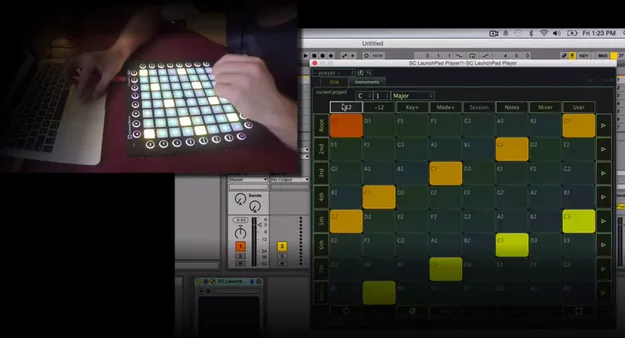
LaunchCraft launchpad plugin by Stagecraft Software interface

LaunchCraft: Launchpad Plugin for Scales, Modes and Sampling Free Download

Rated 3.2/5 on Plugin Boutique (13 ratings)

LaunchCraft is a utility plugin by Stagecraft Software that extends the native functionality of the Novation Launchpad MK2 and Launchpad Pro. It quantizes the pads to a range of scales and modes and lets you trigger samples or play any VST or AU instrument.

VST3AUAAXStandaloneWindowsmacOS64-bit
AVAILABLE ATPlugin Boutique
Free trial available from the developer
01Overview

LaunchCraft is built for producers who use a Launchpad as a performance and composition controller. In Notes mode, the Launchpad is normally locked to a single note layout. LaunchCraft changes that by letting you choose from a variety of scales and modes, so pads stay in key and melodic ideas are easier to find. The plugin also adds a session mode for triggering samples in a drum-machine style, and it sends its quantized MIDI stream out to any DAW-native synth or other instrument you choose.

Best for

  • Melodic Launchpad performance
  • Live clip and sample triggering
  • Drum-style pad playing
  • Scale-locked songwriting
  • Routing to external synths
Category
Utilities
Store
Plugin Boutique
02Key features

What you get

  • Quantizes Launchpad pads to a variety of scales and modes
  • Session mode for drum-machine style sample triggering
  • Sends quantized MIDI to any DAW-native synth or instrument
  • Hosts VST, VST3 and AU instruments inside the plugin
  • Supports aftertouch and channel pressure
  • Effects chaining
  • One-button record, stack and delete on the sampler grid
  • Keeps existing DAW integrations and Launchpad layouts
03In depth

Scales, Modes and Melodic Playing on the Launchpad

LaunchCraft quantizes the Launchpad pads to a large variety of scales and modes. Stagecraft Software describes this as a way to explore melodies intuitively, without needing to know where each note sits on the grid.

Because the quantized MIDI is sent out, you can route it to a DAW-native synth or to any VST or AU instrument. LaunchCraft can also host VST and AU instruments itself, so the synth sound can live inside the plugin chain.

Aftertouch and channel pressure are supported, which gives expressive control over pads when your Launchpad and instrument respond to those messages.
Session Mode, Sampling and Grid Recording

In session mode, LaunchCraft lets you trigger samples from the pads much like a drum machine or the session view in Ableton and other DAWs. This makes it useful for clip launching, beat making and live sample performance.

The sampler grid includes one-button Record, stack and delete functions, so you can capture and rearrange material directly from the controller.

LaunchCraft keeps existing DAW integrations intact, so you can use the Launchpad's layouts and modes alongside your current setup.

04Specs

Will it run?

Formats, systems and requirements as listed by Plugin Boutique. Missing details are left out, not guessed.

DeveloperStagecraft Software
TypePlugin
CategoryUtility
FormatsVST3, AU, AAX, Standalone
Operating systemsWindows, macOS
Architecture64-bit
Free trialYes
05FAQ

Questions, answered

What formats does LaunchCraft support?

LaunchCraft is available as VST3, AU, AAX and Standalone. It runs on Windows and macOS and is 64-bit only.

Which operating systems can I run LaunchCraft on?

LaunchCraft supports Windows 7 or newer (64-bit only) and macOS 10.13 or newer, including Intel and M1 Apple Silicon Macs. On Windows, the supported formats are AAX, VST3 and Standalone. On macOS, they are AAX, AU, VST3 and Standalone.

What hardware does LaunchCraft work with?

LaunchCraft extends the native functionality of the Novation Launchpad MK2 and Launchpad Pro.

Can LaunchCraft host other instruments?

Yes. LaunchCraft can host any AU, VST or VST3 software instrument, even though it is a plugin itself.

Is there a trial version?

Yes, LaunchCraft offers a trial.

07Developer

More from Stagecraft Software

All Stagecraft Software products →