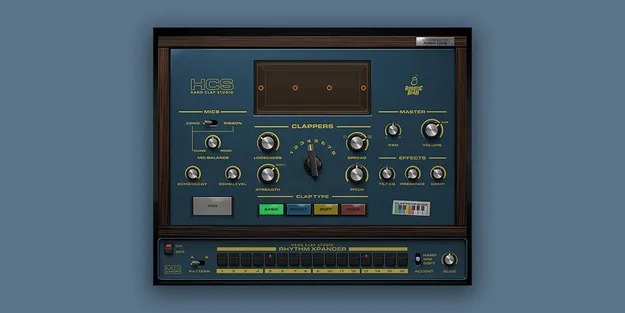
Hand Clap Studio by Robotic Bean clap and snap virtual instrument plugin interface

Hand Clap Studio: Clap and Finger Snap Virtual Instrument by Robotic Bean Free Download

Rated 4.6/5 on Plugin Boutique (799 ratings)

Hand Clap Studio is a virtual instrument plugin by Robotic Bean for creating handclaps and finger snaps. It offers four clap types, adjustable clapper count and positioning, and Close, Room and Echo Chamber microphone options.

VST3AUAAXWindowsmacOS64-bit
AVAILABLE ATPlugin Boutique
Free trial available from the developer
01Overview

Hand Clap Studio is built for producers who need claps and snaps that sit naturally in a mix, from dry, soft finger snaps in an acoustic ballad to reverb-soaked claps in club tracks. The developer says the samples were recorded with a percussionist at Atlantis Studio in Stockholm and captured with both close and room microphones. The plugin is available in VST3, AU and AAX formats for Windows and macOS.

Best for

  • Club and dance tracks
  • Acoustic ballads
  • Hip-hop drum programming
  • Pop and vocal production
  • Reverb-heavy clap layers
Developer
Robotic Bean
Store
Plugin Boutique
02Key features

What you get

  • Four clap types: Basic, Bright, Soft and Snap
  • Five velocity layers and 13 round robins
  • Close, Room and Echo Chamber microphone options
  • Up to eight clappers with stereo positioning
  • Display with clapper and room visualisation
  • 16-step sequencer with two patterns
  • Three accent levels per sequencer step
  • Built-in EQ and compressor
  • VST3, AU and AAX formats
03In depth

Sound Shaping and Clap Character

Hand Clap Studio lets you choose from four clap types: Basic, Bright, Soft and Snap. Each clap is built from five velocity layers and 13 round robins, which helps avoid the repetitive sound of a single sample played over and over.

You can select how many clappers play, up to eight, and how they are positioned across the stereo field. The Close and Room microphones can be blended, and the Echo Chamber adds sampled reverb. A built-in EQ and compressor let you shape the claps to fit your mix. The display shows the clappers and room visualisation, so you can see how your settings change the sound.
Sequencer and Workflow

A 16-step sequencer with two patterns is included directly in the plugin. Each step can have one of three accent levels, which lets you build varied rhythmic patterns without leaving the instrument.

If you need more control over timing, you can also record MIDI from your DAW's sequencer into Hand Clap Studio.

04Specs

Will it run?

Formats, systems and requirements as listed by Plugin Boutique. Missing details are left out, not guessed.

DeveloperRobotic Bean
TypePlugin
CategoryVirtual Instruments
FormatsVST3, AU, AAX
Operating systemsWindows, macOS
Architecture64-bit
Free trialYes
05FAQ

Questions, answered

What formats does Hand Clap Studio support?

Hand Clap Studio is available in VST3, AU and AAX formats. Pro Tools 11.3 or later is required for the AAX version.

Which operating systems are supported?

Hand Clap Studio runs on 64-bit Windows 10 or later and macOS 10.13 or later, with native Apple Silicon support on Mac.

What do I need to use Hand Clap Studio?

You need a VST3, AU or AAX compatible host, about 300 MB of disk space, and a 64-bit system. An internet connection is required every 30 days to validate your license.

Is there a trial version?

Yes, Hand Clap Studio offers a trial.

07Developer

More from Robotic Bean

All Robotic Bean products →