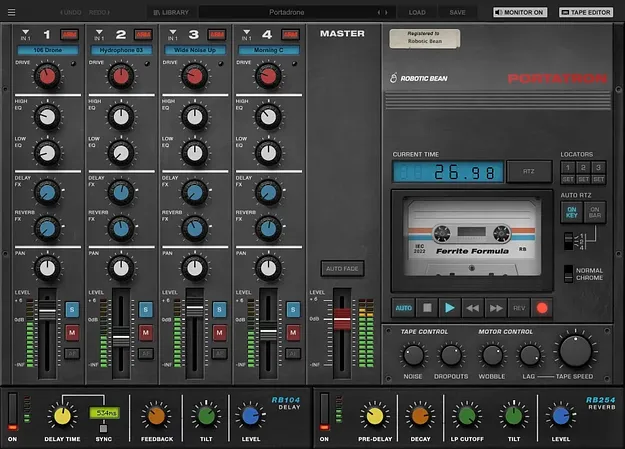
Portatron tape loop synth plugin interface by Robotic Bean

Portatron: Tape Loop Instrument by Robotic Bean Free Download

Rated 4.7/5 on Plugin Boutique (114 ratings)

Portatron is a tape loop instrument plugin by Robotic Bean that plays and records looping samples through four simulated cassette tracks, with built-in lofi tape effects. It runs as a VST3, AU or AAX plugin on Windows and macOS.

VST3AUAAXWindowsmacOS
AVAILABLE ATPlugin Boutique
Free trial available from the developer
01Overview

Portatron brings the sound of vintage four-track cassette recording into a modern DAW. You can play looping samples in sync with your project's transport, or trigger them from a MIDI keyboard as a monophonic instrument. Each of the four tracks has its own EQ, Drive, Level and Pan, with shared delay and reverb sends. Tape effects such as Noise, Dropouts, Wobble and Tape Speed shape the character of every loop.

Best for

  • Lofi sample loops
  • Tape-style sound design
  • Ambient textures
  • Sampled vocal chops
  • Hip-hop beat production
  • Field recording processing
Developer
Robotic Bean
Store
Plugin Boutique
02Key features

What you get

  • Four sample playback tracks with independent EQ, Drive, Level and Pan
  • Loops synchronized to DAW transport or played as a monophonic instrument
  • Record audio from your DAW onto up to four tape tracks
  • Adjustable Tape Speed, Noise, Dropouts, Wobble and start/stop Lag
  • Normal and Chrome tape types with tape saturation Drive
  • Tape Editor for resizing, moving, looping, repitching, fading and reversing samples
  • Delay and Reverb send effects with multitrack and effects outputs
  • MIDI Learn for all knobs and faders
03In depth

Lofi Tape Sound and Playback Modes

Portatron gives you direct control over the cassette sound. Tape Speed ranges from 0 to 200 percent, and Noise, Dropouts, Wobble and start and stop Lag can each be adjusted. You can choose Normal or Chrome tape types and add Drive to recreate tape saturation.

The instrument offers three playback modes. Drone plays along with the DAW transport. Semi-synced loops restart every 1, 2 or 4 bars. A monophonic Mellotron-style mode lets you play the samples from a MIDI keyboard.
Recording Onto Tape and Sample Library

Portatron can record any audio signal from your DAW straight onto its tape tracks, up to all four at once depending on your host. Arming, monitoring and recording happen inside the plugin, and each take is saved to disk as its own file.

The included library holds hundreds of pre-recorded samples, including piano, vibraphone, vocals and synths, plus sources such as hydrophones and shortwave radio. The Portapack manager lets you browse, download and add sound bank expansions, and point Portatron at folders on an external drive.

04Specs

Will it run?

Formats, systems and requirements as listed by Plugin Boutique. Missing details are left out, not guessed.

DeveloperRobotic Bean
TypePlugin
CategoryVirtual Instruments
FormatsVST3, AU, AAX
Operating systemsWindows, macOS
Free trialYes
05FAQ

Questions, answered

What formats does Portatron support?

Portatron is available in VST3, AU and AAX formats. The AAX version requires Pro Tools 11.3 or later.

Which operating systems does Portatron run on?

Portatron runs on Windows 10 or later and on macOS 10.13 or later.

What do I need to use Portatron?

You need a VST3, AU or AAX compatible host, Windows 10+ or macOS 10.13+, and 500MB of disk space. Pro Tools 11.3 or later is required for AAX.

Does Portatron include sounds?

Yes. It includes a sample library with hundreds of pre-recorded samples, and you can add more through the Portapack manager.

Is there a trial version?

Yes, Portatron offers a trial version.

07Developer

More from Robotic Bean

All Robotic Bean products →