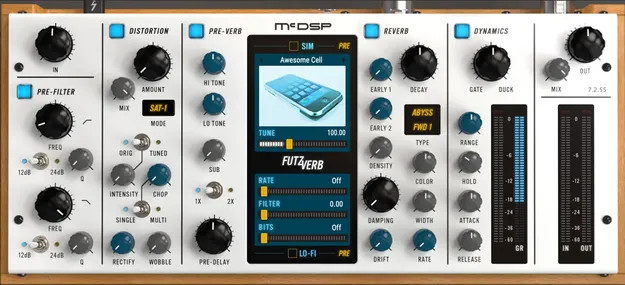
FutzVerb multi-effect reverb plugin interface by McDSP

FutzVerb: Reverb and Audio Mangling Effect by McDSP

Rated 4.8/5 on Plugin Boutique (10 ratings)

FutzVerb is a multi-effect plugin from McDSP that combines a reverberator with filtering, distortion, lo-fi, sub octave generation and device simulation. It processes audio in VST3, VST2, AU and AAX formats on Windows and macOS.

VST3VST2AUAAXWindowsmacOS64-bit
AVAILABLE ATPlugin Boutique
Opens the store in a new tab
01Overview

FutzVerb builds on McDSP's FutzBox plugin, keeping its prefiltering and distortion features and adding a sub octave generator, relocatable Synthetic Impulse Models (SIMs) and lo-fi effects. The reverb engine offers a range of reverb and reflection types, two early reflection stages, drift modulation and stereo field adjustment. A dynamics section after the reverb can gate or duck the reverb output. Its SIM-based design aims to use less DSP than conventional convolution reverbs.

Best for

  • Lo-fi reverb textures
  • Distorted vocal effects
  • Sub bass reinforcement
  • Sci-fi ambience
  • Ducked reverb sends
  • Mix crunch and saturation
Developer
McDSP
Store
Plugin Boutique
02Key features

What you get

  • Library of Synthetic Impulse Models (SIMs) placeable before, after or inside the reverb
  • Configurable futz effects: filtering, EQ, distortion, down sampling, bit reduction
  • Reverb with several types, reflection models, pre-delay, modulation, damping
  • Sub octave generator for 1x and 2x pitched sounds, synced to the input pitch
  • Reverb gating and ducking controlled by the input signal
  • Double precision processing
  • Zero latency
  • Mono and stereo algorithms
03In depth

Reverb Types and Lo-Fi Processing

FutzVerb's reverb section includes several reverb types and reflection models, from physical spaces to more abstract sounds. McDSP describes the reflection options as covering spaces such as a closet, a club or a town hall, along with sci-fi style environments.

Lo-fi and SIM modules can be placed before, after or inside each reverb algorithm. This lets you run a reverb tail through a lo-fi stage, for example a bit-reduced fax-style sound, to turn ambience into a textured layer rather than a muddy tail.
Filtering, Distortion and Sub Octave Controls

The filter and distortion controls match those in FutzBox. They include a range of saturation and distortion modes, plus Chop, Wobble and Mix controls for balancing the processed signal against the dry sound.

The sub octave generator blends in signals one and two octaves below the input, and the mix can be fed into the reverb section. The dynamics section adds reverb gating based on the input signal, or ducking that lowers the reverb when the input is present.

04Specs

Will it run?

Formats, systems and requirements as listed by Plugin Boutique. Missing details are left out, not guessed.

DeveloperMcDSP
TypePlugin
CategoryMulti Effect
FormatsVST3, VST2, AU, AAX
Operating systemsWindows, macOS
Architecture64-bit
05FAQ

Questions, answered

What formats does FutzVerb support?

FutzVerb is available in VST3, VST2, AU and AAX formats. It runs on Windows and macOS.

Which operating systems are supported?

McDSP lists Windows 7, 8 and 10 (64-bit only) and macOS 10.13 or higher (64-bit only). The system requirements note that macOS 12 Monterey is compatible and that Apple Silicon processors are supported.

What do I need to authorize FutzVerb?

McDSP plugins require an iLok2 or iLok3 USB Smart Key, or a free iLok License Manager account with an iLok Cloud session for authorization. Each v7 plugin contains two activations per authorization.

Which DAWs are compatible with FutzVerb?

McDSP lists Pro Tools, Logic Pro, Cubase, Nuendo, Ableton Live, LUNA, Reaper, Sonar, Studio One and other DAWs that support AAX, AU or VST3 formats.

07Developer

More from McDSP

All McDSP products →