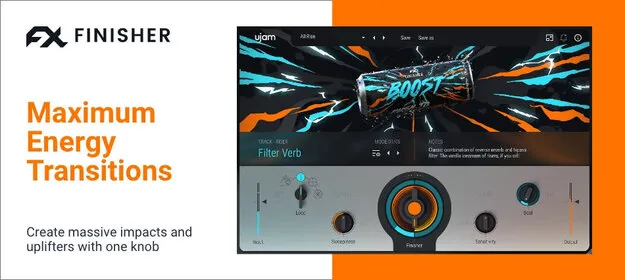
Finisher BOOST by UJAM multi-effect plugin interface

Finisher BOOST: Multi-Effect Transition Plugin by UJAM

Rated 4.7/5 on Plugin Boutique (674 ratings)

Finisher BOOST is a multi-effect plugin by UJAM that turns any audio track or bus into a transition, with 60 effect modes controlled by a single Finisher knob. It runs on Windows and macOS in VST3, VST2, AU and AAX formats.

VST3VST2AUAAXWindowsmacOS64-bit
AVAILABLE ATPlugin Boutique
Opens the store in a new tab
01Overview

Finisher BOOST is built for producers who want transitions with more drama than stock risers or one-shot samples. Instead of layering pre-made hits, you apply the plugin to a track or bus and shape the build with a single knob. BOOST syncs to your DAW's grid, follows the playhead so effects land on the same bars wherever playback starts, and offers loop controls and a Flip button for each mode. The developer describes it as a way to add natural ebb and flow to flat loops and bland choruses.

Best for

  • Build transitions
  • Risers and downlifters
  • Track swells and impacts
  • Chorus drama
  • Flat loop energy
  • Bus-level transitions
Developer
UJAM
Store
Plugin Boutique
02Key features

What you get

  • 60 multi-effect modes with mode-specific Vari controls
  • 200+ included presets
  • Loop control for setting effect length or freehand shaping
  • Flip button for reversing the effect direction
  • Sync to DAW grid with 2, 4 or 8 measure phrase lengths
  • Manual mode with automatable Finisher knob
  • Playhead tracking keeps effects on the same bars
  • Negative More Drama setting prints only the processed signal
03In depth

Sound Design and Transition Modes

BOOST includes 60 multi-effect modes, each with its own Vari controls, so the character of a transition can change from mode to mode. Some modes work as swells, downlifters and impacts, while others filter the dry signal into a heavily processed tail.

The Loop control sets the length of the effect, and you can also freehand the whole curve if you want an irregular shape. The More Drama setting pushes the effect harder, and turning it negative filters the dry signal away so you can print only the processed output.

The plugin includes more than 200 presets to start from.
Syncing BOOST to Your DAW Grid

In sync mode, BOOST follows your DAW's grid. You choose phrase lengths of 2, 4 or 8 measures and pick which beat reaches maximum intensity, then let the plugin run. Because it tracks the playhead position, an effect starting mid-song still hits the same bars as one started from the beginning.

For full control, switch to manual mode and automate the Finisher knob position in your DAW. This suits transitions that need to follow a specific arrangement rather than a fixed phrase length.

04Specs

Will it run?

Formats, systems and requirements as listed by Plugin Boutique. Missing details are left out, not guessed.

DeveloperUJAM
TypePlugin
CategoryMulti Effect
FormatsVST3, VST2, AU, AAX
Operating systemsWindows, macOS
Architecture64-bit
05FAQ

Questions, answered

What formats does Finisher BOOST support?

BOOST is available in VST3, VST2, AU and AAX formats. The AU version is only compatible with Logic Pro X and newer.

Which operating systems does BOOST run on?

BOOST supports Windows 7 or later and macOS 10.14 or later. It is 64-bit only and is available natively on Apple Silicon.

What do I need to run BOOST?

The minimum requirements are 8 GB of RAM and 850 MB of disk space. It runs on 4 GB systems, but 8 GB is recommended for multiple instances. A 1280x768 display and an internet connection are needed, and you authorize the plugin with your ujam.com email and password.

07Developer

More from UJAM

All UJAM products →