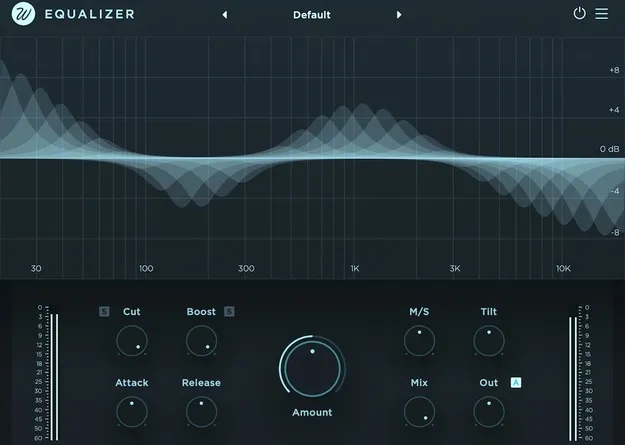
Equalizer by Wavesfactory automatic EQ plugin interface

Equalizer: Automatic EQ Plugin by Wavesfactory Free Download

Rated 4.7/5 on Plugin Boutique (475 ratings)

Equalizer is an automatic EQ plugin by Wavesfactory that divides the signal into 32 bands and adjusts each band's gain to reach a shared target volume. It is available in VST3, VST2, AU and AAX formats for Windows and macOS.

VST3VST2AUAAXWindowsmacOS64-bit
AVAILABLE ATPlugin Boutique
Free trial available from the developer
01Overview

Equalizer takes a different approach to equalization. Instead of setting boosts and cuts by hand, it analyzes each of its 32 bands and moves the gain up or down until the frequencies sit at a similar level. The developer describes the aim as making everything equal, which is where the name comes from. Equalizer can be run with a single knob, and it also includes controls for personalizing how much processing each band receives, so it can act as a balancing tool or as a more precise EQ.

Best for

  • Automatic mix balancing
  • Taming harsh digital tracks
  • Cleaning up dull recordings
  • Removing resonances
  • Live sound processing
  • Mix bus balancing
Developer
Wavesfactory
Category
EQ
Store
Plugin Boutique
02Key features

What you get

  • Automatically balances frequencies across 32 bands
  • Single-knob operation with optional detailed controls
  • Tilt knob for direct brightness control
  • Mid/Side processing
  • Attack and release parameters
  • Separate cut and boost controls with delta audition
  • Zero latency time-domain processing
  • Native Apple Silicon support; resizable interface
03In depth

How Equalizer Balances Frequencies

Equalizer splits the incoming signal into 32 bands. For each band it calculates the current gain, determines a target volume, and then boosts or cuts that band to reach the target. The developer says this removes much of the manual automation that balancing a mix usually requires.

The plugin offers tilt control for direct brightness adjustment, attack and release parameters, and a mix control with output gain and auto-gain. Cut and boost can be auditioned separately using delta signal listening, which helps you hear exactly what the processing changes.

You can also draw directly on the spectrum to set how strongly each band is processed, keep current settings, disable specific bands, or amplify their processing.
Workflow, Latency and Performance

Equalizer is designed to be quick to use. Because it processes in the time domain, it adds no latency, which the developer notes makes it suitable for live use. Mid/Side processing is available for stereo material.

The window can be resized by dragging the bottom right corner, and the interface is drawn in software rather than with images, so graphics stay sharp on high-resolution displays. A preset system lets you save, save as and delete your own settings, and a built-in updater notifies you when a new version is available.

04Specs

Will it run?

Formats, systems and requirements as listed by Plugin Boutique. Missing details are left out, not guessed.

DeveloperWavesfactory
TypePlugin
CategoryEQ
FormatsVST3, VST2, AU, AAX
Operating systemsWindows, macOS
Architecture64-bit
Free trialYes
05FAQ

Questions, answered

What formats does Equalizer support?

Equalizer is available in VST3, VST2, AU and AAX formats.

Which operating systems can run Equalizer?

Equalizer runs on Windows and macOS. On Mac it requires macOS 10.13 or higher and supports Intel and Apple Silicon natively. On Windows it supports Windows 7, 8 and 10. It is 64-bit only and needs a 64-bit DAW and operating system.

Does Equalizer add latency?

No. The developer says Equalizer processes in the time domain and requires no latency, which is why it is suited to live use.

Is there a trial version?

Yes, Equalizer offers a trial.

How is Equalizer registered?

Registration does not require iLok or challenge response. A serial number is provided at the time of purchase.

07Developer

More from Wavesfactory

All Wavesfactory products →