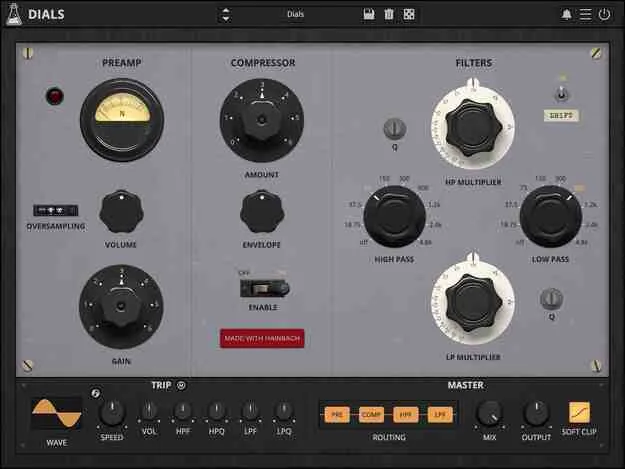
Dials by AudioThing channel strip plugin interface

Dials: 1950s-Style Channel Strip Plugin by AudioThing Free Download

Rated 4.8/5 on Plugin Boutique (109 ratings)

Dials is a channel strip effect plugin by AudioThing, a digital recreation of 1950s electronic music hardware from Hainbach's studio. It combines a preamp emulation, analog-modeled high and low pass filters and a compressor.

VST3VST2AUAAXCLAPWindowsmacOS64-bit
AVAILABLE ATPlugin Boutique
Free trial available from the developer
01Overview

Dials is a channel strip effect built around a combination of two units used in composer Hainbach's studio. The first is a modified German level transmitter originally used in radio broadcast maintenance, which AudioThing has adapted into a preamp emulation. The second is a set of high and low pass filters inspired by the Allison Labs units common in early electronic music studios. AudioThing adds a compressor and a resonance control to the filter section, and the plugin includes a preset system with a randomizer.

Best for

  • Vocal processing
  • Drum processing
  • Experimental sound design
  • Filter bank creation
  • Lo-fi channel strip
Developer
AudioThing
Store
Plugin Boutique
02Key features

What you get

  • Analog preamp emulation with adjustable gain
  • Analog-modeled high pass and low pass filters
  • Easy-to-use compressor
  • Trip modulation
  • Resizable window
  • Preset system with randomizer
  • Resonance control added by AudioThing
  • Bonus Ableton Live projects and drum device
03In depth

Preamp, Compressor and Filter Character

The preamp is based on a 1950s and 1960s measurement instrument that Rogalow Audio adapted into a microphone preamp. In Hainbach's studio it is his main preamp for voice, acoustic mono recordings and synths. AudioThing separated the preamp's overtone-rich gain from the compressor, so you can use each one on its own.

The filters are modeled on passive units that were prized for precision at the time. The developer notes that their peaks ripple across the cutoff frequencies, which becomes most audible when resonance is raised. Frequency markings on the front panel may be inaccurate, so rely on your ears.
Workflow and Creative Use

Dials is intended for processing vocals, drums and other instruments, and the developer also suggests feeding it impulses for more aggressive results. Its resizable window and randomizer make it easy to explore settings quickly.

Bonus material from the developer includes a Dials-based 808-style drum device created with Jamie Lidell, and an Ableton Live filterbank project by Hainbach that stacks multiple instances to create a filter bank. The filterbank project requires Ableton Live.

04Specs

Will it run?

Formats, systems and requirements as listed by Plugin Boutique. Missing details are left out, not guessed.

DeveloperAudioThing
TypePlugin
CategoryChannel Strip
FormatsVST3, VST2, AU, AAX, CLAP
Operating systemsWindows, macOS
Architecture64-bit
Free trialYes
05FAQ

Questions, answered

What formats does Dials support?

Dials is available in VST3, VST2, AU, AAX and CLAP formats.

Which operating systems does Dials run on?

Dials runs on Windows and macOS. The macOS version is 64-bit and supports Apple Silicon as a Universal 2 binary, with macOS 10.13 through macOS 15. Windows 7 through Windows 11 are supported in 64-bit.

Does Dials need an internet connection or dongle?

No internet connection is required to activate it, and it does not use an iLok dongle. You can activate online or offline with a license file, and one license covers up to three computers.

Is there a trial version?

Yes, Dials offers a trial.

What do I need to use the bonus Dials projects?

The Dials 808 Drum Device and the Filterbank A+B project both require Ableton Live. The drum device works best with Ableton Live Suite for full functionality.

07Developer

More from AudioThing

All AudioThing products →