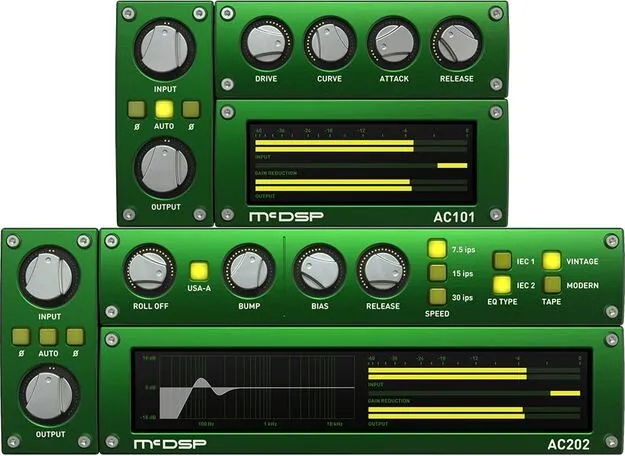
Analog Channel Native v7 by McDSP channel strip plugin interface

Analog Channel Native v7: Tape and Channel Amp Plugin by McDSP Free Download

Rated 4.6/5 on Plugin Boutique (40 ratings)

Analog Channel Native v7 is a McDSP effects plugin that emulates analog tape machines and channel amplifier circuits. It contains two plugins: AC101, a channel amp model, and AC202, a tape machine model.

VST3VST2AUAAXWindowsmacOS64-bit
AVAILABLE ATPlugin Boutique
Free trial available from the developer
01Overview

Analog Channel Native v7 is built around two configurations. The AC101 acts as a digital pre-amp that can take on heavy gain without digital distortion, with a drive control that sets where the signal sits in the saturation and compression region. The AC202 models analog tape machines, with standard parameters such as bias, playback speed and IEC1/2 equalization, plus controls for low-frequency roll-off and head bump that go beyond what physical machines offer.

Best for

  • Mix bus tape saturation
  • Vocal channel drive
  • Drum bus color
  • Digital pre-amp gain
  • Analog mixing emulation
Developer
McDSP
Store
Plugin Boutique
02Key features

What you get

  • AC101 channel amp model with adjustable drive and distortion attack and release
  • AC202 tape machine model with bias, speed and IEC1/2 equalization
  • Adjustable low-frequency roll-off and head bump independent of playback speed
  • Selectable playback head types and tape formulations
  • Adjustable tape saturation recovery time
  • Real-time analyzers and saturation curve display
  • Library of presets emulating analog mixing systems
  • Zero latency algorithms with double precision processing
  • Mono and stereo versions available
03In depth

Channel Amp and Tape Machine Models

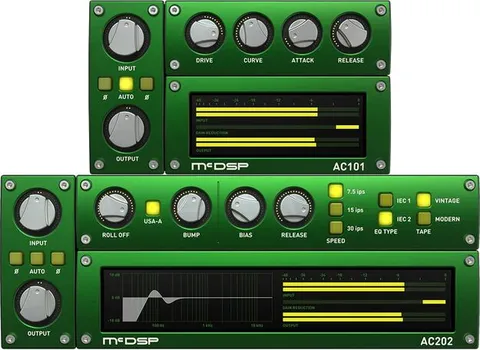
AC101 emulates analog channel amplifier circuits. Its drive control determines where audio sits in the saturation and compression region, and the attack and release times of the distortion character can be adjusted.

AC202 emulates analog tape machines. Beyond the usual bias, playback speed and IEC1/2 equalization settings, it offers adjustable low-frequency roll-off and head bump, independent of playback speed. You can choose from several playback head types and tape formulations, and set the tape saturation recovery time.
Workflow, Metering and Analog Mixing Presets

The plugin includes real-time analyzers and a real-time display of saturation curves and calibrations, so you can see what the saturation is doing as you adjust it. A library of presets emulates analog mixing systems gives you starting points to build from.

Analog Channel is offered in mono and stereo versions. It uses zero latency algorithms and double precision processing, and it runs on Apple Silicon and recent Intel processors.

04Specs

Will it run?

Formats, systems and requirements as listed by Plugin Boutique. Missing details are left out, not guessed.

DeveloperMcDSP
TypePlugin
CategoryChannel Strip
FormatsVST3, VST2, AU, AAX
Operating systemsWindows, macOS
Architecture64-bit
Free trialYes
05Upgrades

Upgrade and crossgrade options

06FAQ

Questions, answered

What formats does Analog Channel Native v7 support?

It is available in VST3, VST2, AU and AAX formats. It runs on Windows and macOS and is 64-bit.

What do I need to run Analog Channel Native v7?

McDSP plugins require an iLok2 or iLok3 USB Smart Key, or a free iLok License Manager account with an iLok Cloud session for authorization. Each v7 plugin includes two activations per authorization.

Is Analog Channel Native v7 compatible with macOS 12 Monterey?

Yes. McDSP lists macOS 12 Monterey as compatible, along with macOS 10.13 High Sierra through 11 Big Sur, and Windows 7, 8 and 10 (64-bit only).

Does Analog Channel Native v7 include the AC101 and AC202?

Yes. Analog Channel is made up of two plugins: AC101, which emulates channel amplifier circuits, and AC202, which emulates analog tape machines.

08Developer

More from McDSP

All McDSP products →