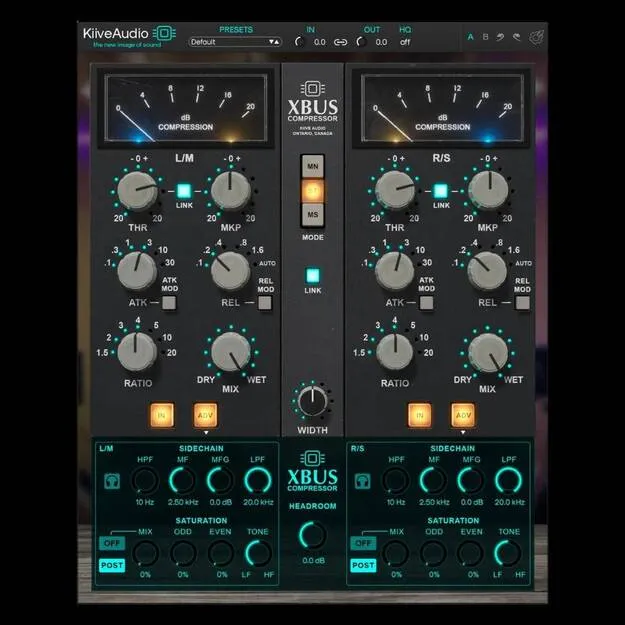
XBus by Kiive Audio VCA bus compressor plugin interface

XBus: VCA Bus Compressor Plugin by Kiive Audio

XBus is a VCA-style bus compressor plugin from Kiive Audio, available in VST3, AU and AAX formats for Windows and macOS. It is modeled on a modern revision of a classic mixbus compressor.

VST3AUAAXWindowsmacOS64-bit
AVAILABLE ATPlugin Boutique
Opens the store in a new tab
01Overview

XBus is a compressor plugin from Kiive Audio that aims for the glue and punch associated with VCA bus compression. Its design draws on a modern revision of a well-known mixbus compressor, and it adds a headroom control for driving into the compression. A sidechain filter and an optional saturation stage give producers more control over how the plugin responds to low end and dynamics, and over the harmonic color it adds to vocals, drums or a master bus.

Best for

  • Mix bus glue
  • Drum bus compression
  • Vocal warmth
  • Master bus saturation
  • Low-end control
Developer
Kiive Audio
Category
Compressors
Store
Plugin Boutique
02Key features

What you get

  • VCA-style bus compression inspired by a modern mixbus compressor revision
  • Headroom control for driving into compression
  • Advanced sidechain filtering for low-end or dynamic control
  • Optional saturation for harmonic warmth
  • Enhances transients and stereo cohesion, per the developer
  • Available in VST3, AU and AAX formats
  • 64-bit plugin for Windows and macOS
03In depth

Sound and Character of the VCA Bus Compression

Kiive Audio describes XBus as a classic VCA bus compressor inspired by a modern revision of a legendary mixbus design. The developer says it enhances transients, stereo cohesion and overall energy, which suits drum groups, full mixes and master buses.

The headroom control lets you push signal into the compressor. This adds character and saturation as you increase it, so the same control handles both gluing and coloring the sound.
Sidechain Filtering and Optional Saturation

The advanced sidechain filtering lets you shape what the compressor reacts to. You can tailor the response to the low end or the dynamic content of a mix, which helps when bass or kick is driving the gain reduction more than you want.

The optional saturation adds harmonic warmth. Kiive Audio positions it for vocals, drums or masters, and it can be left off when you only need the compression behavior.

04Specs

Will it run?

Formats, systems and requirements as listed by Plugin Boutique. Missing details are left out, not guessed.

DeveloperKiive Audio
TypePlugin
CategoryCompressor
FormatsVST3, AU, AAX
Operating systemsWindows, macOS
Architecture64-bit
05FAQ

Questions, answered

What formats does XBus support?

XBus is available in VST3, AU and AAX formats. It runs as a 64-bit plugin on Windows and macOS.

What do I need to run XBus?

On macOS, the listed requirements are OS X 10.7 or higher, with 10.14 or higher recommended, and 4GB of RAM. On Windows 64-bit, the listed requirements are Windows 7 or above, a 1 GHz Intel Dual Core processor or AMD equivalent, and 4GB of RAM.

What is the headroom control used for?

The headroom control lets you push into the compression. Kiive Audio says this adds character and saturation to the sound.

07Developer

More from Kiive Audio

All Kiive Audio products →