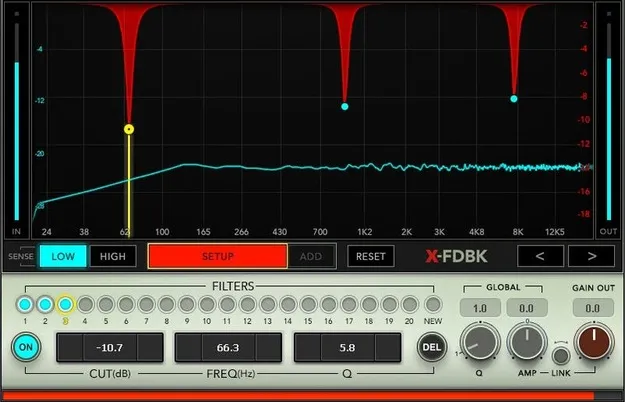
X-FDBK feedback elimination plugin interface by Waves

X-FDBK: Automatic Feedback Eliminator Plugin by Waves

X-FDBK is a feedback elimination plugin from Waves that detects the frequencies causing feedback and notches them out automatically. It is aimed at live sound setups.

VST2AUAAXWindowsmacOS
AVAILABLE ATPlugin Boutique
Opens the store in a new tab
01Overview

X-FDBK is built for live sound work, where feedback from monitors and PA systems can ruin a set. The plugin analyzes incoming audio, identifies the main frequencies that cause feedback, and applies notch filters to them. Waves says the automated setup needs only one person to ring out the PA, which can shorten setup time before the show. Once it is running, the plugin is designed to stay out of the way so the engineer can focus on mixing.

Best for

  • Live PA ring-out
  • Monitor feedback control
  • Live sound setup
  • Fast soundcheck setup
  • Mixing with reduced feedback
Developer
Waves
Store
Plugin Boutique
02Key features

What you get

  • Automatically cuts the frequencies that cause feedback
  • Up to 20 notch filters for feedback frequencies
  • Automatically optimizes filter bandwidth and amount of cut
  • Automated setup needs only one person to ring out the PA
  • Waves says it adds several dB of headroom before feedback
  • Global filter controls for unexpected changes
  • Display overlays notch filter responses on incoming audio
03In depth

How X-FDBK Removes Feedback Automatically

X-FDBK automatically cuts the frequencies that cause feedback. Its automated setup handles the ring-out process, so one person can run it without a second engineer at the desk.

Up to 20 filters are available to notch feedback frequencies. The plugin automatically optimizes each filter's bandwidth and the amount of cut, so you do not have to set every filter by hand.

Waves says this process lets you regain several dB of extra headroom before feedback occurs, giving you more usable gain from your monitors and PA.
Controls and Visual Feedback

Global filter controls let you compensate for unexpected changes during a show, such as a shift in room acoustics or a different mic position.

The display analyzes incoming audio and overlays the notch filter responses, so you can see which frequencies are being cut and how the filters sit against the incoming signal.

04Specs

Will it run?

Formats, systems and requirements as listed by Plugin Boutique. Missing details are left out, not guessed.

DeveloperWaves
TypePlugin
CategoryAudio Restoration
FormatsVST2, AU, AAX
Operating systemsWindows, macOS
05FAQ

Questions, answered

What formats does X-FDBK support?

X-FDBK is available in VST2, AU and AAX formats.

Which operating systems does X-FDBK run on?

X-FDBK supports Windows and macOS. On Mac it runs on macOS Monterey 12, Ventura 13, Sonoma 14 and Sequoia 15. On PC it requires Windows 10 or later, with VST and AAX versions available.

Does X-FDBK need one person to set up?

Waves says the automated setup requires only one person to ring out the PA, so a second engineer is not needed for the ring-out process.

How many filters does X-FDBK use?

X-FDBK provides up to 20 filters to notch feedback frequencies.

07Developer

More from Waves

All Waves products →